



Stephen Headrick / Android Authority
Happy New Year from the team here at Android Authority! I was thinking about the new year throughout December, jotting down ideas and goals as I went. Near the end of every December, I like to sit down and really get into the details of what I want to do the following year, what changes I want to make, and what I hope to accomplish.
If you’re like me, it’s extremely helpful to visually track these goals, write them down, and see the progress you’re making along the way. I’ve tried many versions of this over the years, but in 2025, I used three apps I found super helpful, each with a unique approach.
Here are my three favorite apps that will actually help you keep your New Year’s resolutions.
Do you use apps to track your goals and habits?
30 votes
HabitKit, a powerfully simple habit-tracking app

Stephen Headrick / Android Authority
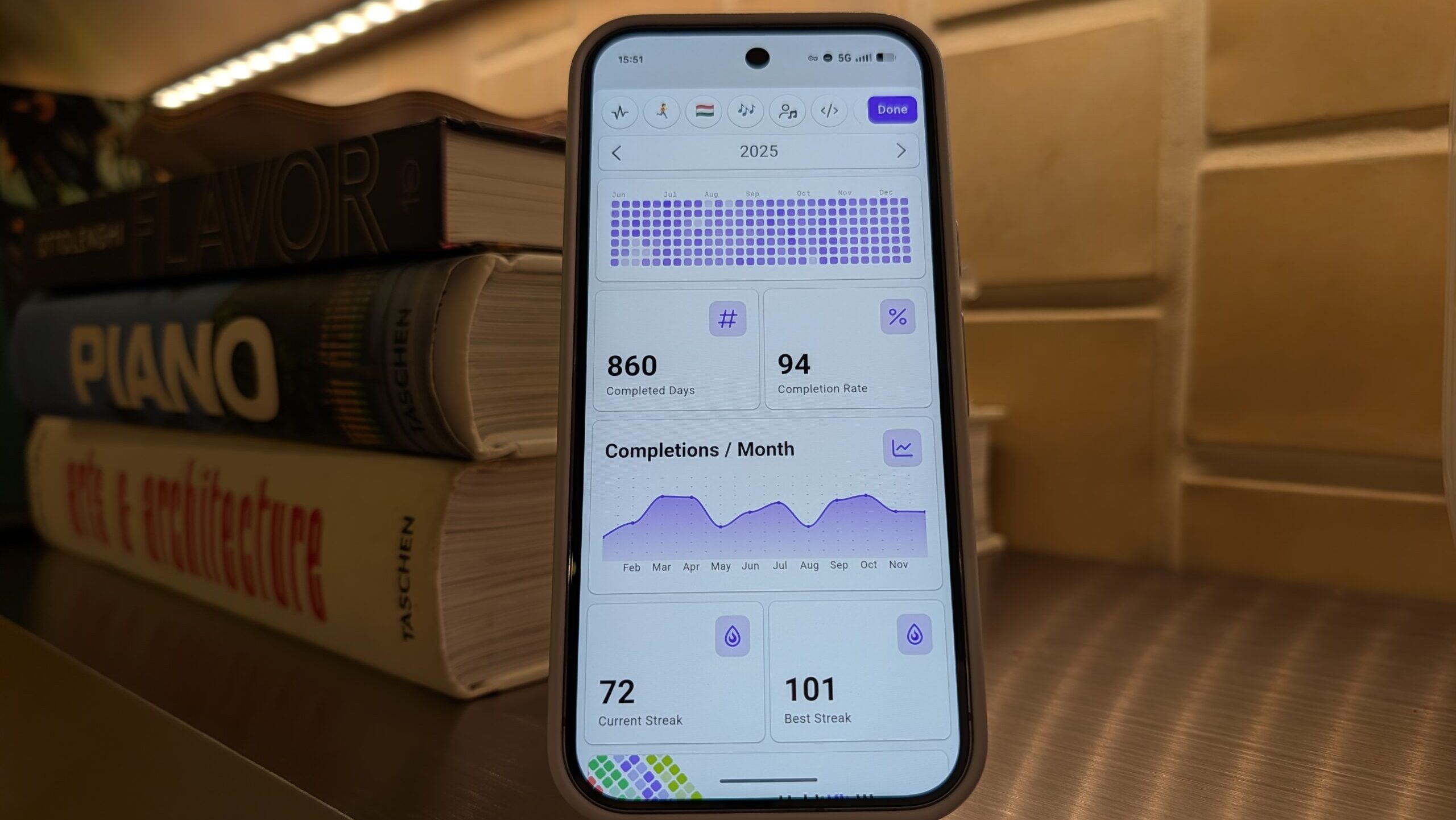
HabitKit’s advantage is its simplicity, which is probably why it has been the easiest app for me to consistently use. Once you’ve entered your habits and goals, each one gets its own contribution graph, with a grid of squares where each square represents a day. This graph, popularized by GitHub, is extremely useful for visualizing your progress, providing a glanceable overview of your entire year.
While simple in its approach, HabitKit manages to pack a range of features and customization options, too. Adding a habit is simple: title it, pick a color and a symbol or emoji that represents it, and you’re done. If you want to go even further, you can set a streak goal, add reminders, and create a category to group certain habits in a single view. Importantly, you can also customize how many completions you’re aiming for each day, and similar to GitHub’s approach, the color intensity of the day’s square increases with the number of completions in a day.

Stephen Headrick / Android Authority
HabitKit also has really good analytics. It’s easy to lose sight of your progress over a long period of time, especially when day-to-day progress seems small, but checking the analytics every so often will help you realize that your small wins are adding up.
Pro tip: use HabitKit’s widgets! You can place a habit’s contribution graph right on your home screen. In addition to reminder notifications, this is a great way to keep your progress top of mind.
Finch, a digital companion to keep you going

Stephen Headrick / Android Authority
Remember Tamagotchi? Finch is essentially a modern-day version of that, but your little digital pet will only grow and thrive as you check in each day and make progress on your real-life goals. It’s truly a unique take on building habits.
Finch focuses more on self-care and improving your mental health, suggesting habits such as drinking water or taking deep breaths during the day. You can, of course, use Finch just like any habit tracker, but it’s nice to have a place that isn’t focused on working all the time. This app invites you to slow down and enjoy life a little more while appreciating the small things. If you ask me, a lot of us could use more of that these days.

Stephen Headrick / Android Authority
I could write an entire book on the gamification in this app, but let’s save that for another day. You can customize your pet and its home almost endlessly, and you can even add your real-life friends to the app. Every bit of progress your pet makes stems from you checking off your self-improvement goals. In a world of lifeless productivity apps, this one doesn’t feel like a productivity app at all, yet it will surprise you how slyly it has you remembering to drink water and tidy up the house each day.
To-Do List + Calendar, a tried-and-true method

Stephen Headrick / Android Authority
Google Calendar — or any calendar app, for that matter — can easily be turned into quite the habit tracker, especially now that Google Tasks is built directly into the Calendar app. I use Calendar for some recurring work-related goals, but I generally stick to the previous two options for the bulk of my tracking.
To make this method work, I’d recommend creating a new list in Tasks specifically for your habit tracking. This way, everything is in one place rather than spread across different lists, and your day-to-day tasks won’t get in the way. For each habit, set the frequency you want to repeat it, and use reminders to keep it top of mind.

Stephen Headrick / Android Authority
The most significant benefit of this approach is that it’s available almost everywhere. While the previous two apps are mobile-only, you can access both Tasks and Calendar on mobile and desktop devices. On top of that, your scheduled tasks will appear in your Calendar view, so it’s easy to see where your habits fit throughout your day.
The main downside of this approach is a lack of built-in progress tracking. No analytics, no streak indicator to keep you going, no way to see how often you’re completing a habit. This will require more discipline than other apps, but the added benefit is that every phone has this built right in from the start.
Find what works for you
Habit tracking apps are a dime a dozen, so you need to find what works for you. It’s easy to fall into the trap of constantly finding new ones and continually wasting time on setting everything up only to move onto the next one — speaking from experience here — so when you find one that does the job, stick with it. Give it till the end of 2026, at least, and you’ll be surprised by how far it takes you.
Don’t want to miss the best from Android Authority?


Thank you for being part of our community. Read our Comment Policy before posting.
