

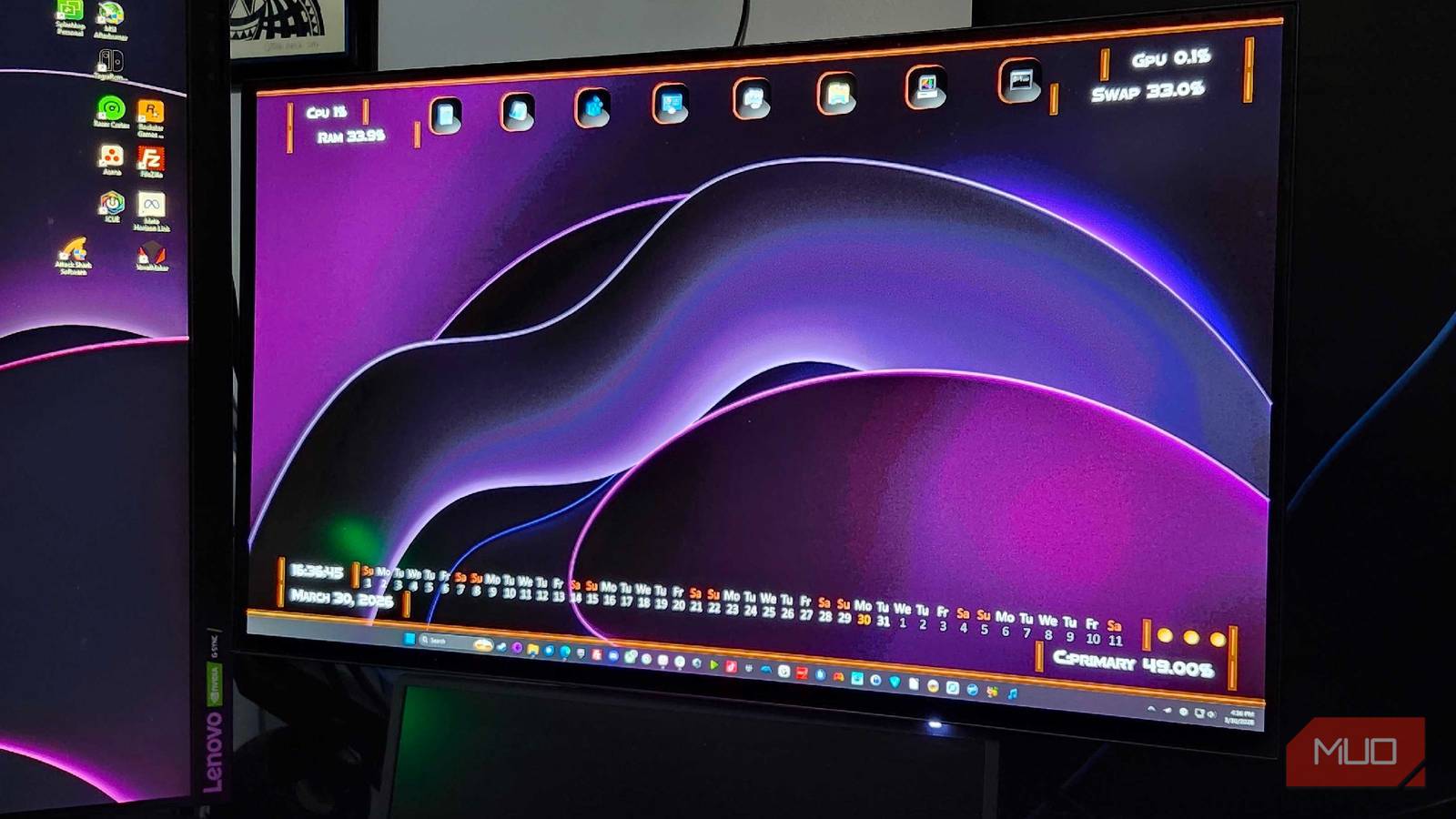

I’ve seen more friends than I can think of using programs like Wallpaper Engine to give their PC a bit of extra flair. But back in 2001, and subsequently since then, a little application called Rainmeter has been the customization king. If you’re hoping to make your PC look unlike anything else, this is the app that can make it happen.
Wallpaper Engine and other similar programs can absolutely make your PC look pretty, but if you’re hoping to have a constant stream of information about your computer available every time you go back to the desktop? It may be time to pick up Rainmeter and see what it can do for you.
Rainmeter offers unparalleled freedom
Aesthetics are just as important as information with Rainmeter
While I’ve used Wallpaper Engine myself, I’m also incredibly curious about what’s going on with my PC at any given time. Seeing what makes it run is just as fascinating as building one yourself, and I’m always hungry for more data about my computer. I mean, that’s one of the biggest reasons why I bought a specialty keyboard, just so I could keep an eye on my CPU and GPU temps all the time.
But the desktop can be just as informative, if not more so. Rainmeter lets you set up RSS feeds, stocks, weather, CPU temps, RAM usage, GPU clock speeds, and everything else in between. It’s incredibly useful every single day, and tweaking it can be quite fun. You can even have digital sticky notes that you can plaster all over your desktop, so you never forget what you’re doing. Plus, unlike Wallpaper Engine, which costs $4.99 for a license, Rainmeter has always been free.
It’s surprisingly lightweight
Depending on what you have, Rainmeter won’t affect your usage

While you can pair Wallpaper Engine and Rainmeter together, the difference in resource use is quite astonishing. Most skins for Rainmeter are tiny in comparison to anything that Wallpaper Engine can offer, and it’ll still make your PC look quite beautiful in the process. Rainmeter uses basically no CPU resources and typically around 15 MB of RAM.
|
Specs (Minimum) |
Rainmeter |
Wallpaper Engine |
|---|---|---|
|
GPU |
128MB VRAM |
HD Graphics 4000 or above (dedicated recommended) |
|
RAM |
~15MB in Use |
1GB Minimum, 2GB recommended |
|
CPU |
Any modern processor |
1.66 GHz i5 or equivalent |
Compared to Wallpaper Engine, which is known to be a GPU-intensive program, this is a great break. If you’ve got the power in your PC to run both, you’ll have one of the most beautiful setups around. But if you’re searching for something that can add a bit of flair to your Windows desktop, choose the one that’s both beautiful and helpful. Follow it up with some Windows debloat, and you’ll be loving your PC like it was brand new all over again.
It’s completely open source and free
You won’t pay a dime for Rainmeter or anything you can do with it
Open-source applications are quickly replacing nearly every other type of app on my PC. It doesn’t matter if I’m getting rid of something like Microsoft Office and replacing it with a fantastic, free, and open-source alternative, or just searching for ways to make my daily use better. Open-source is built for people, by people, rather than for the betterment of a massive corporation that wants nothing more than your delicious credit card information for another subscription service. Since it is open source, Rainmeter could continue to be developed after the original developer stopped working on it in 2009. Without the community push, Rainmeter would have stayed inactive and would have never seen a 1.0 launch.
You can also see which types of changes are being committed to your favorite software, without having to trust that someone isn’t adding malicious code before shipping it. Dedicated communities of eager developers are also able to contribute to making something like Rainmeter even better, and with 25 years of experience under their belts, I can see why this is still the gold standard for PC customization to this day.

I built my own desktop dashboard with Rainmeter and now everything I need is at a glance
I created a custom Rainmeter dashboard and now my desktop feels like a command center.
Rainmeter has a learning curve
Some stuff feels incredibly dated, so be prepared to learn

Now, for a program that I’ve been heaping praise onto for what feels like forever, some things about Rainmeter still make it hard to recommend to someone who is more “unfamiliar” with what makes a computer run behind the scenes. There are plenty of free skins and themes available, but if you want to start making your own and adding your own tweaks, there’s quite a substantial learning curve. Primarily, messing with the .ini files that make Rainmeter tick. The Linux-adjacent Conky or GeekTool for macOS may be easier to use and still offer a delightful level of customization for those hoping to bring their desktop to the next level.
Let’s say that you found a skin that would look absolutely stunning on your OLED display. Rich blacks, silky colors, the whole nine yards. If you want to change anything about it, from the color of the text to the location of the clock, you’ll need to tweak files, code, and do plenty of other things to make it exclusively “yours”. This can be incredibly frustrating for someone who has an idea but doesn’t know how to properly implement it, so you may need to rely on the helping hands of others who know more about Rainmeter, searching places such as r/Rainmeter, or depend on well-known skins like Mond. DeviantArt, the official skin gallery, and other places do offer plenty of spots to get started with Rainmeter. The Rainmeter manual is a must-read for anyone hoping to get super in-depth with how the program works.
Rainmeter is worth the hurdles
You can make your PC sing as it has never sung before with this program
Even with the hurdles and headaches that can come with perfecting a .ini file, there’s a reason Rainmeter is still releasing steady updates 25 years after its initial launch. While the original developer, Kimmo “Rainy” Pekkola, isn’t involved with the project any longer, the community has turned it into something bigger and better than ever. It’s never charged a dime, and instead, is brought to life by a team of incredibly passionate fans who want to make their PCs even smarter than they already are.
Rainmeter may not be for everyone, but for those who want to make their computer an all-in-one information board, there’s nothing better out there. Some of the things people can do with Rainmeter to completely transform their setup are nothing short of miraculous, and it’s shown me that I really need to step up my game. For now? I’m content with some additional information and some sleek text to make my PC look just as sharp as I want it to.

- OS
-
Windows
- Developer
-
Rainmeter
Rainmeter is a lightweight Windows customization tool that lets you build interactive desktop widgets for system stats, media controls, and personalized layouts.
