

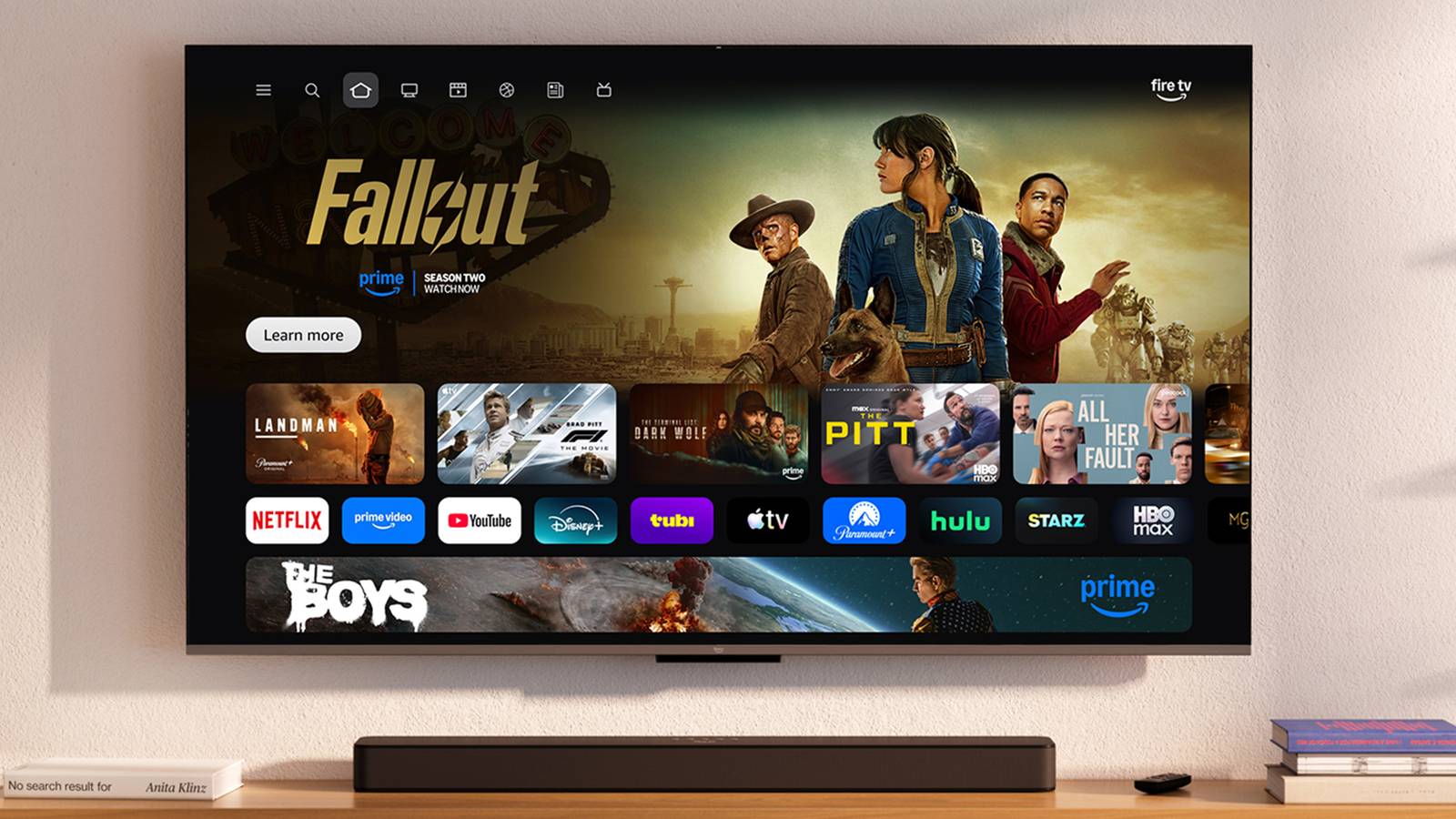

At CES 2026, Amazon made three big Fire TV announcements, including its new Ember Artline TV series and a revamped Fire TV mobile app that’s coming soon. But arguably the biggest reveal was that a completely redesigned Fire TV user interface (UI) is on the way, built to make the platform faster and easier to use. Now, that new Fire TV experience is finally here.
Amazon has officially begun rolling out its new Fire TV UI in the US, with the Fire TV Stick 4K Plus, Fire TV Stick 4K Max (2nd Gen), and Fire TV Omni Mini-LED Series among the first devices to receive the update.
The biggest change you’ll notice between the old and new Fire TV UI is the layout. The navigation bar that used to sit in the middle of your screen, along with your pinned apps, has been moved to the top. Your pinned apps now live exclusively on the home screen, and you can pin up to 20 apps you frequently use, a huge jump from the previous limit of six.

In the redesigned navigation bar at the top of the screen, you’ll now find eight options: Menu, Search, Home, and dedicated tabs for Movies, TV Shows, Sports, News, and Live TV.
“We’ve redesigned the Fire TV UI to be cleaner, faster, and better organized — helping customers spend less time searching and more time watching,” Amazon explained in a blog post. “The new UI has a more modern design with improved layouts, rounded corners, redesigned color gradients, updated typography, and more optimized spacing.”
The new Fire TV UI also improves performance
There’s also a new main menu and shortcut panel

Beyond the refreshed home screen and redesigned menus, one of the biggest changes in this update isn’t something you’ll notice by just looking at it — you’ll notice it when you start using it, and that’s improved performance across the board.
While rebuilding the UI, Amazon says it also rewrote much of Fire TV’s underlying code to better optimize the experience and make everything feel faster. According to Amazon, the new interface delivers performance gains of up to 20-30 percent. So far, in my brief time testing the new UI, it has been incredibly smooth.

Moving back to the design, there are also two other key additions worth noting. The first is a new Menu, which you can access either by pressing the Menu button on your remote or by selecting the three-line icon in the top navigation bar. From there, you’ll find quick access to Movies and TV, Games, Arts & Photos, the Appstore, your watchlist, Ambient Experience, your Smart Home controls, and your Fire TV Settings.
The second is a redesigned shortcut panel. When you hold down the Home button on your remote, a new quick-access menu appears on the right-hand side of the screen. Amazon describes it as a way to “give you quick access to the most-used controls on Fire TV,” including audio and display settings, accessibility options, and smart home device management, such as Ring cameras.
How to update to the new Fire TV UI
More Fire TV devices will get the update this spring

If you have a Fire TV Stick 4K Plus (formerly Fire TV Stick 4K), a Fire TV Stick 4K Max (2nd Gen), or a Fire TV Omni Mini-LED Series, you can download the update now if you’re in the US for free. Here’s how:
1. Go to the Fire TV home screen and navigate to Settings.
2. Select My Fire TV.
3. Choose About.
4. Scroll down and select Check for Updates.
5. The update will then begin downloading. Once it’s complete, you’ll see an option to restart your Fire TV and install the update. After it’s done installing, you’ll then be able to start using the new Fire TV UI.
In the spring, Amazon says its new Fire TV UI will roll out to more countries and devices, like the Fire TV Stick 4K Select, Fire TV 2-Series, Fire TV 4-Series, Fire TV Omni QLED Series, and the new Ember Artline TVs.
I’ve only had a short time to test the new UI, but so far I’m enjoying it. The most impressive aspect at this point is the performance. I’m testing it on a Fire TV Stick 4K Max, and the experience is buttery smooth. I haven’t encountered any lag or stutter while navigating the new menus, and everything loads quickly. In terms of design, I haven’t had any trouble finding anything, and I do like how many pinned apps you can have on the home screen now. I’ll have more to say on the new UI once I’ve had longer to test it, but overall, my impressions are positive.
