

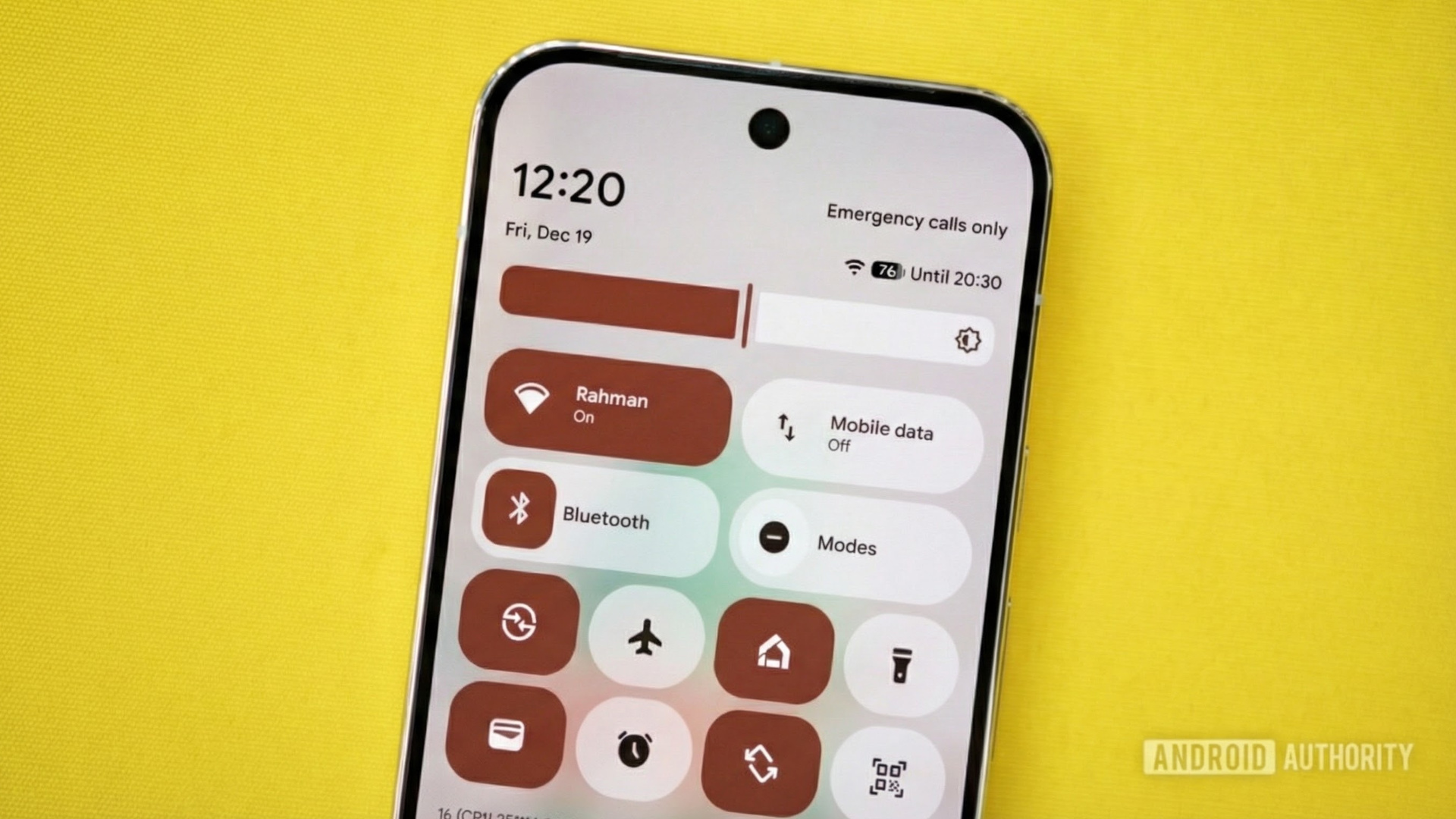


With the release of Android 12 back in 2021, Google made a somewhat controversial change to the Quick Settings panel. Gone were the individual toggles for Wi-Fi and mobile data. In their place was a new, expandable Internet tile that housed the old mobile data and Wi-Fi toggles. The change aimed to simplify things for users, but it had the side effect of making it more tedious to toggle Wi-Fi and mobile data. Years after rolling out this change, though, Google may be on the verge of reversing it in a future update to Android 16.
You’re reading the Authority Insights Newsletter, a weekly newsletter that reveals some new facet of Android that hasn’t been reported on anywhere else. If you’re looking for the latest scoops, the hottest leaks, and breaking news on Google’s Android operating system and other mobile tech topics, then we’ve got you covered.
Subscribe here to get this post delivered to your email inbox every Saturday.
A brief history of Android’s Internet Panel
Prior to Android 12, the operating system had separate toggles for Wi-Fi and mobile data. These were convenient shortcuts for anyone who needed to toggle these connections frequently. Users could simply pull down the Quick Settings panel and tap the Wi-Fi or mobile data tile to quickly toggle the respective radio.
When Google released Android 12, the company replaced these individual toggles with a combined “Internet” tile. Tapping this tile launches the new Internet Panel, which contains switches for controlling mobile data and Wi-Fi, as well as a list of other nearby networks and a button to share your Wi-Fi connection.
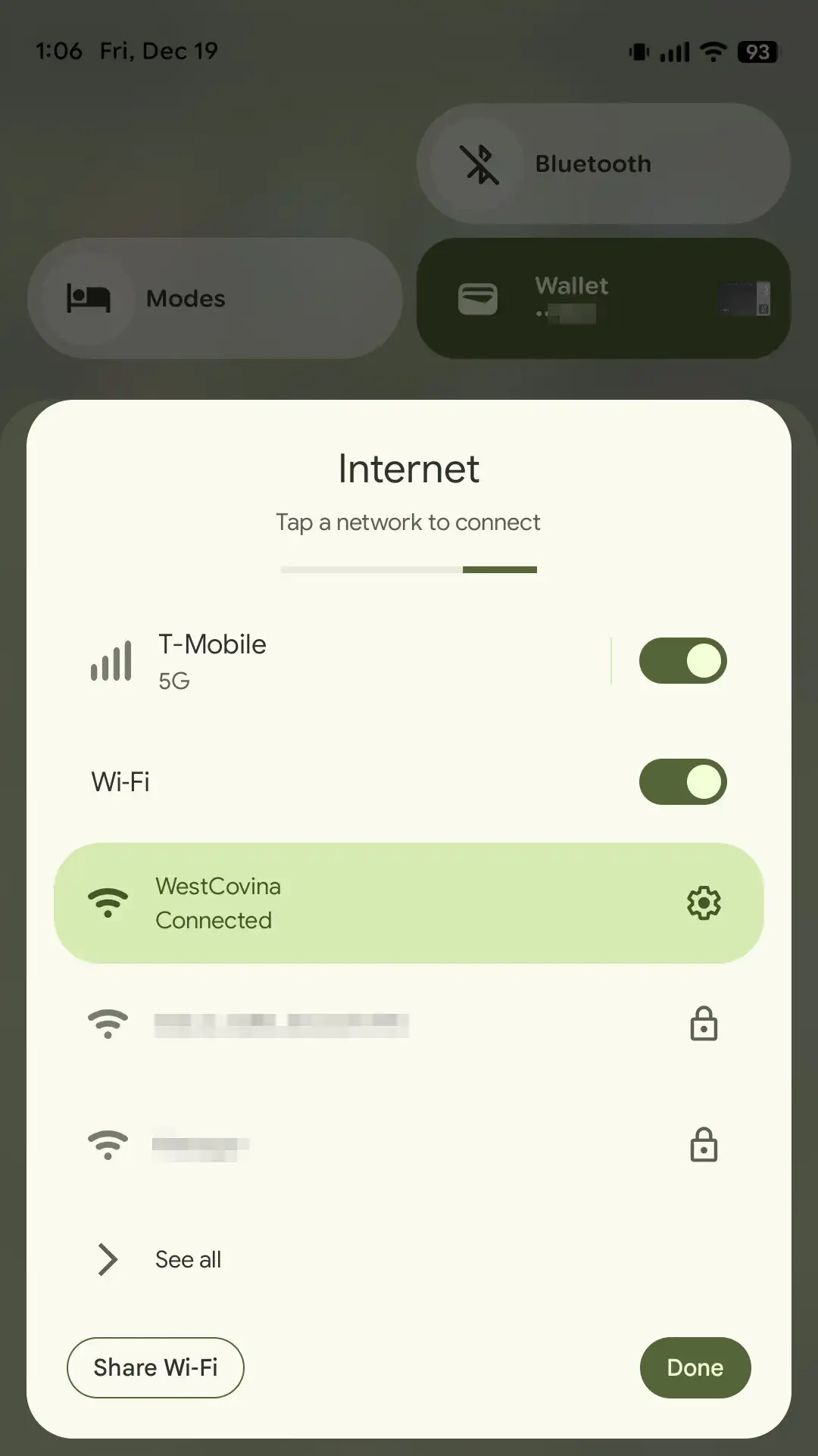
Stephen Schenck / Android Authority
Although the Internet tile offers more functionality than the old, one-click Wi-Fi and mobile data tiles, it adds an extra step every time a user wants to toggle either radio. This is because the user must expand the tile to access the mobile data or Wi-Fi controls. While this isn’t difficult, many see it as an unnecessary hurdle given it wasn’t required before.
Immediately following the rollout of Android 12, many users complained about the new Internet Panel, prompting Google to publish a post explaining the rationale for the change. Google stated it designed the Internet Panel to address a common pain point users experienced with network connectivity. The company found that when users turned off Wi-Fi to force their Android phones to connect to mobile data, they often forgot to turn it back on, resulting in excessive mobile data usage.
The Internet Panel addresses this issue by providing an alternative to switching off Wi-Fi: a simple way to switch the active network connection to mobile data. Google acknowledged that it would take some time for long-time Android users to get used to the new tile. However, the company believed that once they did, they would find the Panel to be “a more intuitive and straightforward way for users to solve their Wi-Fi connectivity issues, while reducing user error and unintended consequences.”
The quest to restore Android’s old Wi-Fi and mobile data tiles
Google’s explanation for this move makes sense, especially considering it has to design the Android operating system with billions of users in mind. However, this decision still didn’t sit right with power users who felt hamstrung by a change that “dumbed down” the Quick Settings panel. These users searched for ways to undo the modification, and fortunately, I quickly discovered a workaround.
Unfortunately, this workaround stopped functioning in Android 13, forcing users to find alternative solutions. Several third-party applications can add Wi-Fi and mobile data tiles to the Quick Settings panel, but they all require elevated privileges because Android doesn’t provide public APIs to toggle these radios. While most power users might accept this requirement, not all will. Furthermore, this solution leaves out users who are knowledgeable enough to monitor their data usage but lack the technical expertise to use ADB.
The Better Internet Tiles app, one of several third-party apps that use elevated privileges to bring back the Wi-Fi and Mobile Data toggles to Quick Settings.
For years, there was no indication that Google planned to reverse this change. However, following the release of Android 16 QPR2 earlier this month, new clues have emerged. Michael Bestas, one of the head developers of LineageOS, discovered evidence within the Android Open Source Project (AOSP) suggesting that Google plans to split the Internet tile into separate Wi-Fi and mobile data tiles.
This evidence appears in code changes submitted earlier this year that became public with the Android 16 QPR2 source code release. The first code change, titled “Add separate mobile data tile,” simply adds “a mobile data tile that allows toggling mobile data on/off.” The tile will be called “Mobile Data,” and when tapped, it will show a dialog asking if the user wants to toggle mobile data.

Mishaal Rahman / Android Authority
The second code change, titled “Add wifi tile with toggle,” adds “a new wifi tile with toggle to pause and scan for wifi.” Unlike the new mobile data tile, the Wi-Fi tile will still be called “Internet” and will show “the current default non-wifi internet provider when Wifi is not default.” This is being done to help “ease the transition away from the Provider Model,” where “Provider Model” is the codename for the Internet Panel. A comment in the newly added code suggests that Google plans to “migrate to a Wifi-only tile,” but there’s no information on when that will happen, or when the Internet tile itself will be split.

Mishaal Rahman / Android Authority
Currently, this change is gated behind a feature flag named “com.android.systemui.qs_split_internet_tile,” described as “Splits the Internet tile into Wifi (with internet info) + Mobile Data.” This flag isn’t enabled in the latest Android 16 QPR3 Beta 1 or Android Canary releases, so we have no idea when this change will go live. There’s a slight possibility that Google is preparing this change solely for its OEM partners and won’t introduce it on Pixel devices, but I doubt that’s the case, as many OEMs never adopted the Internet Panel in the first place. Still, I can’t definitively say what Google’s plans are for this feature, so we’ll just have to keep an eye out for clues in future Android releases.
Thanks for reading another edition of the Authority Insights Newsletter! There won’t be a newsletter next week due to the Christmas holiday. Happy holidays!
Want more?
Authority Insights is more than a newsletter — it’s the hub for all our best content. If you care about Android, you won’t want to miss any of our other exclusive reports.
Don’t have time to read them all? Subscribe to our Authority Insights Podcast to hear me and my co-host, C. Scott Brown, break down our top stories of the week.
This week’s top Authority Insights
The Bots Are Learning (To Be Less Annoying)
Gemini could soon stop wasting your time on basic questions, and that’s great news
Related

Gemini prepares to organize ‘My Stuff’ into some useful new categories
Related

Your favorite ChatGPT chats may soon be much easier to access on Android
Related

Lost and Found: Hubs & Connections
Find Hub will finally start taking proper advantage of Google Maps
Related

Android is preparing a hub for all your satellite-connected apps
Related

Addition by Subtraction: Toning Down the Noise
Spotify may finally let you tone down those distracting animations
Related

Google may be toning down this annoying new Messages feature after backlash
Related

Other top stories
Hot Takes & Heartbreaks: The Editorial Desk
The OnePlus 15R is the most disappointing Android phone I’ve used in 2025
Related

The Samsung Galaxy S26 is already the worst phone of 2026
Related

Google Messages has a major problem, and I’m sick of it
Related

I’ve used every Pixel since the 5, and I’m still baffled by their battery life
Related

Here’s why I ditched ChatGPT and moved to local AI
Related

Fresh Silicon & Nostalgia Trips
This beast of a Google TV projector might be a real threat to your living room TV
Related

This cheap Android clamshell let me relive the Nintendo DS glory days, and it felt like coming home
Related

Android 16 QPR2 has breathed new life into my Google Pixel 9 Pro
Related

Did you know: Pixels and iPhones are actually made by the same company
Related

Under the Hood: Betas, Drivers, and Tweaks
Here’s every new feature for Pixel phones in Android 16 QPR3 Beta 1
Related

Pixel 10 finally gets its long-promised GPU driver upgrade, but the real test starts now
Related

Don’t look now, but your Pixel may be getting a surprise update
Related

Google is adding granular Wi-Fi controls for shared Android devices
Related

Android is fixing the most annoying part of taking scrolling screenshots
Related

Waze may be finally catching up to Google Maps with this highly-requested feature
Related

Google’s making an annoying change to how you uninstall system app updates
Related

Thank you for being part of our community. Read our Comment Policy before posting.
