


As someone who grew up with massive tower computers, I’m always amazed by the latest generation of mini PCs, like the Geekom A5, which pack enough power for my daily computing tasks in a palm-sized package. Laptops may be more popular, but Windows mini PCs have their place and are probably one of the most affordable ways to get decent computing power. They come in a practical compact size ideal for many uses. They work equally well as home desktop computers as they do for commercial applications, like running digital signboards or point of sale systems.
I was excited to get my hands on the Windows 11 Geekom A5 because I wanted to see what the latest generation of cheap mini PCs was capable of, and if it could compete with my more powerful laptop as a daily driver. I tested for a week doing various tasks, and this is how it went.


4.5/5
- Brand
-
Geekom
- Storage
-
512GB
- CPU
-
Ryzen 5 7430U
- Memory
-
16GB
- Upgradeable
- Amazing value
- Versatile for various uses
- No integrated sound
- Limited gaming ability
Price, availability, and specs
Performance at a reasonable price
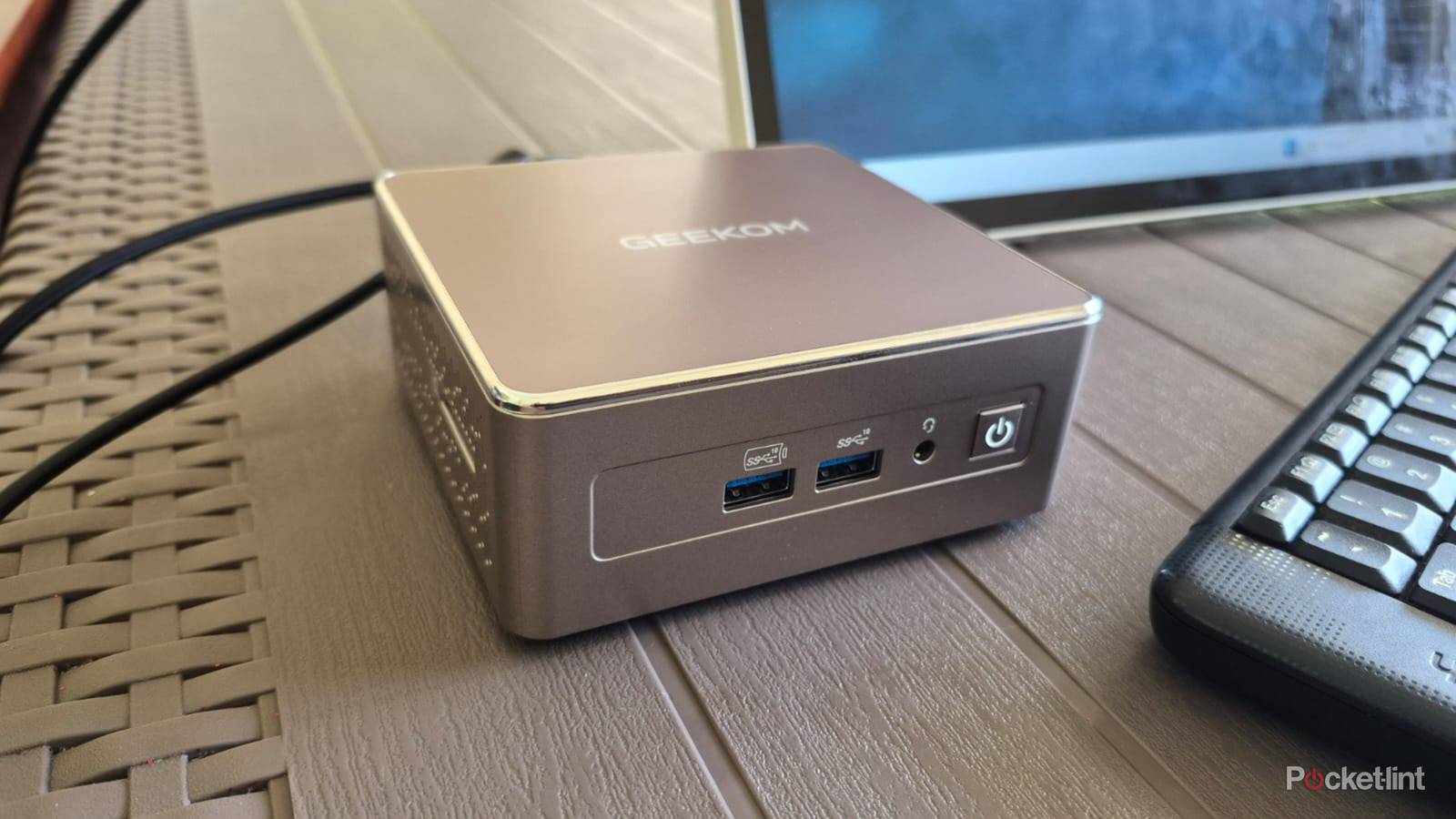
The Geekom A5 is a sleek piece of kit with a square champagne-colored housing measuring 4.61 x 4.41 x 1.94 inches and weighing 1.44 lbs. The sturdy plastic has no flex and includes cooling vents on all sides and a silver accent running along the edge to add some flair. Inside it is a metal frame to add support and strength for securing the components, and it contributes to the unit’s heft.
The port selection is better than most laptops. You get a pair of 3.2 Gen 2 USB-A ports and a 3.5mm audio jack on the front, and an SD card reader on the left side. The back is home to a useful array of ports, including a pair of 3.2 Gen 2 USB-Cs, two more 3.2 Gen 2 USB-A ports, two HDMI 2.0s, an Ethernet port, and the power-in.
Included in the box is a lengthy power cable, an HDMI cable, and a VESA mounting plate and screws, so you have everything you need to get started.
Everything’s powered by an AMD Ryzen 5 7430U CPU paired with a decent 16GB of RAM and a 512GB storage capacity. Visuals are courtesy of Integrated AMD Vega Radeon graphics. The 16GB of RAM comprises a pair of 8GB DDR4 chips while the storage is a single PCIe Gen 3×4 chip. The A5’s case is easy to open by loosening the four screws at the bottom, and you can upgrade the memory and storage space with higher capacity chips if you feel like it.
Included in the box is a lengthy power cable, an HDMI cable, and a VESA mounting plate and screws, so you have everything you need to get started. The thank you card with the company’s contact details was a nice touch and shows appreciation for customer support.
The Geekom A5 has a three-year warranty and is available from the official site and Amazon for $380.
- Brand
-
Geekom
- Storage
-
512GB
- CPU
-
Ryzen 5 7430U
- Memory
-
16GB
- Operating System
-
Windows 11
- Ports
-
4 x USB-A, 2 x USB-C, 2 x HDMI 2.0
What I liked about the Geekom A5 mini PC
Compact versatility
My daily use gaming laptop probably costs three times as much as the A5 and I constantly struggle with its limited ports. I like that I could plug in all my devices, including my external drives, SD card, and extra charging cables without needing to swap them around due to the comprehensive port selection. I had no issues setting up my dual monitor setup via USB-C and HDMI, and still had ports to spare for another two displays.
When testing the A5, my goal was to see if it could match my laptop as a daily driver. I set up my Google profile and copied all my documents and images across. For work, I usually have my custom CMS open on one display and maybe 20 or more open Google Chrome tabs open on the second, including web-based apps, like Pixlr, and Asana. The A5 didn’t miss a beat and worked smoothly with no lag whatsoever.
I wasn’t expecting much in the way of gaming ability, but had to try some older titles to test it anyway. Borderland 2 worked without a hitch on medium settings, and I consistently got 60 FPS on my gaming monitor and TV with GPU usage hovering around 50 to 60%. Mad Max offered similar performance and I managed to get 60 FPS with GPU usage at around 93%.
It’s not made to handle the latest AAA titles, it gets the job done for casual gaming.
Next up was Counter-Strike 2, and this is where I encountered issues. It ran at around 15 FPS on my gaming monitor and windowed mode on my TV with GPU usage at 100%. I got it up to around 30 FPS on my smaller 15-inch portable monitor, but GPU usage remained at 100%. The A5 still exceeded my expectations, and while it’s not made to handle the latest AAA titles, it gets the job done for casual gaming.
I was impressed with the A5’s versatile multi-function ability. I used it as a work PC and had it on my desk for the first few days. Then I connected it to my TV and used it as a multimedia center to browse the internet and stream movies, and play games. I loved using it on a massive display and found it easier to access my favorite apps on Windows via a mouse and keyboard than using my smart TV’s OS and clunky remote control.
I wondered how the A5 would do as a laptop replacement and tried using it at a coffee shop. Needing a power source wasn’t a big deal for me as I usually do the same with my laptop. Then I connected it to a portable monitor and added a wireless mouse and keyboard, and was impressed with the result. This combination has a smaller and lighter footprint than my bulky 17-inch gaming laptop, while delivering adequate performance to get my work done.
What I didn’t like about the Geekom A5 mini PC
Audio would be nice
For me, the Geekom A5 worked as advertised, and it never felt short of power. I forgot my earbuds when I was testing the A5 at a coffee shop and the lack of sound hampered my experience. I understand that it’s a knitpicky complaint, but I think the A5 could be better if it included a basic integrated speaker and there’s space for one in the housing.
Should you buy the Geekom A5 mini PC
An appealing device
The Geekom A5 offers sufficient power for most daily uses in a compact and affordable package that offers impressive value. It’s not the most powerful computer out there, but you can’t complain considering the price, especially when it can work for so many applications. You can use it as a desktop PC or a media center, and it’s ideal for many work-related applications. You also get a lengthy three-year warranty, which provides some assurance of its quality. I think the A5 is a fantastic buy if you’re looking for a portable computing solution, as long as you know its limitations.
This device was provided to Pocket-lint by Geekom.
4.5/5
- Brand
-
Geekom
- Storage
-
512GB
- CPU
-
Ryzen 5 7430U
- Memory
-
16GB
