


I’ve enjoyed using the Xteink X4 since I wrote about it in January, but I’ll be the first to admit it has problems. You don’t have to hold the tiny magnetic e-reader for long to find them. It has a confusing number of buttons, and it’s hard to predict what they’ll do. It can’t actually stick to the back of most phones unless you’re willing to attach an additional magnetic ring or deal with it protruding out of the side of your phone. And it’s not always the best to use, or particularly good at displaying EPUBs.
Despite those issues, people love the X4’s hardware, which remains relatively cheap and uniquely sized among the e-readers available from North American companies. It’s also, as it turns out, fairly easy to customize, too. You don’t need to spend long on the Xteink Reddit to find dozens of custom cases and mounts created for the X4. And those customizations extend to the device’s software, too. Xteink has updated the barebones firmware the X4 launched with to be a bit more visually appealing and better at handling EPUBs, but most of the device’s community appears far more interested in a piece of third-party firmware. It’s called CrossPoint, and it might just be the ideal example of how open-source software can radically change the usefulness of your gadgets.
Fixing the X4’s software
Xteink’s updated firmware cleans up the home screen
The original Xteink X4 interface was barebones, to say the least. Outside a simple home screen with shortcuts to the device’s settings, the most recent book you read, a rudimentary menu for wirelessly syncing files, and whatever content is stored on the device’s microSD card, the rest is cramped menus of text and the raw file system of the X4’s memory. For what most people are using the e-reader for, that’s not really a big deal, but as more people have bought an X4, and interest has grown in Xteink making e-readers in other sizes, it’s understandable the company would want to clean things up.
There’s reason to expect more meaningful software changes to take a long time to arrive.
As part of updates that have rolled out in the last few months, the Xteink X4 now looks a lot more pleasing to the eye and does a better job of opening and displaying ebooks. Now when you first wake the X4 from sleep, you’re greeted by whatever book you read last, and a progress bar showing off how far into the book you are. The home screen also has cleaned-up shortcuts for the e-readers various features, and a much better workflow for wirelessly getting files on the X4 thanks to a new Xteink companion app. You don’t have to dig too far to find the same file system and cramped menus the X4 launched with, but at least the e-reader makes a better first impression now and is a bit more user-friendly.
That’s all fine and good as a first pass, but Xteink is developing software and hardware at the same time. There’s reason to expect more meaningful software changes to take a long time to arrive. That’s why plenty of X4 owners have turned to third-party, open-source software to address the problems they have now, and tweak the e-reader’s interface even more to their liking.
CrossPoint is simple firmware that fits the Xteink X4
Clean menus and the ability to stay in sync with other third-party reading apps
You don’t have to lurk in the Xteink subreddit long to hear about CrossPoint. The open-source alternative firmware is one of the most popular ways X4 owners are opting to update their e-reader, largely because of the features CrossPoint adds, and how simple it is to install. CrossPoint is specifically designed for the X4 and its chip, and offers many of the core improvements of Xteink’s latest official updates, including a more visually presentable home screen, and better handling for EPUB files, particularly when it comes to loading images embedded inside eBooks.
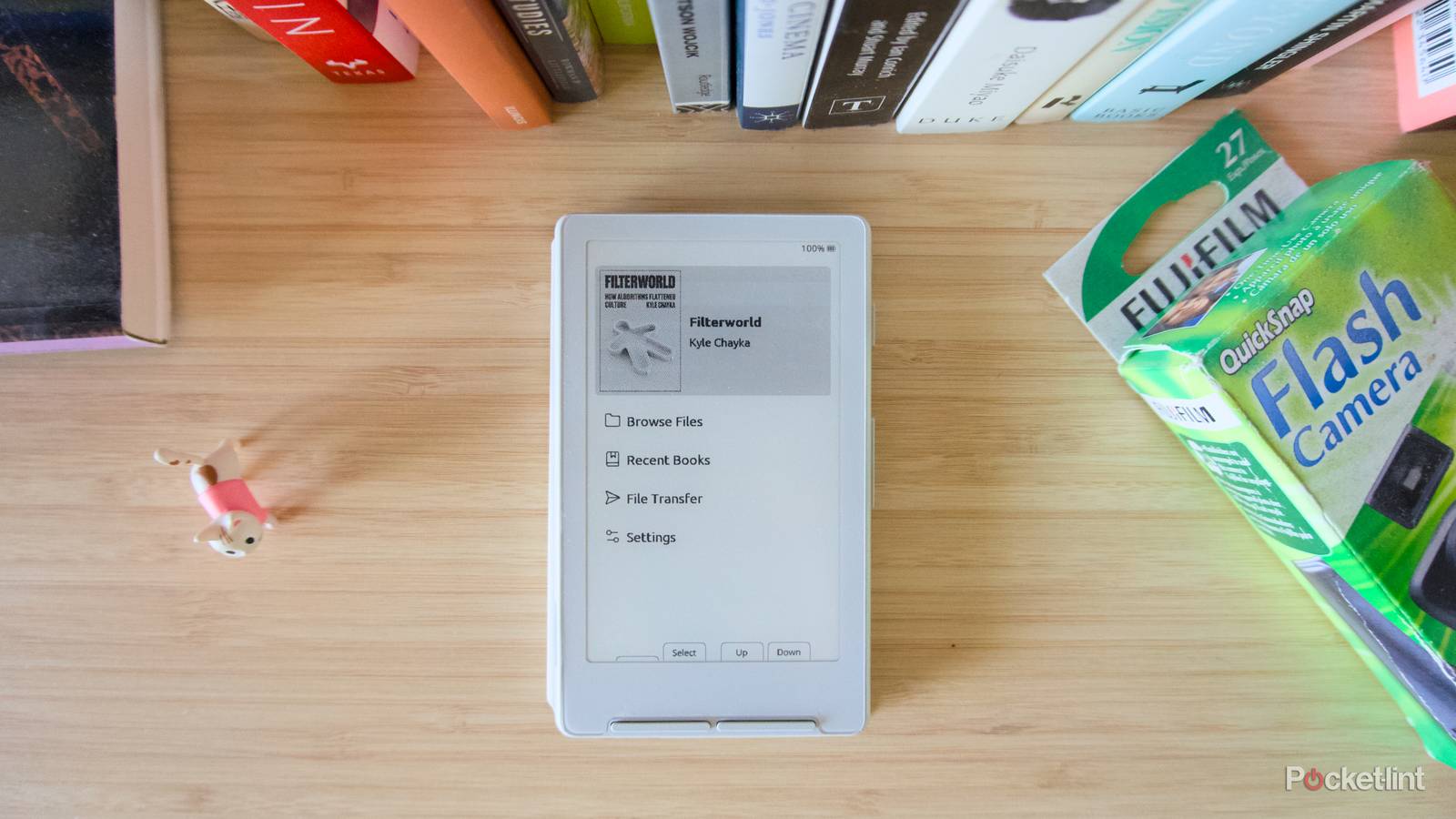
CrossPoint features a simple home screen with the cover of whatever book you open last at the top, the book’s name, and the book’s author. Selecting the cover with one of the X4’s buttons drops you on whatever page you were reading last. Below that, there’s a collection of menu options, including a shortcut to your microSD card files, recent books you opened, a file transfer option for the multiple ways you can get files on the X4, and a shortcut to the settings menu.
Make sure your X4 is set to your preferred language before flashing it with new firmware.
The more meaningful changes might be the ways CrossPoint tweaks the X4’s interface, labeling the e-readers many buttons so you know which does what, allowing the cover of whatever book you’re reading to become the lockscreen of the X4 when it’s asleep or powered off, and adding the ability to sync your progress in books with KOReader, one of the most popular third-party reading apps (and one that’s frequently sideloaded onto Kindles and Kobos).

You don’t have to be satisfied with the default features of CrossPoint, either. The open-source nature of the project means that anyone can modify CrossPoint and create their own version. There are already tweaks out there changing CrossPoint’s home screen and introducing entirely new features like a Tamagotchi-inspired virtual pet. Of course, you don’t have to develop your own version to get a lot out of what’s in CrossPoint by default, and installing the firmware is relatively simple:
- Connect your Xteink X4 to your computer over USB-C and wake/unlock it.
- Head to the Xteink Flash Tools website.
- Under Full flash controls, click on Save full flash, and wait around 25 minutes for a full copy of the device’s firmware to be created. Save that copy (the file will be called “flash.bin”) in a safe place.
- Scroll down to OTA fast flash controls and click on Flash CrossPoint firmware.
- Wait for the firmware to be written to your X4, then reboot your e-reader by pressing the Reset button on the bottom-right side of the device, and then pressing and holding the sleep/wake button.
Open-source software can breathe life into gadgets
Save your cheap handheld emulator and janky e-reader

There are unavoidable security risks to adding third-party software to your gadget, but those downsides come with positives, too. An open-source project like CrossPoint could mean the X4 is supported with new features, or at the very least, bug fixes, well after Xteink has moved on to other hardware. For a device this simple, you really don’t need all that much to have a good experience, but open-source software can often save poorly optimized gadgets, too. There’s a growing number of cheap Linux or Android-based handheld game emulators that are vastly improved using third-party launchers or firmware than whatever they ship with. If you’re already saving some money buying a cheap, weird gadget, why not take the plunge and see if you can make it better with software someone made just because they loved the device itself.

- Resolution
-
220ppi
- Storage
-
32GB (from included microSD card)
Xteink’s X4 is a compact, 4.3-inch e-reader with physical buttons that’s designed to be used by itself or while magnetically attached to the back of a smartphone.
