


I still remember the first time I used Notion. It felt like such a relaxed space where I could take down my notes without worrying about formats and layouts. The flexibility and freedom Notion offered, especially compared to other writing apps, were refreshing, and its focus on simplicity was one of the reasons for its success. For a long time, this hype was well-deserved, too.
Lately, however, Notion has not felt the same.
What began as a clean, focused tool for planning and writing has become something larger that integrates calendars, emails, collaboration options, and, of course, AI automation. In doing so, Notion has become convoluted, leading to what people call Notion fatigue. I spend more time thinking about optimizing the Notion workspace for my needs than actually using it. This realization prompted a search for an app that doesn’t require the user to provide emotional support.

I replaced Notion with a plain text file and I’m more organized than ever
A note app that works on my terms, effortlessly.
Notion fatigue is real
And you’re not the only one feeling it

Turns out, Notion fatigue is a shared experience among users. Though almost everyone loved the flexibility Notion offered at first, recent updates have changed things. Many now face a considerable cognitive load trying to keep up with Notion’s hyper-customizable nature. It often leads to an uncomfortable truth that many Notion users recognize: you spend more time setting up Notion than actually using it.
Think of all the times you have opened the Notion app and stared at the blank canvas, thinking about where and how to start. Sure, Notion offers a lot — too much at times. With so many fields, tags, and viewing modes to choose from, creating a connected workspace becomes a tough task. Considering how Notion was supposed to help you reduce cognitive load, there’s no better example of a paradox.
You can always try to declutter Notion. However, given how the company is integrating more enterprise-focused features than ever before, I believe what we need is a more focused alternative.
Craft is what Notion used to feel like
Before databases and dashboards took over
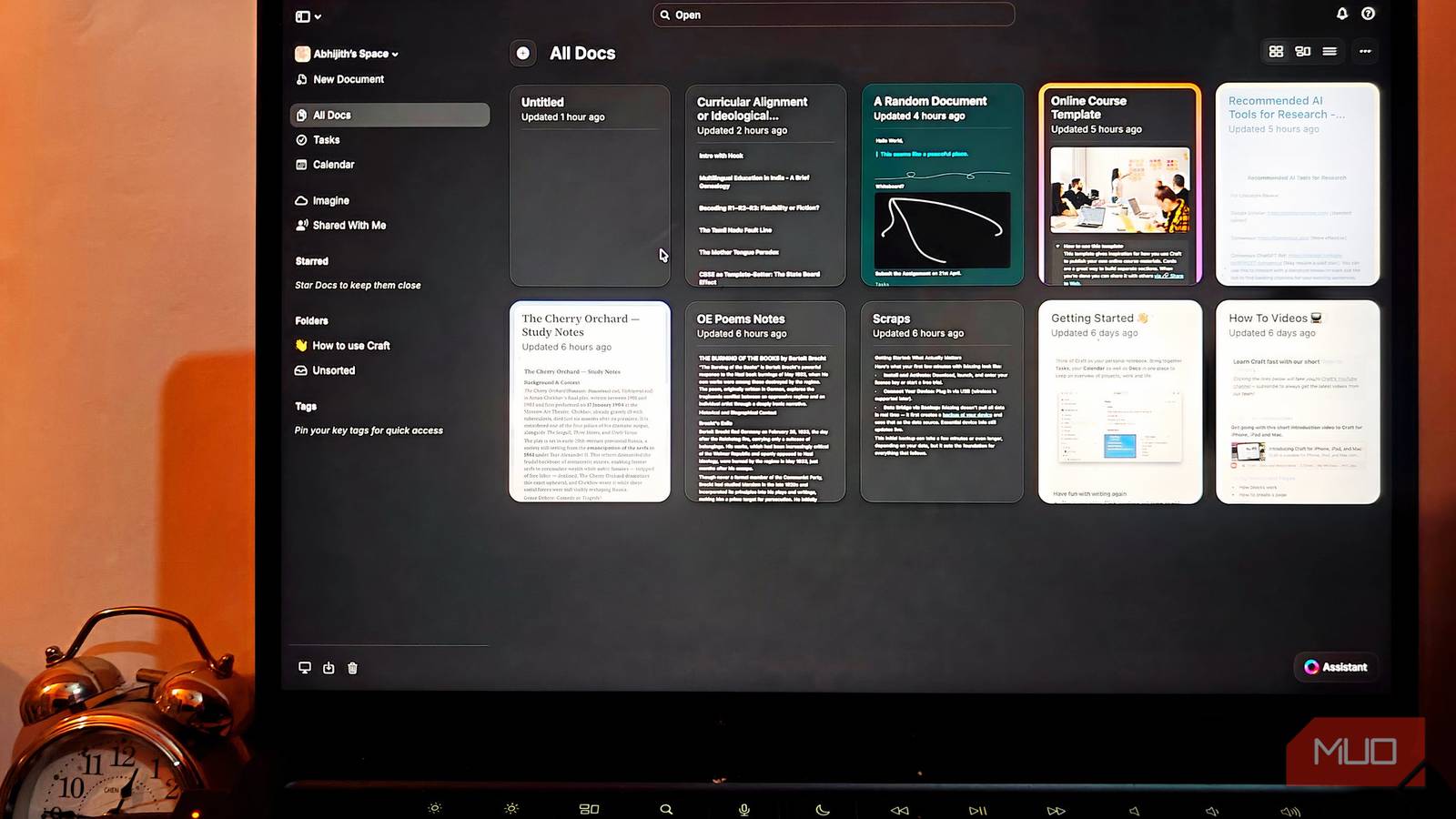
Using Craft takes me back to the days when Notion really helped me relax, organize my thoughts, and write. Like Notion, Craft is also designed for a few things: documents, tasks, a calendar, whiteboards, and daily notes. However, unlike Notion, Craft does not put everything on a single page, which makes the experience congested. Instead, when you use an aspect, say Docs, everything stays focused.
Throughout the experience, Craft feels like an app made for you, not an enterprise team. This shift towards individual experience makes a noticeable difference in how you use the app for documents, with the freedom to customize them however you like. You can easily switch between other aspects, such as the calendar and tasks, without spending extra time developing a calendar template or a task list.
Coming from the do-everything-on-your-own situation that Notion has become, Craft feels like a relaxed space where I can get work done.

- OS
-
Windows, macOS, Android, iOS, Web
- Individual pricing
-
Free, Subscription available
- Developer(s)
-
Craft
Craft is a productivity-focused writing and note-taking tool available for various devices.
Craft puts the document back at the center
Turns out, writing apps should feel good to write in
Craft soon became an app I loved opening and working on. One of the ways Craft does this is by bringing the focus back to documents rather than forcing users to deal with databases and forms. The Docs section of Craft is designed to offer a quick overview of everything you have created and shared using the platform. Compared to what happens on Notion, creating a well-organized document using Craft is a simpler affair.
For starters, you can start a blank document or choose one of the many templates from Craft. While the template collection is not as extensive on Notion, it checks a lot of boxes. More importantly, it feels nice to write using Craft. You can use the left sidebar to see the table of contents, associated tasks, and attachments. The right sidebar lets you insert various blocks, alter the formatting style, and optimize the style of the document.
It also helps that the Craft app is lightweight and intuitive. You get to create a space that you can connect with in fewer steps. Getting started with Craft doesn’t mean starting from scratch, either. I was able to import data from platforms like Notion, Google Drive, and Evernote to bring everything home.
Notion is built for teams; Craft is built for people
Enterprise features are great — unless you’re a person

Over-engineered, enterprise-centric features were another reason Notion became unbearable for many. While many of these features are great for teams, they don’t offer immediate value for individual users. Furthermore, they add cognitive load and spike up resource consumption. Craft, however, gets rid of those while optimizing everything for individual users.
Craft does this without losing the essentials, though. For instance, users can easily shift between multiple aspects like documents, tasks, and the calendar. The Tasks section is a great way to keep track of your to-do list, whereas the Calendar section allows you to keep track of your agenda for the whole day or the week. Because documents are the currency on Craft, you can easily convert a task or event to a rich document.
I also love that Craft doesn’t trade customization for simplicity. You get ample ways to make Craft look and work the way you like, starting with how all your documents appear. The options for custom templates and tags are great. When you publish content for others, Craft offers in-depth statistics as well. Overall, this app manages to keep the necessary features available without ruining intuition.
Before you switch: Craft can’t do everything
It should not come as a surprise that there are a few things Craft cannot do that Notion can! For instance, Craft does not offer support for relational databases, advanced project and task management, or extensive options for automation and integrations. It may also not be a great place where you can collaborate within a huge team. Craft kind of lacks the extensive template ecosystem, as I mentioned earlier.
However, from a productivity standpoint, this lack of features is what makes Craft a more peaceful alternative for most people. You don’t have to worry about advanced stuff and instead focus on what you need. At the end of the day, you end up paying less for features that actually help you rather than cause a blank canvas paralysis.

The open-source Notion alternative that you’ve never heard of
A documentation tool that actually teaches better organization.
