


If you’re like me, you struggle to stay as productive as you’d like. There are changes you can make to your routine, such as keeping your phone in a different room when you’re working or playing classical music to help you focus. However, utilizing AI to increase efficiency is something that has worked for me.
Google’s NotebookLM has been a massive help for me when I’ve tried to learn a new skill or conduct research for a project around my home. While I can take NotebookLM’s outputs with me wherever I go to learn more, there’s a decent amount of prep work to get to that point. That’s why Gistr has become my go-to option for learning new tasks. The Chrome browser extension takes it over the edge for me with NotebookLM.
I can create my own database for Gistr’s AI assistant
All it takes is a few clicks

Once you install the Gistr Chrome extension, it asks you to sign up for a free account. This lets you curate collections to return to as you research different things. But the genius of the Chrome extension is that it is a minimal button you can click to catalog a video.
When you’re using NotebookLM, you are in charge of the sources for the database to rely on. It differs from large language models like Google Gemini, ChatGPT, and Microsoft Copilot, as those rely on scraping the Internet to find answers to prompts. NotebookLM asks you to provide the sources, and then it can search through the provided sources to find answers for you. One of those is YouTube links, which you have to copy and paste into NotebookLM to create a Notebook.
But with Gistr, you can go to YouTube and click the Gistr button while watching a video to add it to your thread immediately. You can click that button and Gistr logs that you want to use this YouTube video as a source, and it will analyze the video and be able to answer prompts based on that video’s information.
I can make notes based on specific points in the video
It helps when you’re trying to remember exact steps

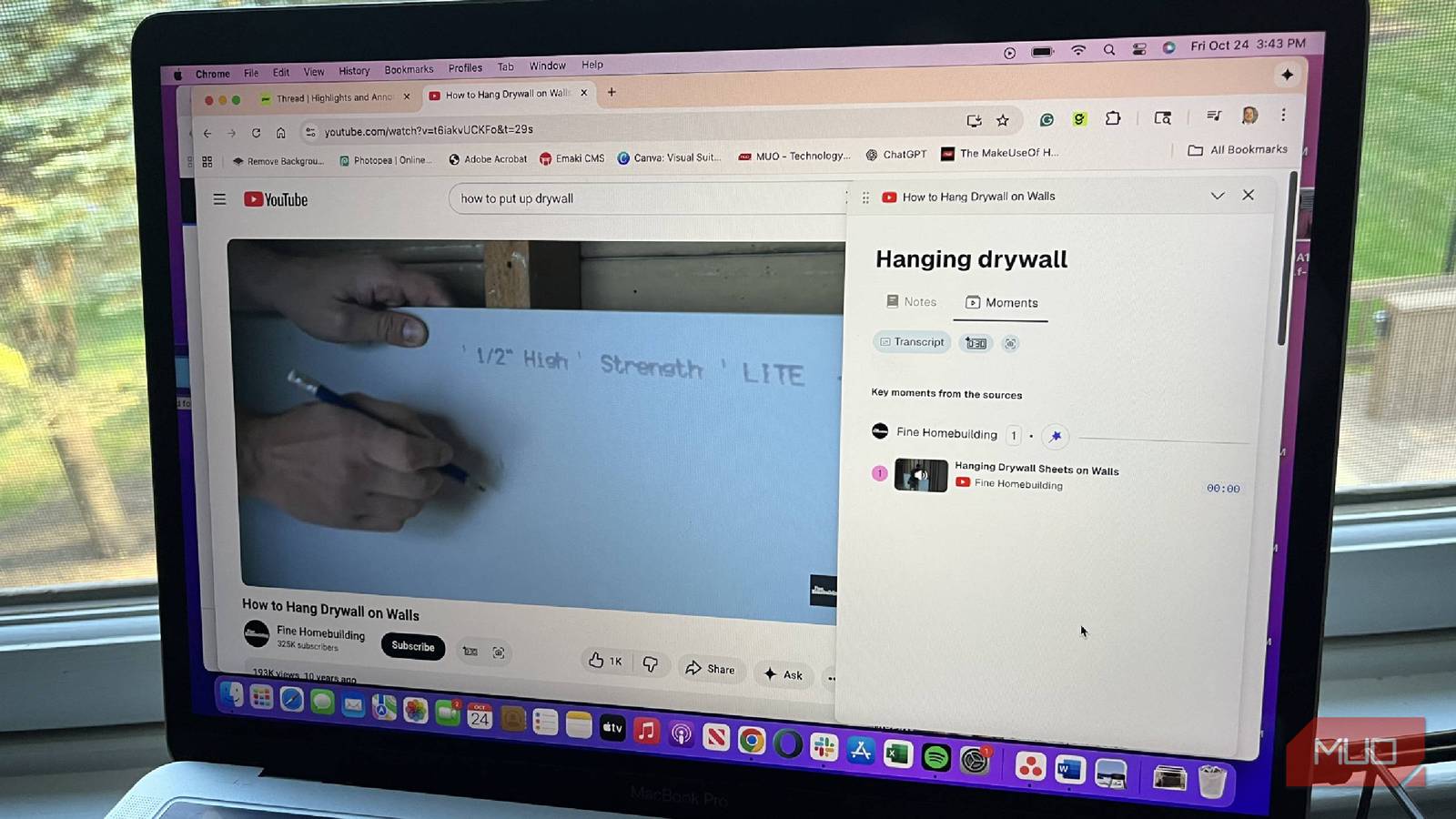
After entering a video into the Gistr thread, you can take a lot of steps to better understand the video. There is a transcript button that will give you a written account of the entire video. You can also choose a screenshot of a certain moment in the video, as well as add a timestamp. When you add a timestamp, you can add notes to Gistr for that specific moment in the video.
Recently, I was interested in learning how to install drywall as we are considering finishing our basement. One of the videos noted how to measure the length of screws you need during the project. I made a note at that timestamp, so that I would remember it when I needed it.
I later asked the tool to mark key moments in the three videos I saved so I could go back and revisit them if the time came to put drywall up in my home. They’re already marked in my account, making it faster for me to retrieve them at a later date.
You can add notes at any time to Gistr, but it makes sense to organize them based on timestamps in the videos, helping to organize the notes.
I don’t even have to come up with the questions myself
Gistr makes deciding what to ask simple
When you’re using Gistr, there is a prompt entry bar where you can type in what you want to know from the sources. Let’s say you don’t actually know what you want to learn right away. Gistr has buttons that make the experience easier. You can either click Smart Guide, Toolkit, or Smart Questions.
Smart Guide populates Gistr AI and gives you ideas of what you might want to take away from the video. It gives you options like Get the gist, which is ideal for really long videos. It gives you a synopsis of what the video is about. A legitimately TL:DR shortcut that doesn’t require typing a prompt asking for a succinct recap is incredibly helpful. You can also choose
- Super simple explanations, no jargon
- Advice I can take away from this source
- Core concepts broken into bullet points
- Deep questions to make me think
Toolkit takes on some of NotebookLM’s features and can create a quiz from the material to help you study. There’s a feature similar to NotebookLM’s Mind Map that breaks out the source into chapters with subsections. It can also create a story to help you remember the core concepts of the video and create a one-page cram sheet for your review. Toolkit is ideal for anyone who wants to use YouTube for studying and educational purposes.
Smart Questions help you interact with the AI assistant more efficiently. It utilizes Gistr AI to populate questions based on the source material. For my drywall example, Gistr AI’s smart questions included “What are the primary differences between the factory edge (butt joint) and the tapered edge of drywall, and how do these differences impact the finishing process?” These more in-depth questions help me break down the key points of the video to gain a deeper understanding of the topic.
If you create a Collection in Gistr, you can include all the sources or just choose a specific source to ask questions from. This became helpful when I added in different parts of the drywalling process and could ask questions based on the stages I was looking into.
Gistr centralizes a lot of what NotebookLM does
I have been a fan of NotebookLM for a while. But I have leaned more towards Gistr whenever there is a subject I need to research that is better learned on YouTube. The features are quite comparable, and I really like that I can add notes at specific points in a video, making it easier to revisit. The fact that Gistr is an extension in Chrome and can populate with a quick click helps seal the decision for me against NotebookLM.
