


I always loved reading. When I was in middle school, you’d never find me without a book (or a couple of books) in hand. I’d spend hours in the library, in the same exact spot, completely lost in whatever world I’d stumbled into that day. Unfortunately, I went from reading multiple books in a single week to reading practically none in months. While I’d obviously read stuff for work and college, it didn’t count in the way that made me feel like a “reader” anymore.
This summer, I had one goal and one goal only: get back into reading. Getting an eReader ended up being the turning point. It gave me the space to read without distractions and finally feel connected to books again. I’ve read more in the last few months than I have in years. Something I started doing recently is turning my highlights into a mind map, and it’s completely changed how I learn.
I use NotebookLM + Readwise to turn what I read into actual knowledge
It only takes a few seconds
There are countless mind-mapping software options, both free and paid, you can use. However, a lot of this software requires you to manually create mind maps. For this workflow particularly, I didn’t want to create the mind map myself. I just wanted my Kindle highlights to be organized automatically into something I could actually use and learn from.
I tested a bunch of different tools for this purpose, including one I found on Reddit dedicated to it. However, NotebookLM ended up being by far the easiest and most effective option. NotebookLM has a dedicated Mind Maps feature, which can turn any source(s) you upload to your notebook into full-fledged interactive mind maps.
As with all NotebookLM features, the mind maps you generate using the tool only consist of information from the sources you upload. To turn my reading highlights into NotebookLM Mind Maps, the first thing I needed to do was convert my highlights into a format NotebookLM accepted. The approach I’ve settled on is using Readwise, a tool that lets you sync highlights from various sources, including the Kindle app, and export them in a structured format.

I paired Obsidian with Readwise and my highlights finally make sense
This combo allows me to save and process all my highlights in one place
Though I use an Android eReader for all my reading instead of a Kindle, I still use the Kindle app for the reading part itself. So, once I’m done reading a book, I simply use Readwise to get all the highlights exported in a structured format. In this case, I save my highlights in Markdown format. Then, I upload the markdown file to a NotebookLM notebook and hit the Mind Map button in the Studio panel.
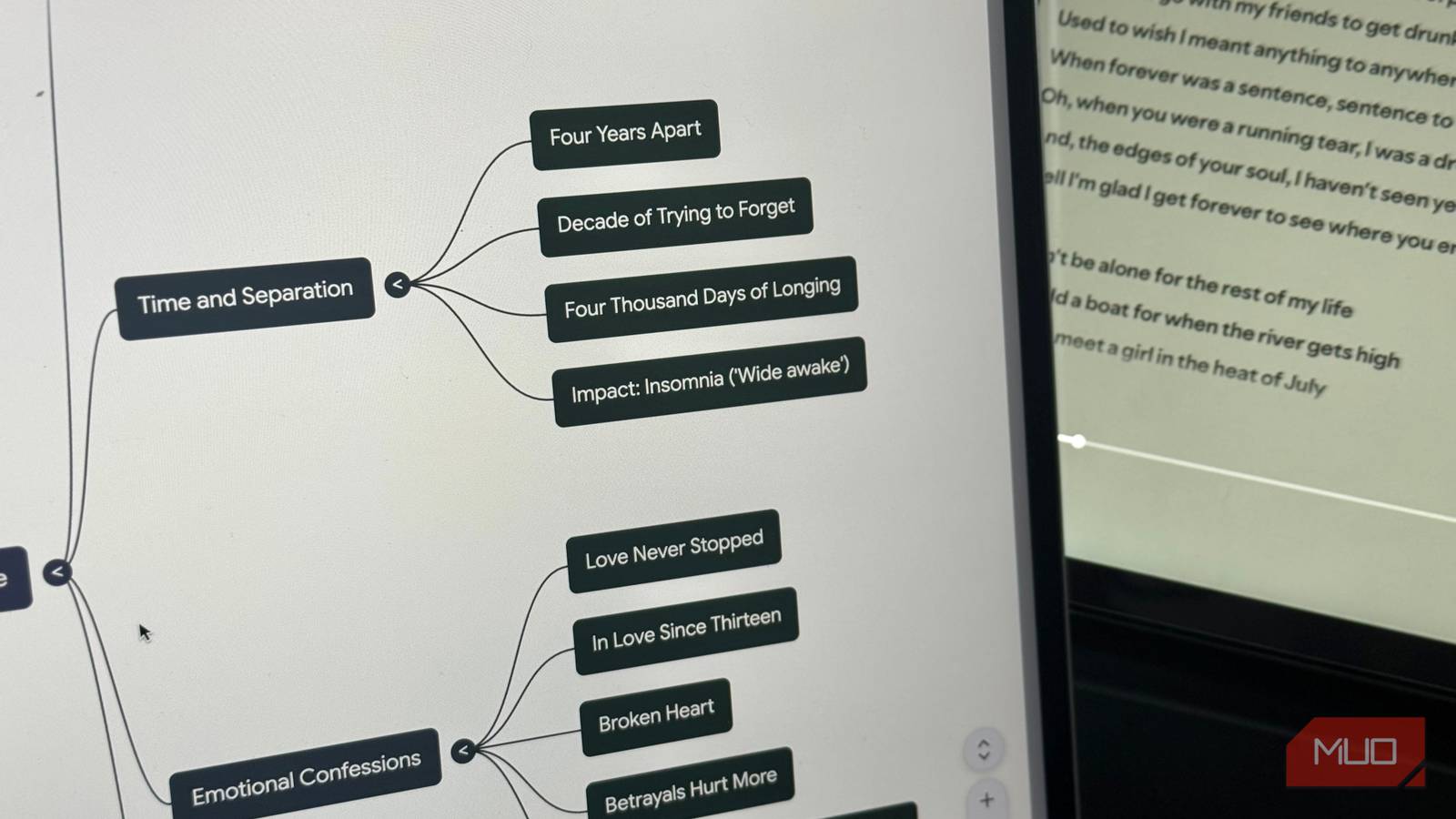
Within seconds, my scattered highlights are transformed into a fully structured mind map. The mind map is interactive, so you can zoom in and out to navigate different parts and expand the branches to find sub-nodes. When you click on a certain node in the mind map, NotebookLM automatically generates summaries of that specific node. You can then ask follow-up questions about it.
The entire process only takes a few minutes, and since NotebookLM is an app I use daily, creating a mind map of a book I’ve finished has become a quick, almost effortless part of my routine.
More importantly, why would I even do this?
It sounds a bit weird, I know
A question anyone would naturally have is: why would someone want to turn their reading highlights into a mind map? Let me explain. Given that I’m a lot older now, and I’ve only recently started reading as consistently as I used to, reading again made me realize something very quickly: I don’t really retain anything I read. I can get through entire books and still forget 90% of them.
Though a lot of what I read is simply for fun and I don’t necessarily want to remember every single detail, it’s not fun forgetting the entire book the moment I close it. This “read and forget it immediately” problem is something I’ve struggled with beyond reading too. That’s the entire reason why flashcards are my go-to for memorization-heavy courses at college.
So, I started looking for a way to take the stuff I wanted to remember from reading and organize it in a way that actually sticks. I annotate all the books I read, but the notes often end up scattered and disconnected. I’d highlight something interesting on page 67, then another insight on page 102. The worst part is that I’d never actually return to what I had highlighted, so all those insights would just fade away.

That’s when I realized I needed a system that would bring all my notes together, make the connections between ideas clear, and actually help me retain what I was learning. In addition to flashcards, mind maps have been another tool that completely changed the way I process and remember information.
Turning my Kindle highlights into flashcards would make it feel like a college course, which would take the fun out of it and make reading feel like a chore. So, mind maps felt like the perfect middle ground. And trust me when I say this, this fairly simple change has made a huge difference in how I retain information and actually enjoy reviewing what I’ve read.

My e‑reader now doubles as a notebook thanks to this stylus
Move over iPad, my e‑reader now does it all.
The reason I wouldn’t open my highlights before was that they’d feel too overwhelming and scattered, making it hard to make sense of anything. With mind maps, this isn’t an issue anymore. Since everything is organized visually, I can quickly see how ideas connect and dive into the details without feeling lost. Sure, I still end up forgetting a lot of details, but the key concepts and connections stick far better than they ever did before.
