


Your Windows PC might be doing something you didn’t expect. While you’re browsing, working, or gaming, it is quietly sending pieces of update files to other computers around the world. It sounds strange at first, but it’s not due to any bug or malware. It’s Windows’ Delivery Optimization feature.
Delivery Optimization is meant to make updates faster and smoother for everyone. But the idea of using your internet to send updates to strangers can feel a bit off. Plus, there are also a couple of other downsides that make it worth a second look.
What Delivery Optimization actually does
Inside Windows’ peer-to-peer update engine

Typically, when you download an app or update, your PC goes straight to Microsoft’s servers and downloads everything from there. Delivery Optimization is Microsoft’s peer-to-peer update system that changes that. Instead of pulling updates only from Microsoft’s servers, this feature allows your PC to get parts of those same updates from other computers on your local network who already have them.
Your PC can also download pieces of the update files from other PCs on the internet. In return, your PC does the same. It shares files with other PCs on the local network and online. This works for both Windows updates and Microsoft Store app downloads.
This does two things. First, it helps reduce the bandwidth required to keep your PC up to date, which is ideal if you’ve got a limited internet plan. It also eases the load on Microsoft’s servers as your PC gets files straight from other PCs.
The good thing here is Delivery Optimization doesn’t touch any of your personal content, so there’s no need to worry about privacy. Also, when you’re updating files and apps from other PCs, the same security measures are applied. This means you don’t have to worry about the authenticity of the downloads.
Why this feature can be a problem
The hidden costs of faster updates

Delivery Optimization may sound harmless, but it can cause a few issues that make it slightly less appealing.
The biggest one is background data usage. It’s fine when you’re downloading updates yourself, but when your PC is uploading parts of those updates to other PCs on the internet, it can make your connection feel sluggish. For instance, if you’re gaming online or attending a video call, this feature may sometimes affect those things at the worst possible time. This is even a bigger issue if you’re on a limited internet plan and haven’t set your connection as metered on Windows.
Another problem with Delivery Optimization is that it creates a local cache to store update files even after they’ve been installed. This, of course, comes at the cost of disk space. Although Windows only stores this cache for a short period of time, it can be a problem for anyone already struggling with storage space.
Recently, I ended up recovering almost 20GB of storage by deleting old Delivery Optimization files. But the catch is that this space won’t stay free for long. It’s only a matter of time before Windows fills it up again with new update files.
In some cases, Delivery Optimization can also slow down your PC. Some Reddit users have reported sudden spikes in RAM usage because of this feature. It’s not something that happens constantly or to every PC, but when it does, it can be a major frustration.
So yes, Delivery Optimization is safe and helpful, but the trade-off is your bandwidth, increased storage consumption, and occasionally, a hit to your system performance.

This registry hack finally stopped Windows updates from hogging my bandwidth
This clever registry hack stopped Windows Update from hogging my bandwidth for good.
Stopping Windows from sharing update files with others
Keep your bandwidth to yourself
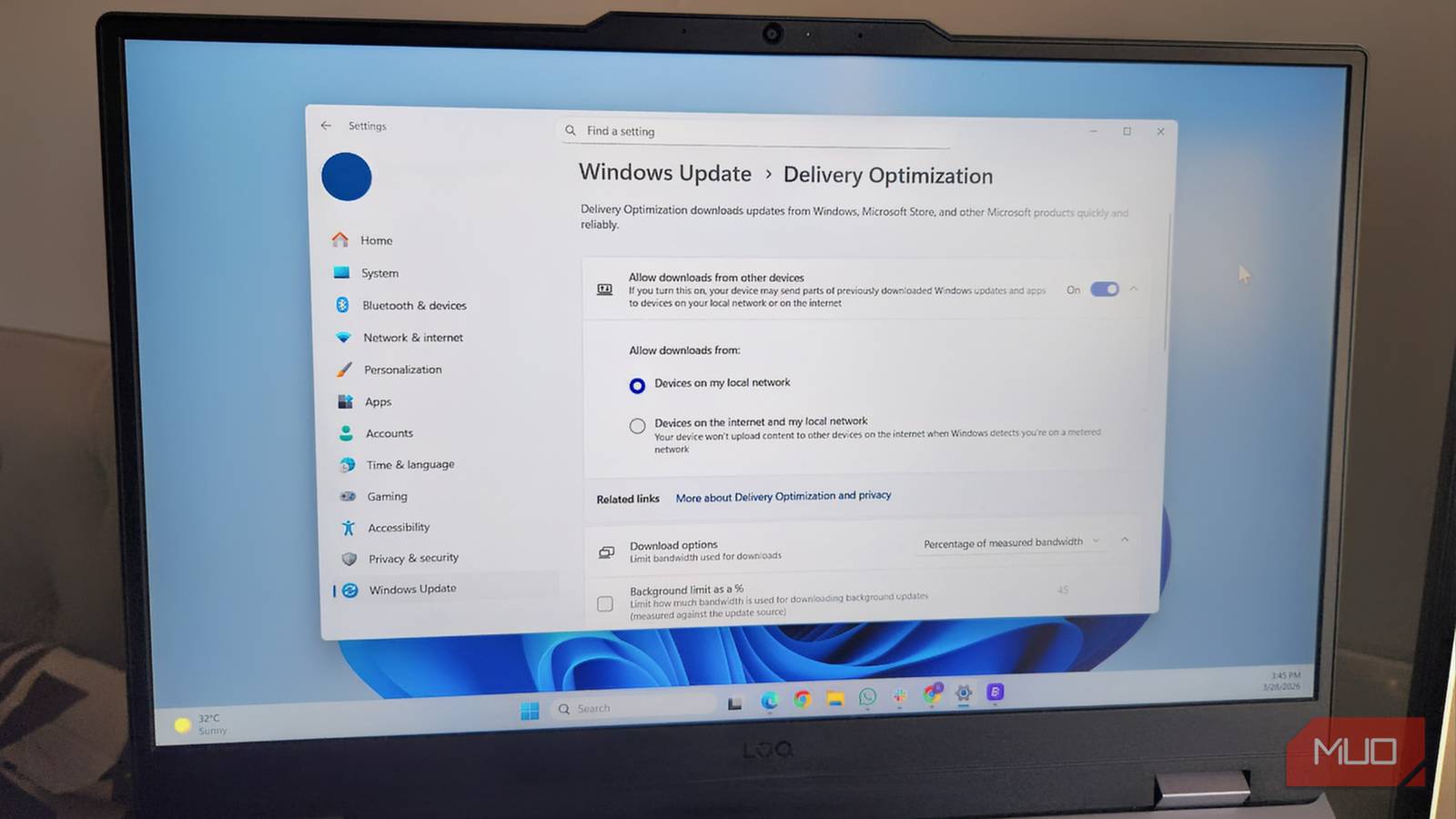
If the idea of your PC sharing update files in the background doesn’t sit well with you, it’s easy to put a stop to it. For this, head to Settings > Windows update > Advanced options > Delivery optimization. Then, disable the Allow downloads from other devices toggle. That’s it. Your PC will now only download updates directly from Microsoft and won’t use your internet to share updates with others.
If you don’t want to disable the feature completely, there’s a nice middle ground. You can choose to allow sharing only between PCs on your local network. This way, your own Windows PCs can benefit from faster updates, but the internet connection is not used to upload data to strangers online.
Windows even offers an option to limit how much bandwidth Delivery Optimization can use. You can set caps on both download and upload speeds so that the feature doesn’t interfere with things like streaming, gaming, or video calls. In the end, it’s entirely up to you how you want to deal with this feature.
The impact of Delivery Optimization comes down to your internet speed, PC’s storage capacity, and its overall hardware specs. If you have fast internet, plenty of storage, and a capable system, you may never notice it running. But if you’re on a limited data plan, tight on disk space, or using modest hardware, it can become more of a nuisance than a benefit.
