


I’ve already written about Linux distros I’d avoid at all costs, but this time curiosity got the better of me. I started wondering what North Korea has been up to on the software side, and that question quickly sent me down a very strange rabbit hole.
So, like any other slightly unreasonable Linux fan, I decided to try North Korea’s take on an operating system for myself. It turned out to be a far more interesting experience than I had expected.

Sorry, Linux fans: This OS is actually the better Windows replacement
Not Linux, not Windows. Something better.
The year of the Linux desktop hit North Korea decades ago
It was Fedora all along

While most of us were still arguing between Windows, macOS, and Linux, North Korea, in typical North Korean fashion, made the decision for its people years ago. The country has its own homegrown Linux distribution called Red Star OS.
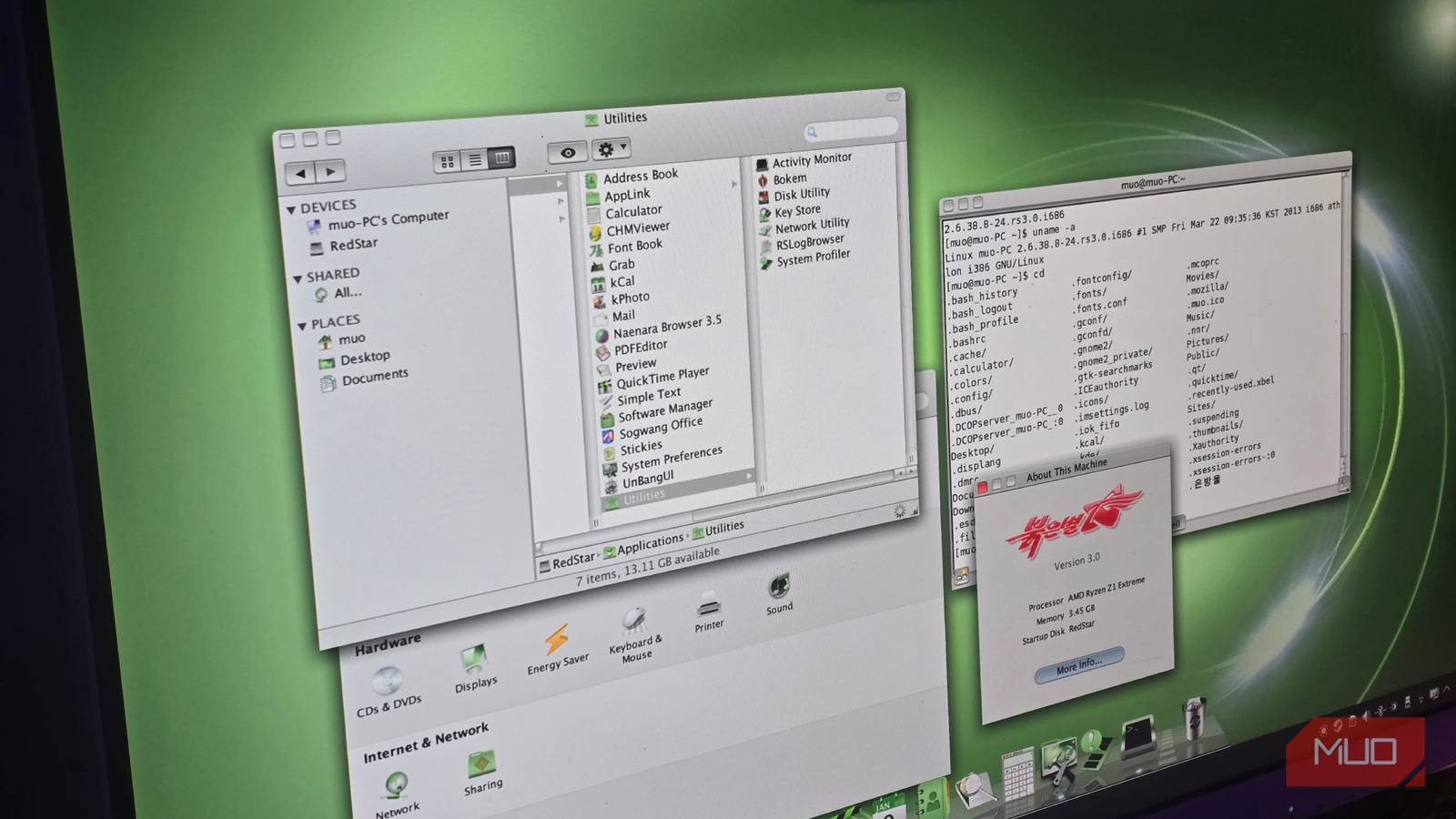
The version of Red Star OS I have been testing is built on Fedora, which I actually recommend to most people. It has KDE sitting on top, wrapped in its own heavily customized theme. Most of the system components are things you’ve probably used before. They’re just VERY old versions at this point, and obviously missing all the spyware that comes with them (more on that later).
The first 2 versions of Red Star OS leaned heavily towards mimicking Windows XP, which made sense around 2008. Then, in 2012, Red Star OS 3, the version I am using, switched to a macOS-style interface. And no, it’s not the macOS you see today. It clearly draws inspiration from the early Mac OS X era, especially from OS X Snow Leopard.

In 2019, Red Star OS 4.0 was also launched, which is actually based on Ubuntu. Unfortunately, (or fortunately) it hasn’t leaked yet, so for this article, I’ll be testing Red Star OS 3 instead.
For obvious reasons, I did not install Red Star OS on bare metal; instead, I opted for a VM with the network adapter detached. While I’ve seen plenty of people on r/RedStarOS installing the OS directly on older machines with network access, it really isn’t worth the risk.
I initially tried booting it using UTM. The installer worked without any issues, but X11 would just crash before I could even reach the login screen. Switching over to VirtualBox did solve the problem, though, so that’s what I went with in the end.
Using it is strangely nostalgic?
Hey, I’ve seen this one!
Upon first installation, the entire system is, unsurprisingly, in Korean. My first few minutes were spent awkwardly pointing Google Lens at my screen just to figure out what I was even clicking.
That said, I did manage to change the system language over to English after gaining root access, which was unexpectedly pretty easy.
The first thing I did was poke around the app list, and there’s a lot here. You get all the obvious basics, like a video player, calculator, text editor, and pretty much everything you would expect from any desktop OS, even if it happens to come from North Korea.
There’s also a full, homegrown office suite called Sogwang Office, which includes its own versions of Word, PowerPoint, and Excel. On top of that, you’ll find the usual system utilities you’d expect on a Linux desktop, like an activity monitor or disk utility.

You might not expect it, but it even ships with a web browser. It’s called Naenara Browser, and under the hood, it’s basically a modified version of Firefox. I’ll get into what that actually means for internet access and browsing a bit later.
Funnily enough, it’s oddly nostalgic. Red Star OS 3 was released back in 2012, and even then, it was already leaning into a dated design language. The whole interface follows a very skeumorphic style. That’s the same thing I grew up with during computer labs in elementary school, so it’s funny seeing it come full circle in Red Star OS of all places.
What’s North Korea without a little spyware
Obviously, you’re being tracked

Obviously, there’s supposed to be a lot of shady stuff going on here, so the first thing I wanted to test was how files are actually tracked. Red Star OS is known for watermarking every file with hardware-level information, so I decided to put that claim to the test myself.
I created a simple .docx file, noted down its hash, and copied it to a USB drive. After mounting that drive in Red Star OS, the MD5 hash had conveniently changed, even though I hadn’t opened or modified the file at all.
This lines up with existing research from Insinuator, where it’s shown that Red Star OS does append an invisible watermark to files. The exact implementation differs a bit depending on the file type, and different formats get different kinds of embedded markers.
You might be a bit puzzled about why this is done, though. It’s pretty simple. The watermark appears to contain a hardware identifier, making it an effective tracking tool. In practice, this means the system can be used to determine who created a file and, potentially, identify who opened or shared it as it gets passed around on USB drives.

You’re probably already aware that most North Koreans don’t have access to the World Wide Web. Instead, it uses its own intranet, which is essentially a closed internal network with a limited set of state-approved websites that never touch the global internet.
Because of that, Naenara, the built-in browser, doesn’t work out of the box. While there are ways to get it to connect to the real internet, I was more interested in seeing what the North Korean intranet itself looks like. As it turns out, there doesn’t seem to be any practical way to access it from outside the country.
There are other restrictions worth noting, too. The built-in antivirus can automatically delete files it considers “undesired,” and the system enforces extremely strict integrity checks. Anything that looks modified or out of place is treated as a problem.

I’m deleting it… until Red Star OS 4.0 leaks
While this was a fun experiment, I don’t think I need to explain why this isn’t something you should keep using. I also haven’t shared a download link to the ISO, for obvious reasons. If you do manage to get hold of one and plan to test it out yourself, only do so if you know exactly what you’re doing.
It’s unlikely that it would cause any serious harm today, but it’s also not really worth the risk. If you’re just curious about Linux or want something interesting to play around with, there are far better distros that you can trust out there.
