

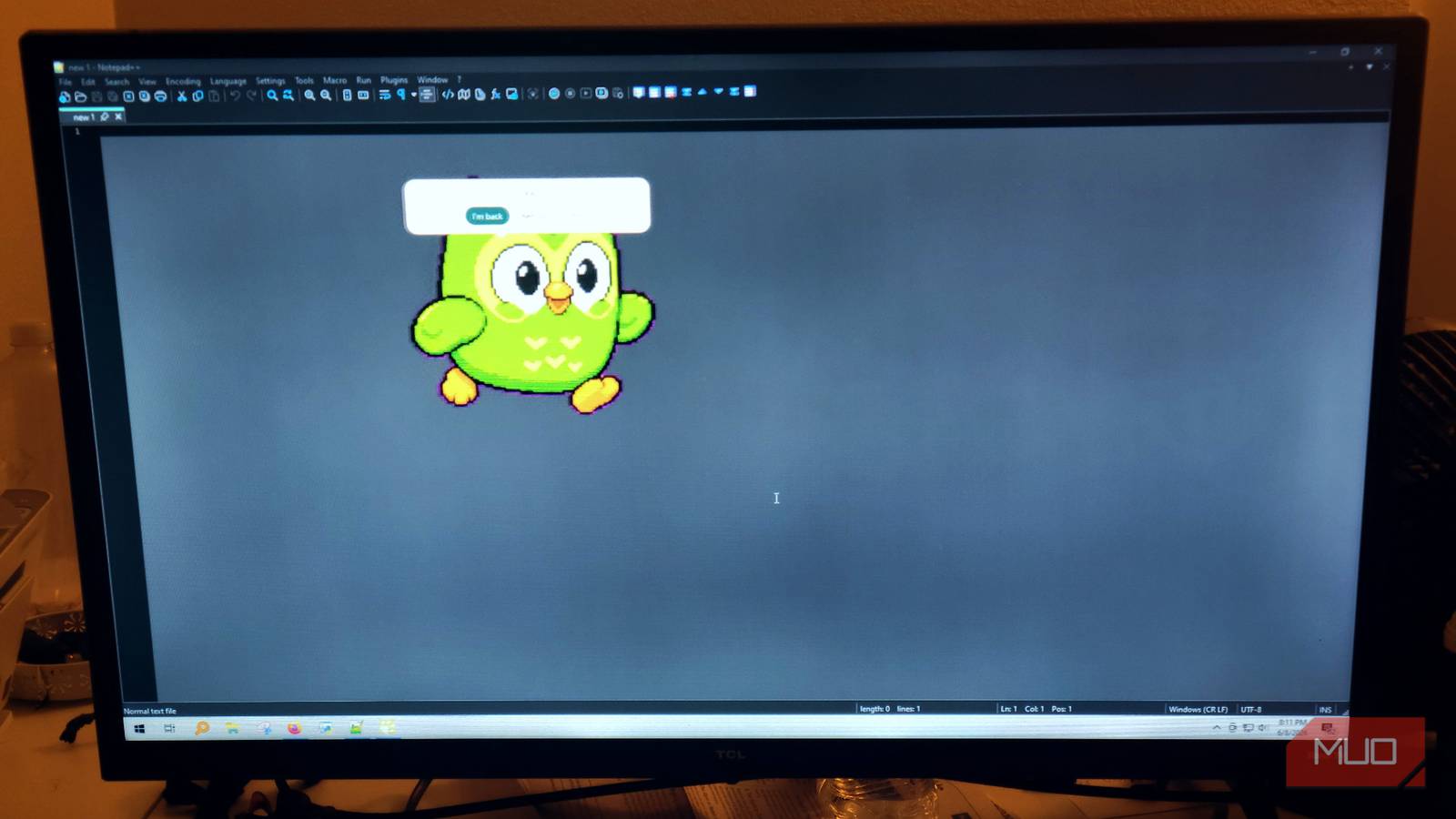

Most tools people use for background company at a desk weren’t designed with actual work in mind. A desktop game sounds harmless until you notice your machine slowing down. It’s common to want a little life at the edge of your screen, but almost everything out there actively competes for your attention. PawPause gives you a pet that’s far more real than a wallpaper, and acts like a true desktop companion.
The 4 Best Virtual Pet Games for Your Mobile
Everyone can own a virtual pet which lives on your mobile. So here are the best virtual pet games for Android and iOS.
Needy management apps aren’t replacing old software
The apps meant to keep you company usually make things worse

Work can get tedious, and having a small outlet for a quick mental break helps. It’s like a mini-break where you don’t lose your train of thought. A lot of people try to fix that by adding a desktop game to play in the background. However, not many of these games are truly built for idle play. Something like Fallout Shelter is a lot of fun, but it needs your attention every ten to thirty seconds.
Bigger games like Fallout Shelter usually use a lot of memory. Under the hood, it runs active 3D rendering and constant CPU polling, which keeps your processor pinned at high performance. That eats into GPU cycles and creates real lag on whatever you’re actually trying to do.
However, many low-end games also require too much attention. The other direction people go is nostalgia. The classic Petz series, for example, offered something genuinely warm and low-key. The problem is getting those old programs to run on a modern OS. Since they were built on legacy frameworks, you end up with broken scaling, compatibility issues, and high resource usage on hardware never designed for them.
They also don’t translate to the best monitors you’d have for work and gaming, since they rely on older software-based rendering. What should have been a nostalgic trip turns into something barely usable. I love Petz, but it’s also really outdated, so if you try to install it now, you’ll feel its age.
That’s where PawPause lands differently. PawPause takes a different path. It’s open-source and avoids those performance issues by using a lightweight, event-driven design rather than a heavy game engine. It puts a small, customizable pixel companion on your screen.
It hands off the visual work to your OS window manager and uses basic hardware acceleration, keeping RAM usage under 50MB. This isn’t some kind of widget, either; it’s a true app.
Peripheral reminders and custom sprite animation
The pet is there to help you
When you’re deep in a writing session or buried in code, it’s easy to lose track of time entirely. Missing meals or forgetting to drink water isn’t a discipline problem; it’s just what hyper-focus does. I know the feeling well. I used to be a correctional officer, did Keto for a year, and still use strict habits to keep myself on track.
Even so, deep focus makes it tough to track time. Traditional alarms try to fix this by deliberately breaking your concentration, which creates the very problem they’re trying to solve.
PawPause works differently. It runs a background countdown that tracks your active work intervals without consuming resources or disrupting your rhythm. When you’ve gone too long without a break, there’s no alarm.
Instead, the pet walks around your screen to let you know it is time to take a break. You won’t have to scramble to find a hidden browser tab just to silence a loud beep.
You don’t have to stick to any default characters, and there is a marketplace that you access from the customization menu. The app monitors your local files for changes, and the moment it detects a new drop or a saved file, it reads the new data and passes it to the renderer in the background.
In addition to timekeeping, PawPause also monitors your processes. If you drift from your text editor to a social media tab, the pet notices the window change and switches to a little focus reminder that points you back to work.
It also reads activity from coding agents and terminal tools such as OpenCode, Codex, DeepSeek TUI, and Hermes, and responds to their actions in real time. The pet celebrates a clean run, flags a failure, and paces when something is sitting there waiting for you.
It acts as a genuine workspace companion, not just a static decoration.
This is not a game
This is a productivity pet

The difference between a game and a productivity pet matters a lot. Idle games are built around a loop designed to pull you back in. Check the timer, collect the resources, increase the number, and wait for the next unlock. Even those marketed as passive eventually train you to glance over every few minutes to see what’s changed. That’s no longer a background activity; it’s actively hurting your work.
The whole premise is that the game rewards your attention, which means it’s competing for the same thing your actual work needs. The problem is that everything built for that slot was designed by someone whose business model depends on you looking at it more, not less. Engagement metrics don’t care whether you finish your report.
Petz understood something most modern software has forgotten. Your pet didn’t send you notifications. It didn’t unlock new zones or punish you for ignoring it for three days. You could walk away, do what you needed to do, and come back to find it napping in the corner where you left it. The pet just existed in the background.
It asked almost nothing from you and gave you something genuinely pleasant to glance at when your brain needed a half-second break between thoughts. That’s a completely different approach from what modern idle games offer.
PawPause is built on that same idea. The pet exists for you, not the other way around. No feeding schedules, no upgrade paths, no daily login bonuses. It sits at the edge of your screen, does its small animations, and only nudges you when you’ve already been at your desk too long.
The goal was never to make something you play, but to have something that works alongside you, quietly, without ever becoming the thing you’re managing instead of your actual work.
That’s what a productivity pet is. Not a game wearing a cute skin. Something that knows its place.
PawPause may be your next favorite pet
PawPause won’t appeal to everyone. If you’ve never lost two hours without noticing or struggled to step away from something mid-flow, a desktop pet probably sounds more like clutter than a tool. For anyone who already knows what time blindness feels like in practice, the peripheral nudge system is a real improvement over a loud alarm that yanks you out of a thought you haven’t finished yet. It’s open-source, it stays under 50MB, and it stays private, which is a combination that’s harder to find than it should be.

- OS
-
PC, Mac, Linux
- Supported Browsers
-
PC, Mac, Linux
PetPause puts a pet on your screen that sits there and tells you when to take breaks and hydrate, and you can switch it out with many well-known characters.
