


When you buy a smartphone, you should own it. It’s a basic principle, but one that phone brands and cellular carriers rarely follow in practice. Buy an Android phone, and it’s usually loaded with pre-installed Google apps by default. Pick up a model from another Android brand, like Samsung or Motorola, and you’ll have your manufacturer’s default apps pre-installed alongside the Google apps. Use a carrier-locked Android phone from AT&T, T-Mobile, or Verizon, and bloatware is coming your way from every direction.
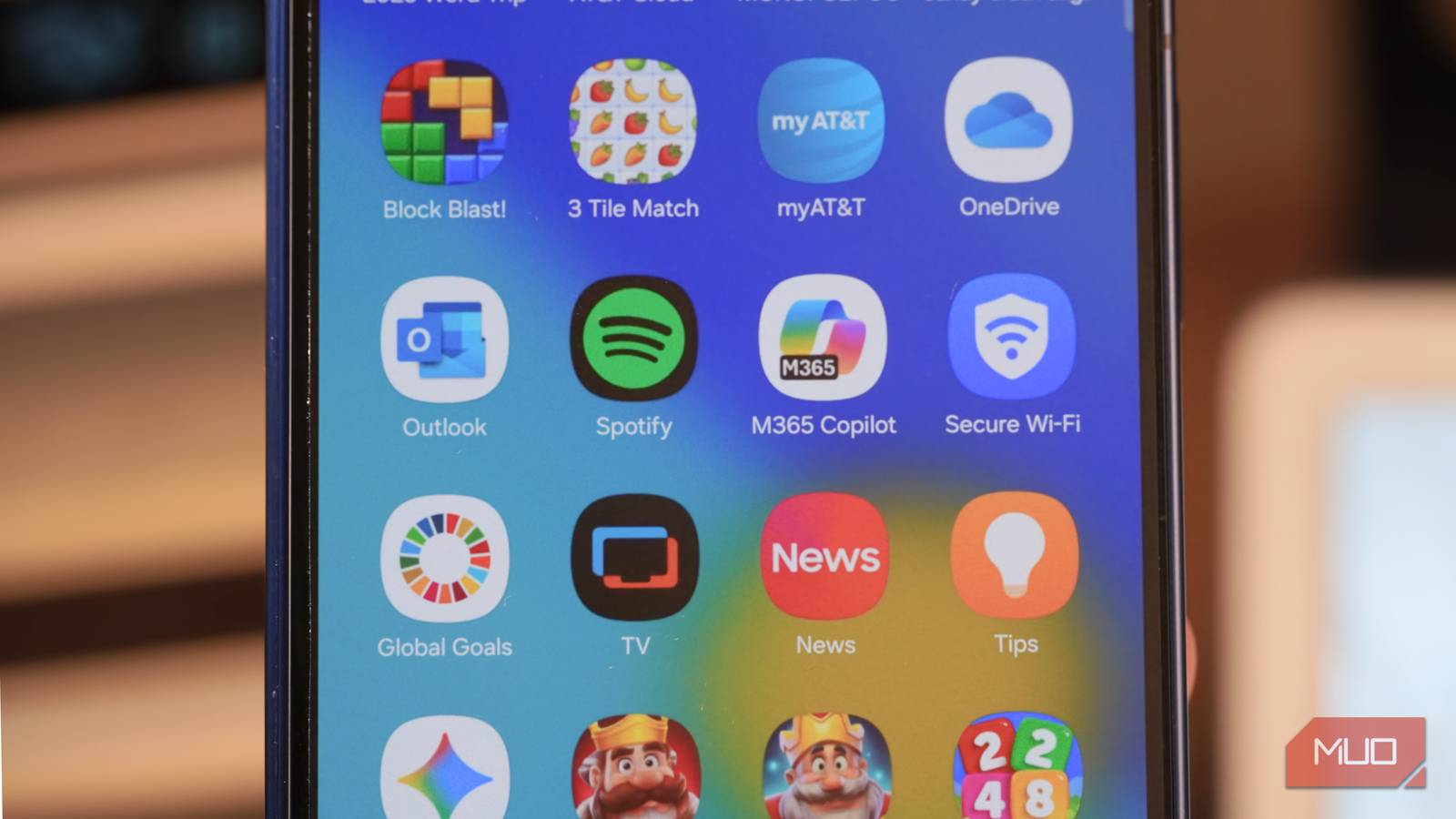
Carrier bloatware is eating your phone’s limited storage space, and I have the numbers to back it up. I tested a Galaxy Z Fold 7 review unit from AT&T, and it had more pre-installed junk apps than I imagined. I cleaned up over 5GB of app storage by removing apps and games that came with my carrier-locked phone, and that isn’t counting a single Google or Samsung app. In the process, I found a surefire way to spot bloatware apps once and for all.
I cut 3.7GB of pre-installed mobile games
I couldn’t believe how many mobile games AT&T put on my phone

I don’t play traditional mobile games — too many of them are designed to be attention traps, and the popular ones are pay-to-play. So, imagine my surprise when some of the most problematic mobile games showed up on my Galaxy Z Fold 7 test device without my permission. Surprisingly, AT&T apps weren’t the bloatware apps consuming the most storage. That title belonged to mobile games installed by my carrier, and by extension, Samsung.
I rounded up all the unwanted mobile games on my carrier-locked Galaxy Z Fold 7, and couldn’t believe how many I found:
- 3 Tile Match: 451MB
- 2025 Word Trip: 354MB
- 2025 CrossWord Jam: 348MB
- Block Blast!: 336MB
- Royal Kingdom: 333MB
- Vita Mahjong: 325MB
- Royal Match: 322MB
- 2248 Two Square: 287MB
- Monopoly GO: 263MB
- Woodoku: 259MB
- Solitaire: 214MB
- Candy Crush Saga: 192MB
The combined total of 3.7GB of storage taken up by these pre-installed games might not seem like a lot, until you look at it in context. The largest game, 3 Tile Match, is the 19th largest app on my phone — and that list includes system apps, background AI models, and music apps. It’s nothing to scoff at, and it’s storage that could be better used some other way.
There’s an easy way to find the bloatware apps on your smartphone. Go to Settings → Apps on your Android phone, and sort by size. Scroll down the list, and look for odd apps taking up a lot of storage you don’t remember installing. If you’re suspicious of an app, tap it to view where it came from. Apps installed from the Google Play Store were probably installed by you, but those downloaded from AppCloud are bloatware installed without your permission.
AppCloud is a system-level app that comes with many Android phones, including devices from Samsung and Motorola. Its sole purpose is to suggest and install third-party apps (bloatware) on your device, and you can’t easily remove it. You can disable it by navigating through Settings → Apps → AppCloud → Disable, but it has a tendency to reappear or enable itself after software updates. This is where all the junk mobile games on my AT&T phone came from, and seeing AppCloud as the installation source proved they were bloat.
I removed 1.7GB of pre-installed apps
Copilot, Facebook, and Yelp? Thanks, but no thanks

Not every bloatware app is installed using services like AppCloud, though. Some are installed through the Google Play Store, usually before you finish setting up your new device. Microsoft and Meta apps are notorious for being installed as bloatware apps on carrier-locked phones. For instance, I found Facebook installed on the Galaxy Z Fold 7 from AT&T, and it’s the one Meta platform I never use. Sure enough, I checked the installation source, and found Facebook was installed using the Meta App Installer. It’s like AppCloud, but just for Meta apps.
Here’s everything else I found on my locked AT&T device, for a grand total of 1.7GB storage:
- Microsoft Copilot: 456MB
- Microsoft Outlook: 353MB
- Facebook: 337MB
- LinkedIn: 176MB
- OneDrive: 176MB
- Yelp: 96MB
- NewsBreak: 68MB
There may have been more, as I only rounded up apps I could be sure were bloatware. While games entirely came from AppCloud, bloatware apps arrived from multiple sources. Yelp came from the Google Play Store, NewsBreak came from AppCloud, and Facebook came from the Meta App Installer. You might notice these apps download themselves on your device over time using AppCloud or during the software update process.
Microsoft apps — Copilot, Outlook, LinkedIn, and OneDrive — consumed a gigabyte of storage on their own, which is impressive (and not in a good way). Ridding my phone of these software apps saved me nearly 2GB of storage.
I got rid of 489MB of official AT&T apps
Why does my phone need a handful of carrier apps?
Official AT&T apps didn’t take up as much storage space as I expected. They consumed about half a gigabyte, but the number of pre-installed apps I found on my phone felt excessive. I found the following four apps pre-installed on my Galaxy Z Fold 7, and the only one that might be remotely useful is myAT&T:
- myAT&T: 221MB
- ActiveArmor: 126MB
- AT&T Cloud: 72MB
- Device Help: 55MB
These apps came from the Google Play Store, and even if you don’t have AT&T as your carrier, it’s likely that your locked phone includes similar apps. Still, these four apps weren’t that annoying to discover — it was everything else AT&T installed that had nothing to do with my wireless service.
How cellular carriers fill your phone with bloatware
Whether you use AT&T, T-Mobile, Verizon, or a mobile virtual network operator (MVNO), your carrier can install apps on locked devices you purchase from it. Carriers do this in a variety of ways, like using the Google Play Store or services such as AppCloud or Meta App Installer. Worst of all, they prevent you from uninstalling certain bloatware apps without using third-party tools, and can re-install apps using software updates. Still, removing and disabling every bloatware app you can will free up gigabytes of precious storage on your Android phone.
