

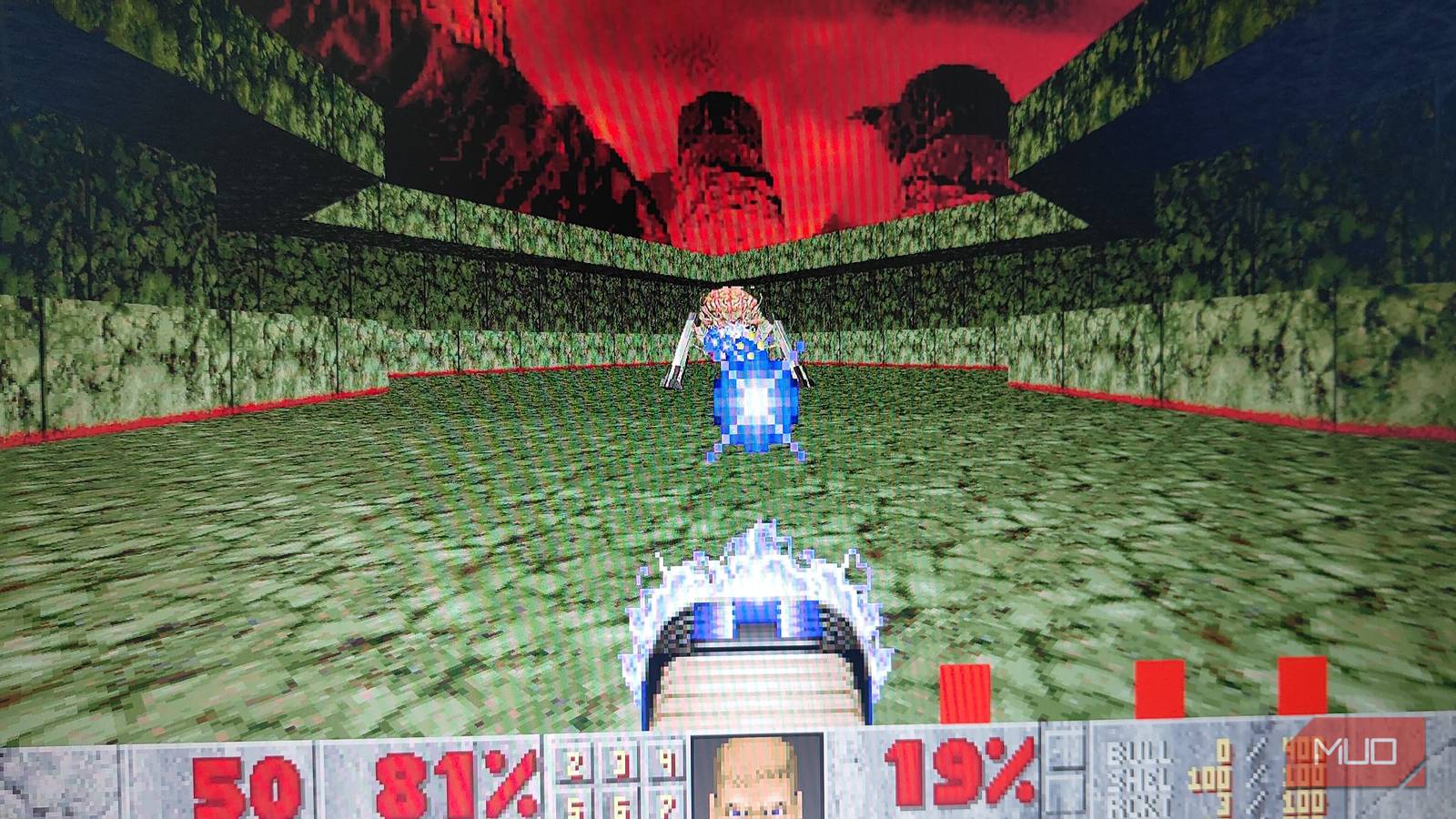

Regardless of how you might feel about DLSS 5’s implementation, it’s still an incredibly impressive piece of tech. Back in 2018, the very first iteration of DLSS felt like black magic, owing to the performance uplift it offered with minimal visual compromise. And much like that, DLSS 5 feels like a technology far ahead of its time. While there are certainly issues with its implementation in modern games, it can be a great asset for creating and preserving games.
Surprisingly enough, we already have proof that DLSS 5 can work as an alternative to “remasters.” Games like DOOM (1993) can already be played with DLSS 5, overhauling the visuals like a fully-fledged remaster.
While DLSS 5 hasn’t been officially released yet, you can already use it to remaster old MS-DOS games, thanks to the DLSS Swapper mod.
How to get DLSS 5 working in DOOM?
All you need is the DLSS Swapper and Linux DOOM.
The idea of using DLSS 5 for MS-DOS games comes courtesy of a YouTube video by Nikolai Zhivotenko. The video essentially shows how DLSS 5 can be used in games as old as the original DOOM. Now, the port of the game Nikolai used is the x64 port of the Linux version of the game, DOOM v1.01. As such, it retains most of the “quirks” of the original MS-DOS release of the title, albeit with some minor changes.
Nikolai also has a GitHub page (niko-zvt) where he has shared the source and files of his DOOM DLSS 5 experiment. Now, after watching the video, I tried using the Steam version of DOOM and DOOM 64 with DLSS Swapper. I used the same injection method as my previous experiment with Cyberpunk 2077, Red Dead Redemption 2, and Onimusha.
However, DLSS 5 didn’t work on either of the games. I did a fresh reinstallation of the DLSS Swapper to see if that made any difference, but to no avail. As such, it seems that to get DLSS 5 working, you need to use Nikolai’s custom Linux version of the game.
Thankfully, getting the Linux version running on Windows is very easy.
Once you download both DLSS Swapper and the files from Nikolai’s project, you just need to follow these steps to run the game:
- First, put an IWAD into the wad folder of the DOOM DLSS 5 mod.
-
Inside the folder, run the PowerShell command:
- \build.cmd
- \play-windoom.cmd
- Alternatively, you can run Terminal (cmd.exe) with the build.cmd command.
-
If you want to play DOOM with DLSS 5 enabled, input the following commands in PowerShell:
- \build.cmd
- \play-windoom.cmd –ngx-dlss5
From my testing, DOOM is relatively unchanged with the DLSS 5 injection. I expected the mod to affect the game’s lighting, like the other games I’ve tested in the past. However, it seems to affect only some HUD elements and textures.
Will I call this version of the game a “remaster?” Probably not. Even though the game looks significantly sharper than vanilla Linux DOOM, it still feels like an old game, for better or worse. Aside from the slight change in Doomguy’s hair color (in the HUD), there are no major visual changes.
However, DLSS 5 did introduce a few unexpected issues.
Can DLSS 5 truly remaster old MS-DOS games?
Yes, it can, with one major caveat: performance.
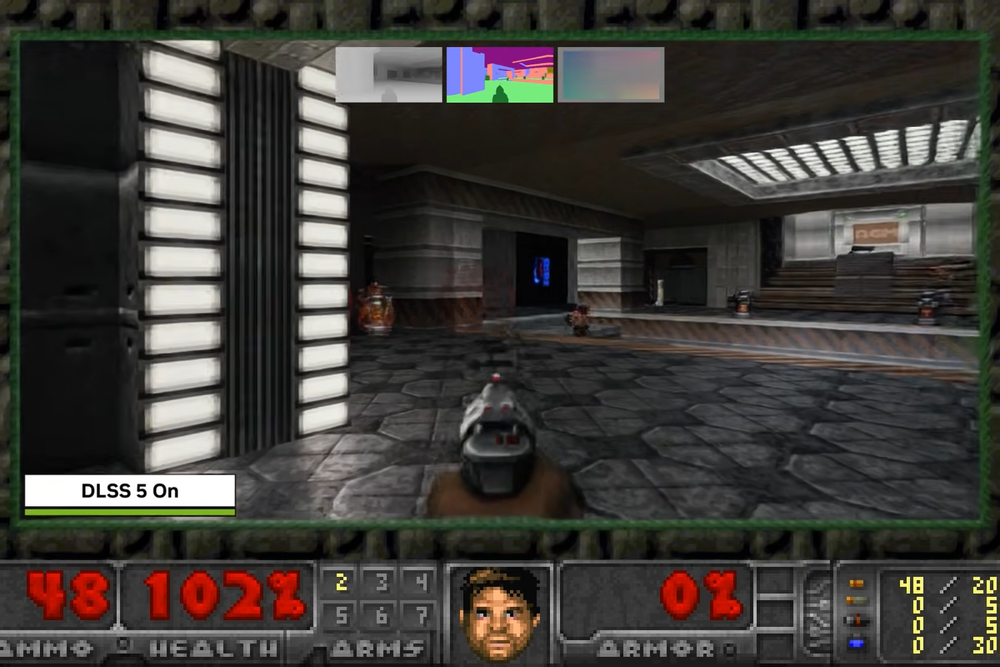
While testing the DOOM DLSS 5 mod, I found a few really intriguing issues within the game. First, the DLSS 5 mod seems to introduce temporal instability in the game’s visuals, likely a byproduct of the premature neural rendering tech. This essentially means that the game looks incredibly blurry in motion. While the mod does bump up texture and mesh quality, it falls apart once you actually start playing.
This looks especially jarring when you’re surrounded by multiple enemies, which in the case of DOOM, happens quite a lot. Another issue that I found with the mod was related to the game’s performance.
It’s no secret that DLSS 5 has a massive impact on CPU and GPU performance. Now, DOOM isn’t particularly taxing on modern hardware. I mean, some people got the game running on a pregnancy test kit. However, with DLSS 5 neural rendering enabled, it did take a substantial toll on my CPU. As a result, the game’s performance felt very inconsistent.
Maybe the world isn’t ready for DLSS 5, just yet
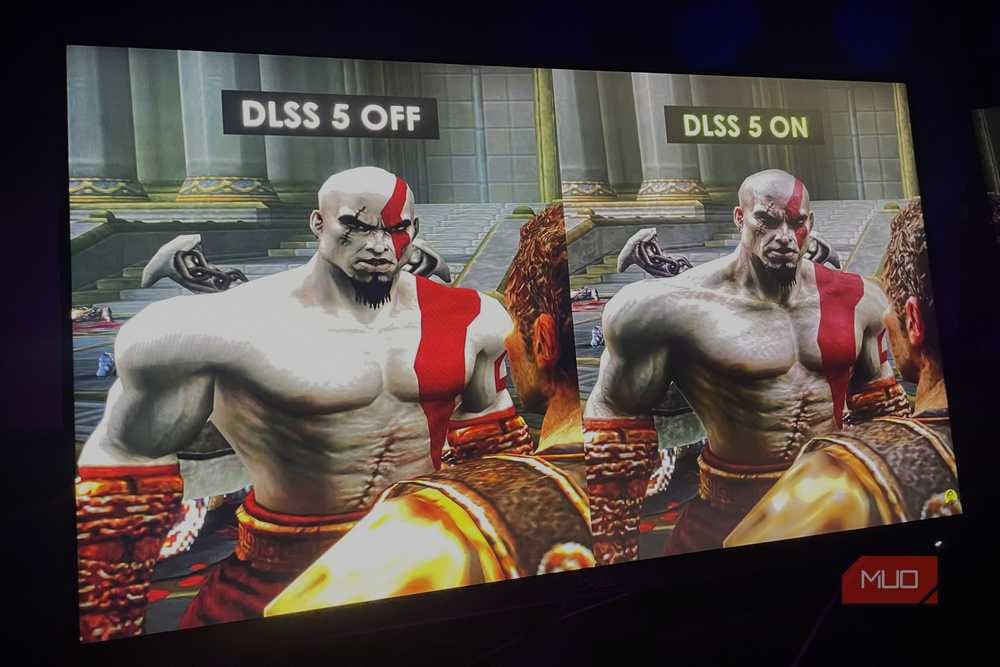
DLSS 5 is an impressive tech and, if used right, can be an invaluable asset for preserving old PC games. However, after seeing how DLSS 5 held up in DOOM and other more modern titles, I still feel it’s far from becoming the “remastering” solution for games. At present, DLSS 5 feels like a decent attempt at bringing Nvidia’s RTX Remix tech to the mainstream.
Ever since its announcement, I’ve always been very curious to see the real-world implementation of RTX Remix. And with DLSS 5, I think we’re finally getting close to that.
I will be keeping an eye on the development of DLSS 5 and its official release. Hopefully, by the time it officially releases, Nvidia will iron out most of the issues I faced while testing out the tech using DLSS Swapper.
I do think that DLSS 5 could work quite well as a remastering tool for old PC games. Just not yet. That said, all my testing has been on what is essentially an unofficial mod that attempts to emulate DLSS 5. It’s also running on hardware that, by Nvidia’s specifications, isn’t meant to run DLSS 5 yet.
As such, I won’t be judging the tech based solely on these “experimental” mods. With proper developer support, I can see DLSS 5 making a real breakthrough in real-time graphics and rendering.
Hopefully, we won’t have to wait too long to see the “official” DLSS 5 in all its glory.
