


My colleagues swear by productivity mice, like Logitech’s MX Master 4, while Mac users tend to go for Apple’s baffling Magic Mouse. However, I usually prefer gaming models because of their high performance and in-depth customization options.
Until now, I’d never considered ergonomic vertical mice because I didn’t feel wrist pain or fatigue after hours of play — I just didn’t see the point. That’s probably why I thought they were a bit gimmicky and trying to create a problem to solve.
I still love testing new electronics and decided to try a vertical mouse to see if it could live up to the hype or even make a difference in the way I work. I had nothing to lose, and the worst-case scenario would be reverting back to my trusty Razer or Logitech mice that had won me countless battles.
After checking out options online, I settled on the Logitech Lift Vertical Mouse — I trust the company, and it doesn’t cost much. Logitech includes a simple measuring system on its sales page, and the Lift Vertical seemed like the best option for my medium-sized hands. I tried this ergonomic vertical mouse for work and gaming for the last two weeks, and here’s how it went.

- Weight
-
4.4 ounces
- Dimensions
-
4.3 x 2.7 x 0.1 inches
- Battery
-
1 Lithium Polymer batteries required (included)
- Connectivity
-
Bluetooth
The Logitech Lift is an ergonomic vertical mouse designed to reduce wrist pain and fatigue and provide a soothing experience.
My initial reservations about using a vertical mouse
If it ain’t broke, don’t fix it
I’m one of those people who believe in “if it isn’t broken, don’t try to fix it,” and I thought there must be a reason most mice favor a flat design. A flatter design has a lower center of gravity and should be more comfortable because my hand can rest on it and move it side to side with minimal effort. I questioned the vertical design choice because it looks like it requires a firmer grip and more effort to move, given its taller stance.
Another reservation was that these types of mice are marketed to people looking to reduce wrist fatigue, which I didn’t have.
I usually spend hours a day at my desk typing articles and playing fast-paced online shooters, and have never had issues with my mouse. If anything, using my mouse is way more comfortable and easier on my body than typing out thousands of words a day with my fingers.
Logitech Lift Vertical mouse initial setup
Simple and intuitive
The initial setup was pretty standard. However, I couldn’t find the wireless dongle after opening the box. After reading the manual, I discovered it was stowed away in the battery compartment for safekeeping. As someone who’s lost countless dongles on the road, I appreciate this feature, and the fact that the Lift Vertical takes a single AA battery rated to last for up to 24 months with regular use.
My laptop detected the mouse instantly after plugging in the dongle and turning on the mouse. The Lift can work via Bluetooth without the dongle, but I prefer the faster, lag-free connection. Downloading the Logi Options+ app was the next step in the setup.
It also detected the mouse instantly then provided information about the Lift’s Vertical’s capabilities with various setup options. The graphical representation of the mouse displayed the left and right click buttons, back and forward buttons on the side, the scroll wheel, and the pointer speed button with options to map them to certain functions in popular apps.
The Lift Vertical offers a 400 to 4,000 DPI range, which should be ideal for most tasks.
For example, I could map the side buttons to redo or undo in Excel, or start/stop video, and mute/unmute in Teams. I can also add other applications from a dropdown menu in the Logi Options+ app. The Point and Scroll menu provides options to invert the scrolling and adjust the pointer speed. The Lift can connect to up to three devices, but I only attached it to my primary laptop.
The Lift Vertical offers a 400 to 4,000 DPI range, which should be ideal for most tasks. I have a multi-display setup, so I set the primary pointer speed to 70% and the secondary to 50%. I can then easily switch between them with the central adjustment button, depending on what I’m doing.
My fears that I’d need to put in more effort than with a regular mouse were unfounded.
Logi Options+ offers gesture controls for certain tasks, like accessing the Start Menu, but I didn’t want to get that deep into the configuration without testing the mouse’s basic functionality first.
Using the Logitech Lift for the first time
A piece of cake
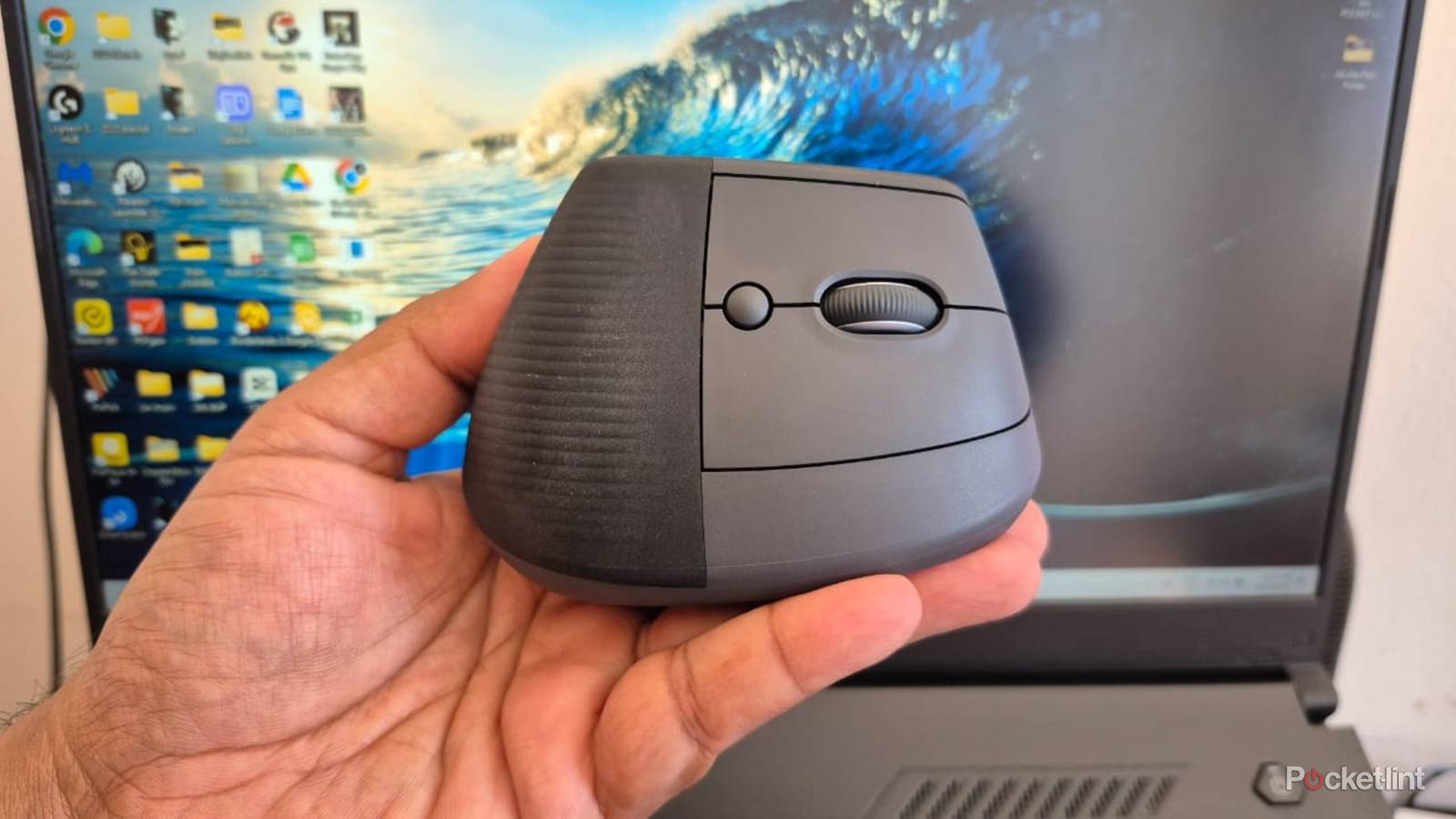
I was expecting a steep learning curve and some discomfort when trying the Lift vertical mouse for the first time. It proved me wrong by fitting my hand perfectly and gliding smoothly across my desk with minimal effort. I think this is partly due to the 57-degree slant, which lets my hand rest comfortably on the mouse’s surface rather than being completely upright. I also appreciated the ribbed black rubber piece at the back, which provides a secure grip for my palm and contrasts nicely with the grey body.
Finding the perfect grip took a few minutes because of the mouse’s unique size and shape. My preferred palm grip was out of the question because the Lift is short, and my fingertips extended well past the buttons. I settled on a comfortable claw grip with my fingertips resting on the left and right clicks, and my thumb on the practical indent between the two side buttons.
The Lift’s silent buttons are a welcome change, which I now prefer because of their subtlety.
All my other mice have audible clicks on each press, and the Lift’s silent buttons are a welcome change. In fact, I actually now prefer their subtlety. Between the left and right clicks is a ridged scroll wheel with decent grip and a clicky feel for precise navigation. The side buttons are smaller than on most regular mice, but they are more pronounced and make a loud tactile sound with each press.
I was surprised by how the Lift felt like home on my first use, and I could navigate across multiple screens and click tiny icons with minimal wrist movement. My fears that I’d need to put in more effort than with a regular mouse were unfounded, and the Lift performed flawlessly for browsing the internet and using apps like Google Docs, Pixlr, and my custom work CMS.
Is the Logitech Lift good for gaming?
It depends on the game

I know the Lift isn’t designed for gaming, but I play online shooters daily and decided to try it out anyway. My first issue was that the Logi Options+ app only allows two mouse speeds and doesn’t support unique profiles for each game. This meant I needed to manually adjust the DPI settings for each game I played. However, it wasn’t a big deal, and I got the mouse speed right after some trial and error.
I warmed up with simple point-and-click games, like Crusader Kings III and Peaky Blinders: Mastermind. These types of games aren’t demanding, and playing with the Lift was a cinch thanks to its smooth movement and precise clicks.
I know the Lift isn’t designed for gaming, but I play online shooters daily and decided to try it out anyway.
Next up were the single-player shooters, Borderlands 2 and Robocop: Rogue City. The Lift passed with flying colors in Borderlands 2, and I had no issue targeting enemies in chaotic battles or making long-distance shots with sniper rifles. I had a great time playing Robocop: Rogue City, and the Lift performed flawlessly in the streets of Detroit.
By this time, I was confident in the Lift’s abilities and moved on to Apex Legends to see how it could perform in a more demanding environment. This is where I first started experiencing issues. The mouse would stutter and feel jittery in intense battles and seemed unable to keep up with the game’s speed. After doing some research, I discovered that it’s probably because of the low 125Hz polling rate, which doesn’t come close to the 1,000Hz minimum on most modern gaming mice.
At the end of the day, this mouse isn’t for gaming, and I just wanted to test its limitations. I think it performed well considering the circumstances, but it won’t match a purpose-built model.
Is the Logitech Lift a good daily driver?
An eye-opening experience

As I mentioned earlier, I’d never experienced mouse-related wrist pain and was initially skeptical about trying an ergonomic mouse. After using the Lift for two weeks, I’ll admit I was wrong. It just feels right and offers a more natural, comfortable position for my hand than regular mice.
I think the Logitech Lift is amazing for daily use and feels more like an extension of my hand than a tool I’m holding onto.
At this point, I’ve been using it extensively for at least eight hours a day for various tasks, and my old mice feel weird when I go back to them. I think the Logitech Lift is fantastic for daily use and feels more like an extension of my hand than a tool I’m holding onto, which is why it’s become my go-to productivity mouse. The only downside is that I still need to use my old mice for online shooters, and I wish Logitech would come out with a gaming model — like Razer’s Pro Click V2 Vertical Edition — to meet my needs.
