

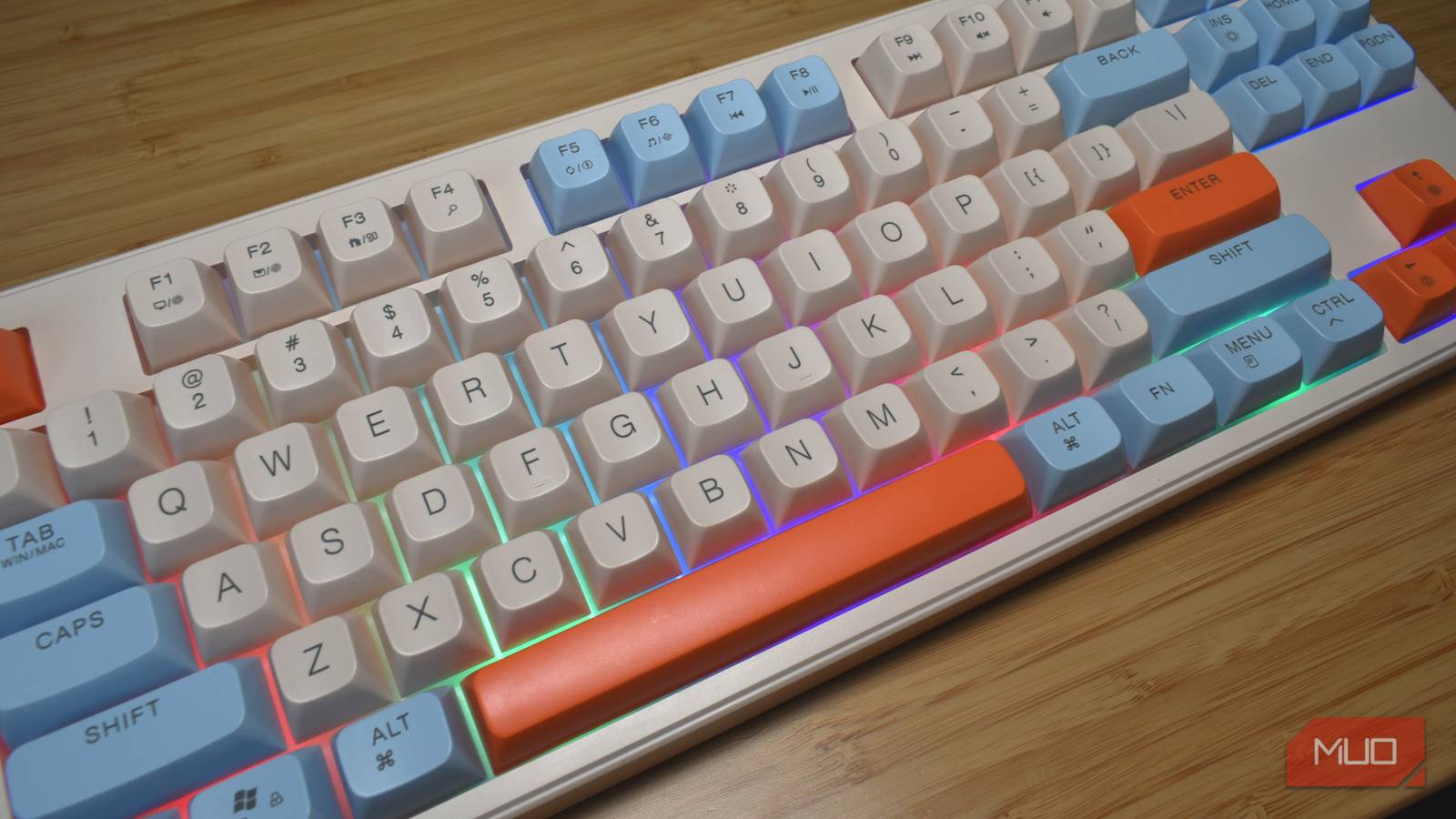

Across the course of 2025, I used ten different mechanical keyboards, from brands like Keychron, ASUS, SteelSeries, Razer, and so on. These keyboards typically retail for hundreds of dollars, with one, the ASUS ROG Falcata, appearing in MakeUseOf’s best of 2025 list.
But not everyone can or wants to spend a few hundred bucks on a mechanical keyboard. So, what about an ultra-cheap “mechanical feeling” gaming keyboard that’s 90 percent cheaper than most other options?
I’m not a huge mechanical keyboard snob, and I don’t spend hours obsessing about which switches have the best sound. I’m here to type and edit, and so long as I can do that, I’m happy. But even I had serious concerns about switching from a high-end mechanical to “mechanical feeling.”
It turns out I’d wandered down a path of misleading Amazon pages, potential fake products, and an altogether odd experience.
Enter the FreeWolf M87
But what are you actually buying here?
As said, I’ve been using an ASUS ROG Falcata. It’s a fairly unique ergonomically designed 75% split keyboard. By which I mean, the keyboard literally splits in half and lets you position both halves where you want. It has high-end customizable magnetic Hall effect switches, which are a dream for typing on. It also costs more than $400.
I’ve switched to the FreeWolf M87 “mechanical feeling” wireless gaming keyboard, described as having “creamy blue” switches (which it doesn’t) and actually features in the mechanical keyboard category on Amazon (which it isn’t).
In fact, the whole Amazon listing for the FreeWolf M87 is full of confusing language designed to trick you into thinking you’re picking up an ultra-cheap mechanical keyboard. It starts with the title, with the aforementioned “creamy blue” label, which refers to the switch type. In this case, “creamy blue” refers to a switch with a very smooth travel yet tactile actuation, with the name likely meant to play on Akko’s V5 Creamy Blue tactile switches (more on the typing experience in a moment).
Then there is the rest of the Amazon listing information and the product description, which repeatedly says “mechanical” alongside categories like Keyboard Description, Switch Type, Mechanical Keyboard Switch Model, and so on. It doesn’t mention that it’s actually a membrane keyboard until halfway down the page, and on US Amazon, it doesn’t appear to mention it at all.
And here’s the other problem: whoever is selling these keyboards is relying on general confusion between the brands Attack Shark and FreeWolf, with overlapping product names, specs, and images, selling the same products. The Attack Shark M87 is a proper mechanical keyboard apparently designed by the same company, but you’ll find heaps of listings on Amazon, eBay, and similar, naming it as both companies, with similar product listings.
It has some other quirks, too. For example, the FreeWolf M87 ships with a handy USB-C cable in the box, which I assumed is for a wired mode. But it’s just for charging the keyboard to use its 2.4GHz or Bluetooth modes. Now, having a 2.4GHz mode with a USB-A wireless dongle is great and there is effectively zero delay on your inputs… but why not include a wired mode? Elsewhere, the keyboard also times out and switches itself into a sleep mode rapidly once you stop typing. The very limited guide says it takes ten minutes, but I’d say it’s closer to two minutes. In fairness, it does respond quickly once you start typing, but the first input is always used to wake the keyboard rather than start typing.
Ranting over: how does it type, and how does it sound?
It’s all about the words per minute

For all of what’s written above, I actually quite like the typing experience on this keyboard. You’ll never get the full feeling of an actual mechanical keyboard with proper blue switches, but it’s not bad enough to be unusable. There is some resistance, and while the PBT keycaps are pretty cheap, they’re comfortable for typing.
In terms of outright typing speed, I hit roughly my average typing speed of 90 WPM at 96% accuracy, which is certainly absolutely fine. Then, in terms of gaming, you won’t find fancy features like multi-point actuation and customizable actuation pressure (remember, it’s a membrane board masquerading as a mechanical anyway), but it feels fine in most games I tried.
I’d actually liken the feeling of this keyboard to a decent-ish laptop keyboard. As most laptops use membrane keyboards to reduce weight and keep designs slim, it’s understandable that the FreeWolf M87 shares similar characteristics. However, anyone who regularly uses a laptop keyboard knows that, in time, it can become tiring, with some typing fatigue expected.
That’s actually one of the biggest benefits of using a proper mechanical keyboard. The switch mechanics deliver more resistance and, as such, prevent fatigue from creeping in, unlike the mushier feel of a membrane keyboard.
The FreeWolf M87 typing sound won’t appeal to mechanical keyboard purists. There is delicate balance between “creamy” and “mushy” and the FreeWolf’s membrane-based mechanism and fake switches definitely errs towards the latter. That said, as you can hear from the typing example above, it’s not completely terrible. You’re very unlikely to irritate a colleague or the local coworking space with this “mechanical feeling” keyboard because it lacks the thudding, crunching clacks of a real mechanical keyboard.
How cheap can you go?
Mechanical keyboards can be really expensive
I picked up the FreeWolf M87 for around $15 on AliExpress, on an introductory deal. Apparently, this is regularly priced at more than 45 bucks, which I find really quite bemusing. A quick glance at Amazon reveals what appears to be the actual Attack Shark M87 Pro mechanical keyboard for $48, which has a rating of 4.8 at the time of writing and would be a darn-sight better than this.
So, it boils down to expectation. I’d advise someone to pay a little more and get actual switches rather than this “mechanical feeling” experience, which is just a misleading, glorified membrane keyboard.
But this keyboard has its uses. It’s cheap, which could make it ideal for kids to learn typing without worrying about it breaking. It’s also lightweight, which could be handy for traveling to replace your laptop keyboard, or you prefer a larger keyboard without the heft of a proper mechanical.
But if your keyboard isn’t leaving your desk and you want a better typing and gaming experience, just spend the extra cash to get a proper mechanical keyboard. Your fingers will thank you, and it’ll last a whole lot longer than the cheaper alternative.

- Form factor
-
80%
- Backlight
-
Yes
- Construction
-
Plastic
- Keycaps
-
PBT
- Battery capacity
-
4,000mAh
- Connectivity
-
2.4GHz, Bluetooth
The FreeWolf M87 is a “mechanical feeling” membrane-based keyboard with decent RGB lighting, 2.4GHz wireless and Bluetooth connectivity, and a lightweight build.
