


Cheap mini PCs have taken off as affordable Windows 11 alternatives to bulky desktops and budget laptops, with many offering comparative performance in a more compact and affordable package. They are far smaller than conventional desktops and can usually fit under a monitor or attached to the back via a VESA mount. For less money, you get more ports and performance to rival many laptops.
I recently tested Geekom’s A5 Mini PC and was impressed by how much it fitted in a tiny package. That’s why I was thrilled to receive the updated A5 Pro, which promised similar performance and practicality in an even smaller size. The A5 Pro literally fits in my palm, and I was eager to see if it could replace my laptop for work and play.


4.5/5
- Brand
-
Geekom
- CPU
-
AMD Ryzen 5 7430U(6C/12T
- Graphics
-
AMD Radeon Vega 7 Graphics
- Memory
-
16GB DDR4
The Geekom A5 Pro is a versatile mini PC with adequate power for most tasks and a wide range of ports.
- Adequate power for most tasks
- Sturdy aluminum housing
- Three-year warranty
- Plastic rear panel
- Limited gaming capabilities
Price, availability, and specs
As small as it gets
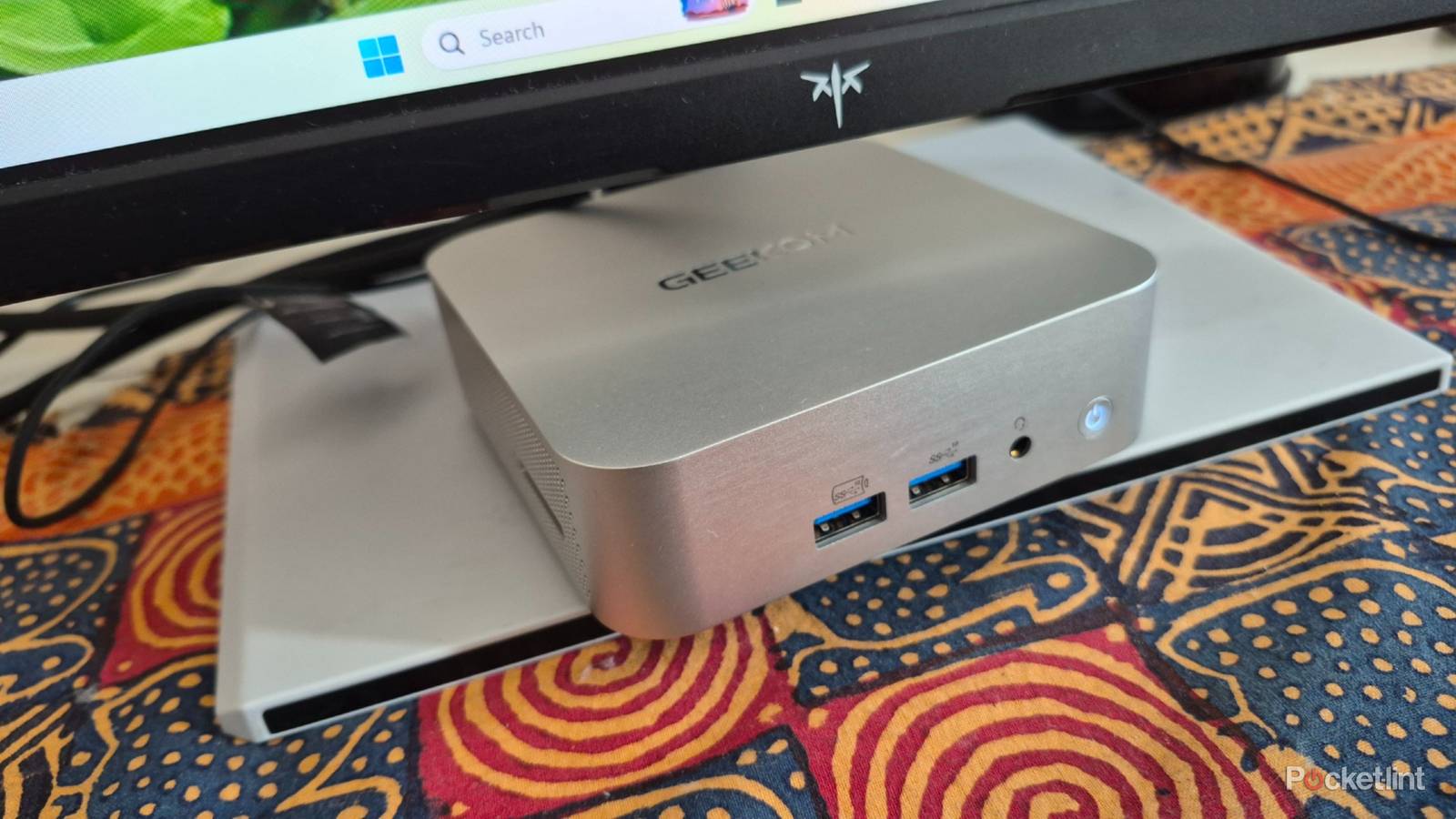
The Geekom A5 Pro’s silky aluminum housing with rounded edges mimics the classy appearance of the Mac Mini and increases its durability. The unit measures just 4.43 x 4.43 x 1.46 inches, and tips the scales at around 1.43 lbs. Everything’s logically laid out, and you get the power button, 3.5mm audio jack and a pair of USB-A 3.2 Gen 2s on the front. The left side houses an SD card reader, while the right has ample venting to suck air in for the cooling fan. On the back, you get a comprehensive port selection, including a pair of HDMI 2.0 ports, two USB-C 3.2 Gen 2s, a USB-A 2.0, a USB-A 3.2 Gen 2, and a 2.5G LAN port.
Processing power is courtesy of AMD’s 6-core, 12-thread Ryzen 5 7430U CPU, which provides mid-range power and decent efficiency. It’s paired with a capable 16GB of DDR4 RAM and a 512GB PCIe 4.0 SSD. The RAM and SSD could be faster, but they get the job done and are inline with the A5 Pro’s competitive pricing. The integrated Radeon Vega 7 Graphics includes 7 compute units that can operate at up to 1,800 Mhz, making it ideal for light gaming, which I’ll get to later. Everything is cooled by an internal cooling fan and copper heat pipes, which somehow fit into the diminutive case.
This mini-PC offers decent upgradability and is easy to disassemble via four screws at the bottom of the case.
This mini-PC offers decent upgradability and is easy to disassemble via four screws at the bottom of the case. A pair of dual-channel RAM slots support up to 64GB of memory. The M.2 2280 PCle Gen3 x4 supports up to 2TB of storage, while the M.2 2242 SATA II SSD supports another 1TB. Included in the box is the power adapter, manual, HDMI cable, VESA mounting screws, and a thank-you note from Geekom for buying its product.
The Geekom A5 Pro has a three-year warranty and is available from the official Geekom site and Amazon for $450.
- Brand
-
Geekom
- CPU
-
AMD Ryzen 5 7430U(6C/12T
- Graphics
-
AMD Radeon Vega 7 Graphics
- Memory
-
16GB DDR4
- Storage
-
512GB
- Ports
-
4 x USB-A, 2 x USB-C, 2 x HDMI 2.0
- Operating System
-
Windows 11
- Dimension
-
4.43 x 4.43 x 1.46 inches
- Weight
-
1.43 lbs
What I liked about the Geekom A5 Pro mini PC
A jack of many trades
The Geekom A5 Pro was easy to set up and involved adding and syncing my Microsoft and Google accounts. After that, I downloaded Microsoft 365 and the other software I use daily, and I was good to go. Right off the bat, I was impressed with the A5 Pro’s performance, and it handled my workload without breaking a sweat. I ran multiple Google Chrome tabs, Word, Excel, and other apps, like CapCut, Canva, and Audacity simultaneously and everything worked smoothly.
I’m a gamer at heart and won’t buy a PC if it can’t play at least a few of my favorite titles. I paired the Geekom A5 Pro with my 27-inch gaming monitor and tried Titanfall 2. I was impressed that the game worked at all and got around 50 fps on high settings, which I didn’t think was bad at all. Next up was Soul Calibur VI. This game hovered at around 25 fps on high settings and eventually settled to 60 fps when I reduced the graphics quality to low. Valorant wasn’t bad either and consistently ran at between 60 and 70 fps on medium settings. Farcry 3 is one of my old favorites, and I was disappointed that it could only manage around 11 fps and wasn’t playable.
I’m usually disappointed with the lack of ports on modern laptops and the abundant connectivity options on the A5 Pro was a breath of fresh air. I plugged in my mouse, controller and wireless headset dongles, portable monitor via USB-C, and main monitor via HDMI, and still had ports left over for other devices. This made life more convenient because I could leave all my devices plugged in without a USB hub.
The Geekom A5 Pro offered the same outstanding versatility as my previously-reviewed A5. It worked flawlessly as a desktop workstation, then became a media PC when I plugged it into my TV with a wireless mouse and keyboard. Using it as a laptop replacement for on-the-go use was straightforward as long as I had access to power. Then it was as easy as connecting a portable monitor, mouse and keyboard, and I was ready to go.
Most mini PCs offer a one to two-year warranty, and I was impressed that Geekom offers three years on its products.
Most mini PCs offer a one to two-year warranty, and I was impressed that Geekom offers three years on its products for some peace of mind about their durability. I also liked that it’s simple to disassemble and encourages buyers to upgrade to further prolong its lifespan.
What I didn’t like about the Geekom A5 Pro mini PC
Minor issues to resolve
I liked the aluminum housing and wished it extended to all sides of the A5 Pro. The black plastic panel on the rear cheapens the look, but at least it’s mostly out of sight. Like with the standard A5, I wished the A5 Pro had a tiny integrated speaker to enjoy podcasts without needing headphones.
Should you buy the Geekom A5 Pro mini PC?
It depends on your needs
I found the Geekom A5 Pro satisfactory as my daily driver and never felt short of performance, as long as I was aware of its limitations. It’s perfect as a workstation for students and casual users who’ll run basic apps, like browsers and productivity software daily. On the other hand, the hardware is dated, and you won’t find the blistering performance for intense graphics and animation apps or serious gaming.
The Geekom A5 Pro punches above its weight and offers an appealing price to performance ratio that will satisfy most buyers.
It comes down to value at the end of the day. I think the Geekom A5 Pro punches above its weight and offers an enticing price to performance ratio that will satisfy most buyers. They’ll also get a three-year warranty and upgradeable RAM and storage to sweeten the deal and make it a worthwhile investment. Those looking for more oomph can always check out the high-end alternatives in the Geekom range, but will have to pay for the privilege.
This device was provided to Pocket-lint by Geekom.
4.5/5
- Brand
-
Geekom
- CPU
-
AMD Ryzen 5 7430U(6C/12T
- Graphics
-
AMD Radeon Vega 7 Graphics
- Memory
-
16GB DDR4
