

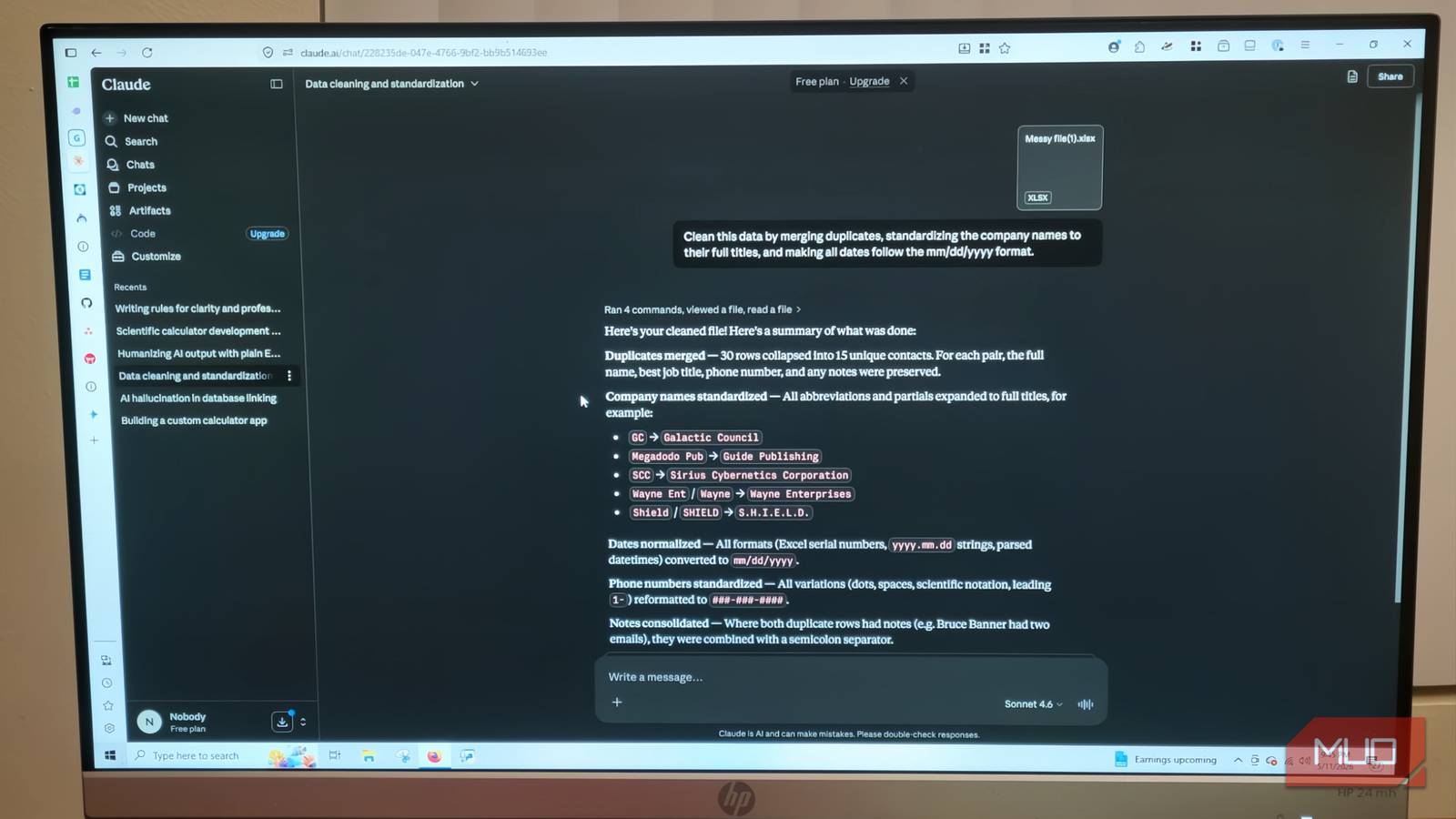

Claude is a great solution for you if you have any problems related to organization. This AI feels like it was made to put a bunch of thoughts together in a structured way. After testing it on sheets that were clearly screwed up, I can see that Claude is amazing. Regardless of whether you have a subscription or use it for free, this can revive your spreadsheets.
I started using Claude instead of these 5 apps — and I’m not going back
The stack got smaller and the work got better
Solving the problem of messy data
You don’t have to fix it yourself

Since software has limits, some people have to spend hours, sometimes days, manually fixing spreadsheet errors, removing duplicate records, or realigning columns. Cleaning data is a tedious job. If you’re doing this for work, it can get worse. Databases are often estimated to decay by roughly 20–30% per year, quickly filling up with old job titles, mixed-up formats, and duplicate contacts like Sarah Smith and S. Smith at the same company.
This means it will start becoming inconsistent, and it’s worse if multiple people work on the same sheet over time. Data has to be consistent because otherwise, you’re not getting accurate reporting. Instead, doing it by hand means spending hours manually going through thousands of records to fix ten different spellings of the same company name or standardizing date formats from January 5, 2024, to 5/1/24.
This manual work leads to professionals wasting a lot of their work week on administrative cleanup instead of actual analysis. Using an AI model can save a lot of time when organizing large files. It can turn days of manual work into a task that takes only minutes.
When integrated into an agentic workflow (e.g., with scripts or automation tools), Claude can help fix messy data without needing specific, hard-coded rules for every unusual situation. Whether you’re giving the AI a whole CRM export to find formatting patterns or asking it to sort out conflicting data from multiple organizations, the AI can process thousands of entries in minutes. Instead of using strict scripts, Claude uses pattern recognition and contextual reasoning rather than rigid rules that separate the core transformation logic from the actual code.
This is actually where AI shines the most. When it is treated like a real assistant whose job is just to find, sort, or organize data, it can significantly reduce errors, though human validation is still necessary for edge cases.
Finding patterns and cleaning files automatically
Automating the boring stuff
Claude might not be great at every complex coding task you give it, but it’s very good at recognizing hidden patterns in broken data and applying automated formatting. I like to think of Claude as a project manager because he is great at organization and putting tasks together. You can use it for things other than code often.
Claude usually gets the bigger picture of the information he’s working with. If you give the model a corrupted CSV or a malformed JSON file, it uses pattern recognition to piece the missing information together. It can easily find structural problems, like where commas are missing, quotes aren’t escaped, or rows have moved because of formatting.
Instead of making you manually step in and fix every cell one by one, the AI processes the whole messy file. It then makes a clean, usable version without these syntax and structural errors.
When I gave Claude a broken sheet as a test, I didn’t expect such a great result. This is a task that fits what Claude can do well. Claude seems to be great despite dealing with CRM exports that have thousands of records. The AI can quickly standardize varied formatting, converting ten different spellings of a company name into one official format. It can standardize job titles, adjust phone numbers to a uniform structure, and map states to standard abbreviations.
The research part was where Claude impressed me most. It can process thousands of names fast and identify likely matches based on spelling variations, abbreviations, or transliterations. It also standardizes very different date formats into one consistent structure.
I honestly thought I’d have to over-explain every little difference, wasting almost as much time as it would take to fix it myself, but I did not have to. The model does all this formatting without needing clear, manual, line-by-line instructions for every unique error it finds.
Keeping your data in your house

While using Claude as a one-off tool to clean up messy spreadsheets is good, you don’t want to keep handing off your important files and sheets to its parent company. The real long-term benefit comes from using the platform to make custom Python scripts that can handle similar data tasks later.
You just have to feed it a few sheets, with different issues, to give it an idea of everything that goes wrong. Gemini, Copilot, and others tend to get lost over time, but Claude ihandles large context windows well within a single session. You can ask the AI to put its data-handling logic into Python modules that you can use again.
While Claude is strong at planning and structured reasoning, some models may produce more optimized code depending on the task. However, you can get a whole project plan with incredible detail that you can give to another AI to program. Claude is at its best when it makes a project plan, and I don’t recommend any other tool more highly.
Most AI is good at understanding complex older Excel or Google Sheets models to give you clean, executable Python code. I haven’t had an issue with my spreadsheets since I started asking AI to give me the scripts or formulas for little repeatable tasks.
I make spreadsheets to handle data pretty often, so I asked Claude to give another model a project plan for a script that basically does these fixes all at once. Claude also adds more situations that it didn’t see, and you likely wouldn’t think of before coming across them.
I know it seems small, but privacy is very important, and you don’t want to rely on AI too much. Treat Claude and the rest like tools, but never let them take control of the wheel.
Don’t give up on your spreadsheets
Claude is a great example of why you shouldn’t treat all AI as if they are the same. Claude is great for taking a lot of data and making it understandable, from project ideas to spreadsheets and code. I personally like Gemini better, but not for things like spreadsheets. When you want this kind of information done well, always stick to Claude.

- Developer
-
Anthropic PBC
- Price model
-
Free, subscription available
