


I like open-source software, but recommendation lists tend to circle the same dozen apps until you could name them from memory. So I went further down the rabbit hole, through smaller GitHub projects, niche recommendation threads, and apps that barely seem to exist outside their communities.
The search turned up a much less familiar collection. Some solve minor annoyances I’d simply accepted, while others are credible alternatives to commercial software backed by entire companies. They’re not all brand-new or completely undiscovered, but each is obscure enough that its feature set made me wonder why I hadn’t run across it sooner.
Kando
It turns launching apps into muscle memory
Kando is a customizable pie menu that appears wherever you summon it, letting you arrange apps, files, keyboard shortcuts, scripts, and other actions around the cursor. Once those actions have fixed positions, you can start selecting them by movement instead of scanning a menu every time.
Opening an app or running a command eventually becomes a gesture you remember, which can cut down on repetitive trips to the taskbar, desktop, or Start menu. With its nested menus, you can fit a lot into one launcher without turning it into a mess. If you prefer working from the keyboard, PowerToys Command Palette can replace Windows Search with a faster app-and-command launcher instead.
The same MIT-licensed app runs on Windows, macOS, and Linux, and it works with a mouse, stylus, touch input, controller, or keyboard. Recent releases have also added keyboard navigation and a portable mode. Some Linux users on Wayland desktops may need additional setup, but Kando already has a deep feature set for an app that rarely appears in mainstream recommendations.
AltSnap
Fixes a weirdly primitive part of Windows

Resizing a Windows application still occasionally means steering the pointer onto a tiny window edge until the correct cursor appears. AltSnap makes that unnecessary.
By default, Alt+left-drag lets you move a window from anywhere inside it, while Alt+right-drag resizes it without making you hunt for the border. If you use Linux, you may recognize the idea because variations of it have existed in desktop environments and window managers for years.
AltSnap brings that behavior to Windows and adds snapping, extra window actions, layouts, transparency controls, keyboard shortcuts, and multi-monitor tweaks. The GPL-licensed project is a maintained continuation of AltDrag and still receives regular updates.
Aves
This one digs much deeper into your photo library
Most Android gallery apps focus on browsing, editing, and sharing photos. Aves pays much more attention to what the files themselves contain. It’s an open-source gallery and metadata explorer that can move between albums, tags, maps, and individual media while understanding far more than ordinary JPEGs and MP4s. It handles SVG files and multi-page TIFFs, recognizes motion photos, panoramas, and 360-degree videos, and can even work with GeoTIFF imagery.
Aves also exposes the metadata buried inside your collection rather than hiding most of it behind a basic “details” screen. You’ll appreciate that more if your phone contains years of camera photos, downloads, edited copies, files copied from other devices, and formats your normal gallery barely acknowledges.
The project is still actively maintained, with version 1.14.9 released in July 2026, and its source is available under the BSD 3-Clause license. If you treat your phone’s image library as more than a camera roll, Aves gives you considerably more to work with.
Thorium Reader
It deserves a spot beside Calibre
Calibre is great for organizing and converting ebooks, but I don’t always want my library manager doing double duty as the app I actually read in. Thorium Reader is much more focused on the reading experience itself.
It supports EPUB across Windows, macOS, and Linux, along with OPDS catalogs, bookmarks, layout controls, and extensive accessibility features. It supports screen readers including NVDA, JAWS, and Narrator, and accessibility has been a major focus from the start rather than an afterthought.
Thorium comes from the European Digital Reading Lab and is built around the open-source Readium ecosystem. The app itself is released under the BSD 3-Clause license. Thorium 3.5 arrived on August 28, 2026, and expanded PDF support with annotations including highlights, bookmarks, and attached notes.
It’s also free and ad-free. EDRLab says Thorium doesn’t collect personal data, though the app sends limited non-personal telemetry at startup, and DRM-protected LCP books may communicate with their licensing server.
For an ebook reader this polished and this focused on open standards, roughly 3,000 GitHub stars seems surprisingly low.
Wino Mail
It kept the Windows Mail idea alive

Microsoft’s decision to replace Windows Mail and Calendar left a clear gap for anyone who wanted a lightweight desktop mail client without being pushed into the full Outlook experience. Wino Mail is one of the closest replacements for Windows Mail I’ve found.
It’s a GPL-licensed WinUI app built specifically for Windows, and it handles different account types through different back ends. Outlook and Microsoft 365 accounts connect through Microsoft Graph, Gmail uses Google’s API, and other providers can fall back to MailKit-based IMAP and SMTP.
That setup gives Wino much more substance than a webmail wrapper in a desktop coat. Underneath the interface is a proper native mail client with account management, notifications, calendar support, and an interface that fits naturally into Windows.
Development has stayed active through 2026, with version 2 bringing substantial work across performance, calendars, account management, and the mail interface. More recent beta builds on GitHub have also been experimenting with a move to Native AOT.
I still wouldn’t make it my first pick for a work mailbox where flawless syncing and enterprise features are mandatory. Users have reported occasional sync issues, and the newer builds are still evolving quickly. For personal email on Windows, though, there’s already much more here than its relatively small following would suggest.
DeskBox
Your desktop can graduate from icon landfill
DeskBox is easily the youngest project on this list, which goes a long way toward explaining why hardly anyone has heard of it. Its first public test release didn’t show up until June 2026.
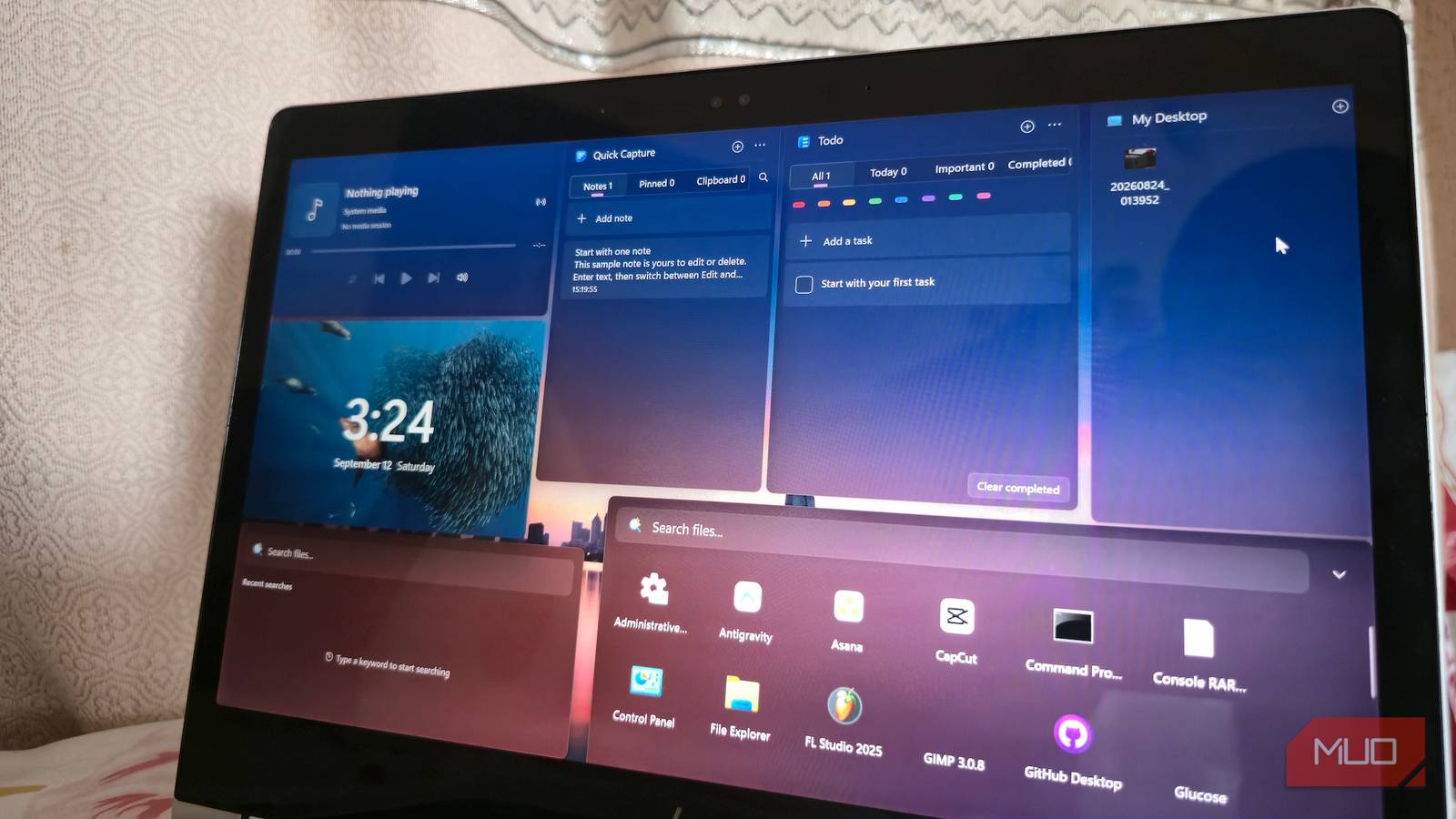
The idea will be familiar if you’ve used Stardock Fences, which has inspired plenty of free alternatives for organizing a Windows desktop. DeskBox lets you place customizable containers on the Windows desktop for files and folders, then pushes the concept further with widgets for tasks, notes, search, music controls, and other bits of information you may want within reach.
One choice makes the setup much easier to trust: DeskBox’s file widgets can point to regular folders instead of shuffling your files into some proprietary organizational system. File Explorer still sees the same data in the same place, so cleaning up your desktop doesn’t mean handing control of your files over to the app.
Development has moved fast since that first test build. Version 1.5.0 arrived in early September with automatic data snapshots, folder navigation inside widgets, optional native Windows context menus, better desktop organization, and further memory reductions.
DeskBox is GPL-licensed, local-first, and still has a GitHub community measured in the hundreds. It’s also just a few months old, so I’d expect some bugs and behavior that may change between releases. Even so, this is exactly the kind of obscure project I was hoping to stumble across when I started digging.
GitHub still has a basement
Looking for obscure software means wading through abandoned repositories, weekend experiments, and apps that look better in screenshots than they do in actual use. These six made it through that filtering because they solve specific problems well enough that I’d actually keep using them and checking back on their development.
