


MagSafe solved the alignment problem with wireless chargers years ago by adding precise magnet layouts to phones, cases, and chargers. The possibilities of MagSafe seem endless, as I’ve used it — also known as Qi2 on Android phones — with stands, wallets, and mounts. MagSafe is one my favorite modern smartphone features, and I won’t stop asking Android phone makers to adopt them. That said, as people use MagSafe and Qi2 for more than charging, they risk running into their weaknesses.
Magnets work great for attaching a lightweight wallet to your phone, and are ideal for achieving a perfect alignment with the wireless charger on your desk or nightstand. For anything more than that, magnets just aren’t strong enough. There are bike mounts, car mounts, and tripods that rely exclusively on MagSafe, but they could send your expensive flagship flying by accident. Luckily, there’s a better solution, and you don’t have to give up MagSafe or Qi2 to get it.
Sometimes, MagSafe alone isn’t enough
It’s great for stationary pads, but not tripod or bike mounts

MagSafe and Qi2 are essentially the same, as both use magnets to connect with wireless chargers and accessories. They are functionally interchangeable, as an iPhone can charge on a Qi2 25W charger and an Android phone can charge on a MagSafe 25W charger. But there’s one key difference between them: the magnetic array. A device with basic Qi or “Qi2 Ready” doesn’t have inbuilt magnets, while a device with full Qi2 compatibility contains a magnetic ring compatible with MagSafe.
The twist is that Apple’s official MagSafe specification includes a magnetic ring and an alignment strip below it. That tiny strip of magnets on MagSafe-compatible phones, chargers, cases, and accessories is responsible for ensuring the right orientation. It also provides an extra bit of support, making an official MagSafe product less likely to budge or slip. While the MagSafe standard sports this extra magnetic strip, it’s not required for Qi2 devices and accessories.
In fact, many third-party accessory makers skip this strip entirely. With or without the strip, I wouldn’t trust MagSafe or Qi2 alone to keep my phone secure in certain situations. I’ve had an iPhone fly off a MagSafe vent mount in my car and into the backseat. While riding an electric scooter, I once clipped the curb and sent my phone onto the concrete sidewalk. Unsurprisingly, it cracked — and that MagSafe failure caused me to rethink how I mount my devices.
SlimLink adds a locking mechanism to your case
Quad Lock is another alternative for secure phone mounting
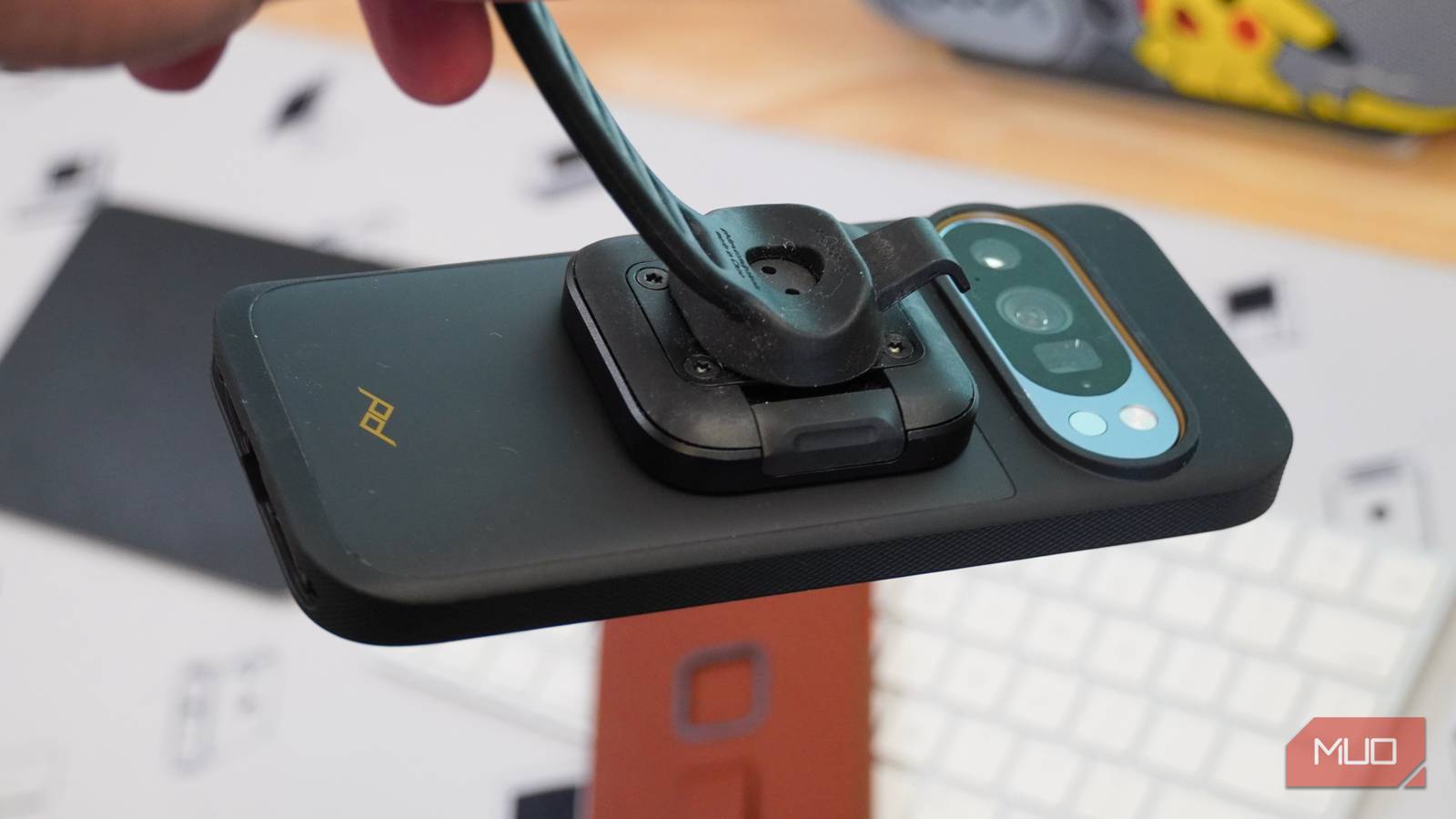
I’ve tested many phone cases from Peak Design, and one unique thing about them is a mounting interface called SlimLink. It combines the convenience of MagSafe and Qi2 with the security of a mechanical locking system, and doesn’t add that much thickness in the process. To be clear, Peak Design isn’t the only company to try this. Quad Lock and Rokform are other brands to check out if you’re interested in extra security for your phone mounts.
From a strictly cosmetic standpoint, the Peak Design SlimLink system doesn’t look out of place on the back of a phone case. The twist-lock mechanism used by Quad Lock and Rokform is jarring to my eyes, and is too utilitarian for my preferences. By comparison, SlimLink is just a recessed square on the back of Peak Design cases designed to catch physical latches on mechanical phone mounts.
The cases and mounts are made to take a beating, because there’s an entire line of Qi2 charging mounts for motorcycles built to handle shakes, vibrations, and shocks.

I don’t ride a motorcycle, so I can’t speak to how these mounts work on that kind of two-wheeler. I have found myself using the Universal Bar Mount quite a bit, which is made for bikes, scooters, and mobility devices of the like. It has mechanical locking latches that ensure my phone doesn’t fly away, while including an adjustable silicone band that can fit multiple handlebar sizes.
This mount is useful for things other than bikes and scooters, too. As a tech journalist, I strap my phone to tripods, lighting stands, or any pole I can find when I need to throw a quick teleprompter up on it. If you’re not shooting photos or videos, you might not share this specific use case. But with a secure phone mount that can be strapped to almost anything, there are plenty of possibilities tailored to your needs.
This case offers the best of both worlds
MagSafe and SlimLink are here, so use the one you need

If you only use MagSafe or Qi2 for basic accessories and charging, you probably don’t need a case with a mechanical locking system. Magnets are strong enough for those uses, and they’re way more convenient than using SlimLink. That said, if you do like to use your phone with bikes, scooters, or motorcycles, the security of a mechanism beyond MagSafe starts to make sense.
The neat thing about SlimLink is that it doesn’t interfere with MagSafe compatibility. It works in addition to the magnets, so you can still use the chargers and cases you already have. As I’ve tested cases with SlimLink, I rarely use the mechanical latch. The magnets are used on a daily basis. However, when I do pull out a SlimLink mount, it does a job I could never ask a MagSafe or Qi2 mount to handle.

- Material
-
Canvas, vegan leather, or eco leather
- Wireless Charging Support
-
MagSafe
- Weight
-
40g
- Thickness
-
2.4mm
The Peak Design SlimLink Case is available for iPhone, Galaxy, and Pixel, and adds a secure locking mechanism to existing MagSafe support.
