


Last night, I spent the whole evening setting up my new Android phone. This was a fresh start, and it felt like the perfect chance to leave some Google baggage behind. Before setting up my new Motorola, I wanted to find out how many Google services I could uninstall on my old Samsung Galaxy before ruining it.
I started by replacing Google Maps and Photos with Organic Maps and uninstalling Google Photos, then checked what the Samsung was connecting to. It didn’t come as much of a surprise to find Google was still there.
That left me wondering how much further I’d have to go, and what would inevitably complain and break as I removed Google piece by piece.
I replaced the apps I could actually see
The familiar icons were just the beginning
My old Samsung Note 20 Ultra was running Samsung’s stock software, Android 13 with One UI 5.1. To record any Google-related connections on my phone, I installed PCAPdroid, making sure to keep Tailscale and Cloudflare WARP+ switched off.
I started with two replacements I use all the time:
- Google Maps → Organic Maps. I downloaded a local map and calculated a few routes, giving me a practical test alternative.
- Google Photos → Samsung Gallery. Any gallery app would have sufficed, but Samsung’s app was already installed.
Gallery obviously didn’t offer cloud backup beyond syncing with a OneDrive account, but the swap allowed testing of photo viewing.
When trying to uninstall Google Maps, I noticed it only had a Disable button, but Google Photos allowed a full uninstallation. Once I’d done both, I realized the obvious weakness in this limited experiment. YouTube, Gmail, and other Google apps I used all the time were still enabled, so I needed to go further before drawing any conclusions.
I connected the phone to my Windows PC and used Android Debugging Bridge (ADB) to disable as many Google apps as humanly possible. For Gmail, I used this PowerShell command:
.\adb.exe shell pm disable-user --user 0 com.google.android.gmI repeated this for all Google apps, including YouTube, Translate, Chrome, Authenticator, and eventually the Play Store itself.
This command meant the apps stayed installed but were completely disabled for the phone’s main user. That gave me a much easier way to reinstate them all once I’d finished with testing.
Google Play Services kept the connections alive
Removing the apps hadn’t removed their supporting infrastructure

Before changing too much, I’d already used PCAPdroid to record the phone’s connections while it sat idle and locked. I repeated that check once again after disabling the Google apps and Play Store.
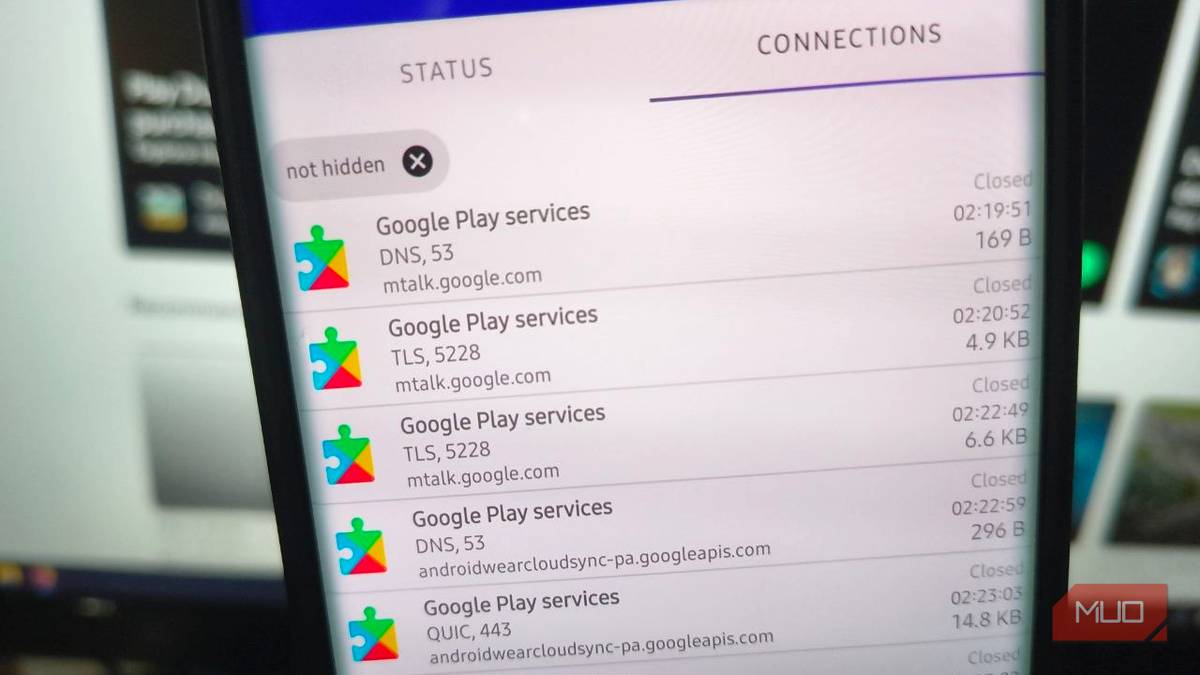
Google Play Services still appeared routinely in the results, with repeated TLS connections to mtalk.google.com and traffic to Google API domains.
It seemed that even though the Google apps were disabled, Google Play Services still featured prominently in the PCAPdroid connection logs.
Play Services is a separate app from the Google Play Store. It provides a lot of the shared functionality that other apps use, including push messaging. So, disabling the storefront hadn’t actually switched off that supporting service.
Google support pages state that mtalk.google.com and TCP port 5228 are part of its Firebase Cloud Messaging (FCM). In other words, it’s the push service that many apps use for push notifications. My PCAPdroid captures exposed those connections, though they weren’t detailed enough to pinpoint specific app notifications.
Sideloading an app or using open-source typically won’t help avoid this, as many still use FCM for notifications.
For my new phone de-Googling project, that meant not only checking if it had Google’s name on it, but also whether it relied on background Google services for something as basic as push notifications.
If you’re trying to cut out more Google dependencies, look for applications that support push notification alternatives like UnifiedPush. Check that the alternative is active before installing, since many apps will default to FCM.
Disabling the service made my Samsung apps complain loudly
The dependencies extended beyond Google’s own apps

The next phase of my little experiment was obvious. If Google Play Services was still making connections, what would happen if I disabled that too?
It was time to find out, so I issued the command to disable it for the main user:
.\adb.exe shell pm disable-user --user 0 com.google.android.gmsSamsung answered immediately. Several components displayed messages warning me to enable Google Play Services, or they’d stop working:
|
Component |
Warning observed |
|
Samsung Wallet Digital Key |
Asked me to enable Google Play Services |
|
Find My Mobile |
Asked me to enable Google Play Services |
|
Galaxy Watch Manager |
Asked me to enable Google Play Services |
|
Samsung Internet |
Independent, so no warning |
|
Samsung Notes |
Local processing, so no warning |
|
Samsung Gallery |
Works without Google Services, no warning |
These were explicit warnings from Samsung software, and they made the consequences hard to ignore due to how constant and persistent the notifications were.
Despite this annoyance, the phone remained completely usable. All the non-Google functions I tried still worked, which made a fair argument for continuing with de-Googling on the new device.
After disabling the Play service, the subsequent PCAPdroid capture indicated that the Play service was no longer making or receiving connections. I considered this a win in some ways, though it’s not conclusive proof that I’d managed to eliminate every Google connection.
Having gotten sick of the Samsung warnings, I then re-enabled Play Services. The Samsung warnings stopped, putting to rest any doubt as to what caused them.
Even Firefox still had a connection to Google
Reducing my reliance was easier than cutting every connection

My Samsung had stayed locked and idle throughout the capture, but somehow, even with Play Services disabled, Firefox had managed to attempt a connection to Google’s infrastructure. There was a google.com tab open in Firefox at the time, but the capture log couldn’t establish which requests that tab had made.
I investigated the destinations. safebrowsing.googleapis.com was fairly normal behavior for Firefox’s phishing and malware protection browser security features. Website tags also explained destinations like googletagmanager.com. Those connections seemed like Google-related tracking rather than connections to Google servers and ecosystem.
Despite the difficulty in fully escaping Google on an Android device, it’s certainly not a pointless endeavor to replace Google apps. I was so impressed with Organic Maps that I didn’t even bother re-enabling Google Maps, and uninstalling Google Photos is just another step closer to finally migrating my images to Noodle Gallery.
I ended up restoring the apps and services after testing. For my new phone, the experiment clarified what I’d be taking on if I allowed even a few apps with Play Services dependencies.
A more thorough attempt would mean starting with an operating system that leaves Google totally out of the picture from the start. Even that comes with extensive challenges, like dealing with banking and streaming apps that require Google Play certification and Google’s plan to lock down Android sideloading.
It seems, unfortunately, that gaining more control over my Android phone is going to require a lot more work than just reconsidering what apps I install.
