

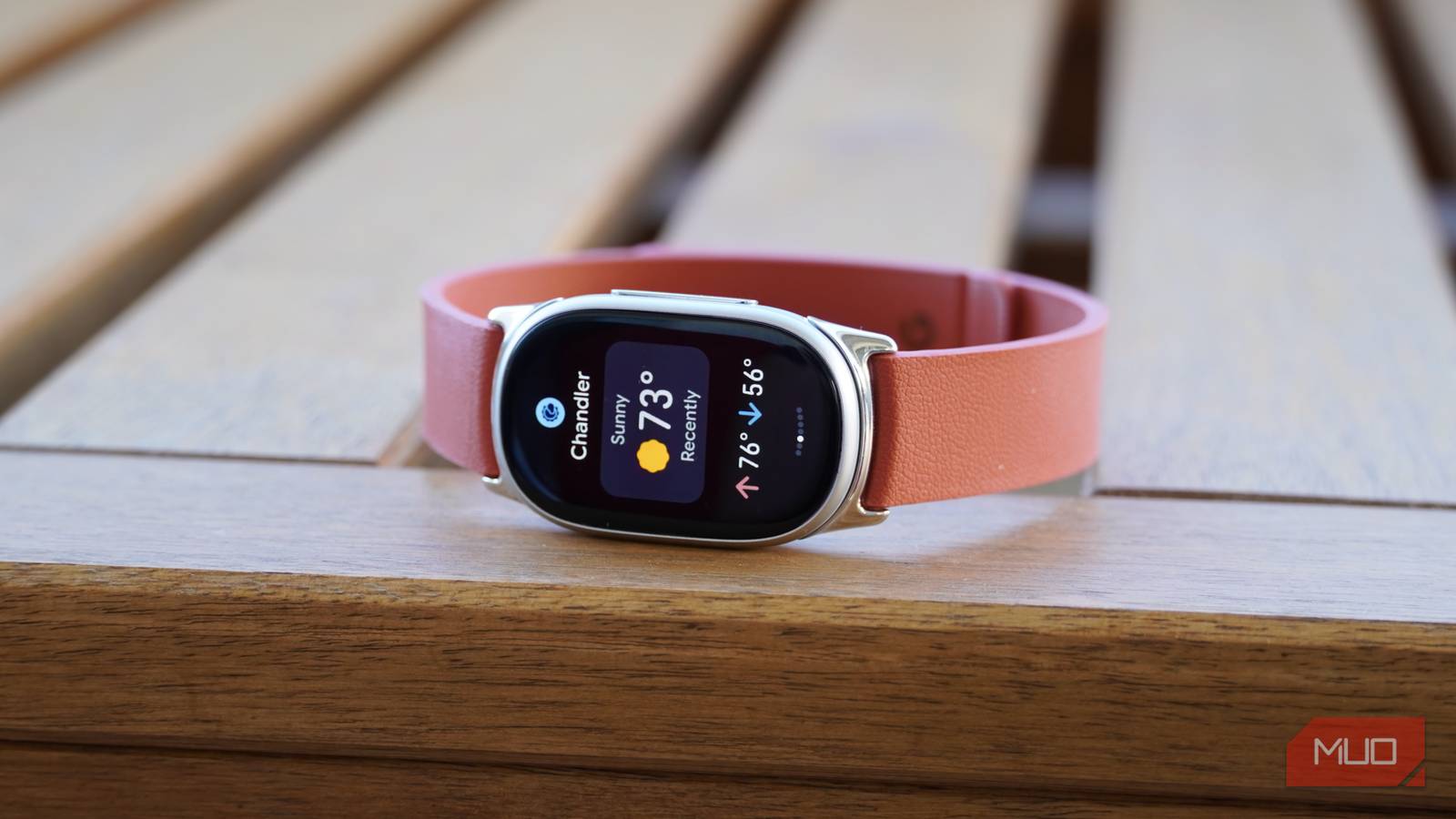

I’m a longtime Apple Watch user who recently turned to Fitbit and Garmin wearables for a more simplified, fitness-focused experience. I didn’t need a smartphone on my wrist, which is what recent Apple Watch models started to feel like. Google’s Fitbit Air seemed like the perfect solution, but as I used it, the screenless band became more of a dedicated sleep monitor than a do-it-all fitness tracker.
After nearly two weeks with the new Fitbit Edge on my wrist, I’m confident this is the Google fitness tracker to buy. It addresses the main pain points I experienced while using the Fitbit Air by adding onboard GPS, a small touchscreen, and more sensors. All the while, it’s only $80 more expensive and still beautifully simple.
Make no mistake, there are still reasons to jump down to the Fitbit Air or step up to the Pixel Watch 5, but the Fitbit Edge is the sweet spot.
Google sent us the Fitbit Edge for review. It had no input on the contents of this article, and didn’t see it before publishing.


8.5/10
- Heart Rate Monitor
-
Yes, optical PPG
- Battery Life
-
Up to 7 days (AOD off)
- Integrations
-
Google Health
The Google Fitbit Edge is a lightweight fitness band with a simple 1.3-inch AMOLED screen and a versatile set of sensors. It has GPS for accurate workout tracking, plus a slew of optical and electrical health sensors. With the always-on display off, it’ll stay powered for a week on a single charge.
- GPS, ECG, and optical HR sensor onboard
- Slim design is still comfortable for sleep and workouts
- No subscription required for use
- No NFC for Google Wallet payments
- Lacks dedicated app for device management
- Most customization features require a phone
Google Fitbit Edge pricing and availability
Google’s Fitbit Edge hits store shelves on Oct. 27, 2026 with a retail price of $179.99. Buyers get a three-month trial of Google Health Premium with their purchase. There’s also a Fitbit Edge Stephen Curry Special Edition, which costs $219.99 and comes with a unique Rye-colored strap.
The Fitbit Edge comes with a basic Active Band in the box, unless you opt for the Stephen Curry Special Edition. In that case, you’ll get the fancier Performance Loop in the box. You can buy additional Active Sport ($39.99), Performance Loop ($49.99), Magnet ($59.99), and Metal Links ($149.99) bands separately. The Performance Loop band for the Fitbit Edge isn’t available at launch, but is “coming soon.”
In the wider context of Google’s wearable lineup, the Fitbit Edge sits between the $100 Fitbit Air and the $400 Pixel Watch 5. It’s a spiritual successor to the Fitbit Charge 6, which retailed for $160.
- Heart Rate Monitor
-
Yes, optical PPG
- Battery Life
-
Up to 7 days (AOD off)
- Integrations
-
Google Health
- Display
-
1.3-inch AMOLED
- Notification Support
-
Yes
- Health sensors
-
Electrical, temperature, red and infrared
- Price
-
$180
- Mobile payments
-
No
- Workout detection
-
Yes
The Fitbit Edge is slim, with just enough screen
It feels surprisingly similar on the wrist to the smaller Fitbit Air
The Fitbit Edge is an evolution of the Fitbit Charge 6, but it’s better in almost every way. The pill-shaped design of the Fitbit Edge is sleek on the wrist, and packs a bigger 1.3-inch AMOLED touchscreen. With the right strap, the new tracker looks more like a fashion accessory than a fitness band. That’s a major improvement compared to the Charge 6, which looked out of place anywhere but the gym or track.
This is the second Fitbit tracker we’ve seen this year, and the Edge will naturally be compared to the one that came first: the Fitbit Air. Without straps attached, the Fitbit Edge is considerably smaller and lighter than the Fitbit Air.
However, since Fitbit Air bands and straps cover the tracking puck and add thickness to the entire package, the Edge has a similar profile on the wrist. I thought the Fitbit Edge would feel less comfortable on my wrist after half a year with the Fitbit Air, but it didn’t.

The fitness tracker only weighs 17.7 grams without a band. The slightly larger sensor area on the bottom makes better contact with my wrist than the Fitbit Air, which had a tendency to slide around throughout the day.
I’m not a huge fan of Google’s Active Band, though. I don’t find it as comfortable as Apple’s Sport Band, and prefer the Magnet Band. For workouts, I’d likely choose the Performance Loop when it becomes available.
The Fitbit Edge is fantastic for runs and workouts
It didn’t miss a beat, and was right in line with my Apple Watch Ultra 4

I spent the bulk of my Fitbit Edge testing period wearing it on one wrist and the Apple Watch Ultra 4 on another. I mixed in the Fitbit Air and Google Pixel Watch 5 along the way, but I really wanted to see if the Edge came with major compromises compared to higher-priced smartwatches and trackers. Wearing the Fitbit Air for walks, runs, and hikes made me miss my smartwatch, but the Fitbit Edge didn’t.
There are two main reasons for that: onboard GPS and the touchscreen. The Fitbit Air’s screenless design relied entirely on phone app control or automatic activity tracking to record workouts. It also didn’t have onboard GPS. I didn’t find automatic activity tracking to be very reliable or accurate on the Fitbit Air, and without GPS, I had to carry my phone to stand a chance at getting the right workout stats.
The Fitbit Edge has GPS built-in, so I could leave my phone at home during runs. The fitness tracker roughly matched the distance accuracy of the Pixel Watch 5, which is an impressive feat. On a four-mile run, the Fitbit Edge tracked only 0.05 miles less than my Apple Watch Ultra 4. It was a minor difference, and I usually see the same discrepancy between the Pixel Watch 5 and my Apple Watch Ultra 4.
The distance and pace accuracy was far better than I expected from a $180 wearable. While the small screen can only fit a few metrics at once, you can swipe on the screen to see more. Crucially, it remembers which screen you last used. If I swipe down to the pace workout view, it’ll stay there until I swipe back — even if I lower my wrist. I do recommend enabling the always-on display for workouts, as it’s much better for quick glances at stats during intense runs.
It’s loaded with health sensors, including electrical sensors, temperature sensors, red and infrared sensors, and an optical heart rate sensor. You get features like ECG and blood-oxygen sensing, which are often found on more expensive wearables. There’s an altimeter, accelerometer, and gyroscope, too. In my testing, the Fitbit Edge’s heart rate sensing was in lockstep with my Apple Watch Ultra 4 during runs.
As for battery life and charging, the Fitbit Edge lasts a week on a single charge, as long as you keep the always-on display off. I didn’t have to think about charging it, because I threw it on the charger while I was in the shower each day.
The software is the obvious weak link
You’ll need to pull out your phone a lot, and the Health app is crowded

The software on the Google Fitbit Edge is incredible. It’s not quite Wear OS, but it has the same design language as the Pixel Watch 5’s software. You can swipe left or right to view tiles, swipe down to access quick settings, or swipe up to view notifications. Pressing the side button shows the list of pre-installed apps.
The software is still the weakest part of the Fitbit Edge, though. The Google Health app redesign and AI-focused Google Health Coach isn’t for everyone. Crucially, a subscription isn’t required for basic features, but the Health app might feel barren without one. More importantly, most customization settings require the Google Health app on a connected phone.
I wish I could change more settings directly on the Fitbit Edge. Additionally, it’d be nice if Fitbit devices had their own app for general management. Needing to dig through Health app menus to add watch faces is a chore — the dedicated Pixel Watch app does it better.
Should you buy the Google Fitbit Edge?
You should buy the Google Fitbit Edge if:
- You want a fitness band with a robust sensor suite
- You value basic phone integration, but don’t need smartwatch features
- You need a fitness band that’s comfortable, thin, and light
You should NOT buy the Google Fitbit Edge if:
- You want a passive fitness tracker to wear alongside a smartwatch
- You want a device with NFC that can replace your smartwatch
- You’re not a fan of the Google Health app
The Fitbit Edge is an interesting fitness band, and if you want a fitness tracker that’s good at a lot of things, you should buy it. There’s also a case for buying the Fitbit Edge and the Fitbit Air together. That entire package is just $280, you can pair both to the same phone, and the Air is still better for sleep tracking and a minimal wrist profile.
If you’re a smartwatch user already, the decision gets complicated. The Fitbit Edge isn’t quite a smartwatch replacement, because it lacks NFC, a speaker, and a microphone. That eliminates basic smartwatch functionality, like digital payments, calls, and custom replies. This makes the Fitbit Edge a much more focused wearable than a smartwatch, and that’s a good thing.
However, since the Fitbit Edge still has a screen, it looks odd to wear it on one wrist and a smartwatch on the other. With that in mind, the Fitbit Edge is best for users that want a fitness band to be the only screen on their wrist. Use the Fitbit Edge on one wrist and an analog watch on the other, and you’ll have a blast. Try to replace your smartwatch with it, and you may be left disappointed.
- Heart Rate Monitor
-
Yes, optical PPG
- Battery Life
-
Up to 7 days (AOD off)
- Integrations
-
Google Health
- Display
-
1.3-inch AMOLED
- Notification Support
-
Yes
- Health sensors
-
Electrical, temperature, red and infrared
The Google Fitbit Edge is a slim fitness tracker with Google Health integration. It packs a 1.3-inch screen, week-long battery life, and an assortment of health sensors.
