


When a new smartphone debuts, we’re told about how much faster it runs and all the new AI tricks it can perform. None of those things really matter — at its core, a phone is a communication device, and it keeps us in contact with the people in our lives. The most important job of a smartphone is to keep us safe and connect us with help in an emergency. That’s why your phone can make emergency calls on any available network, even if you don’t have an active SIM card. Plenty of phones offer safety and emergency features, but none provide quite as complete of a suite as the Google Pixel.
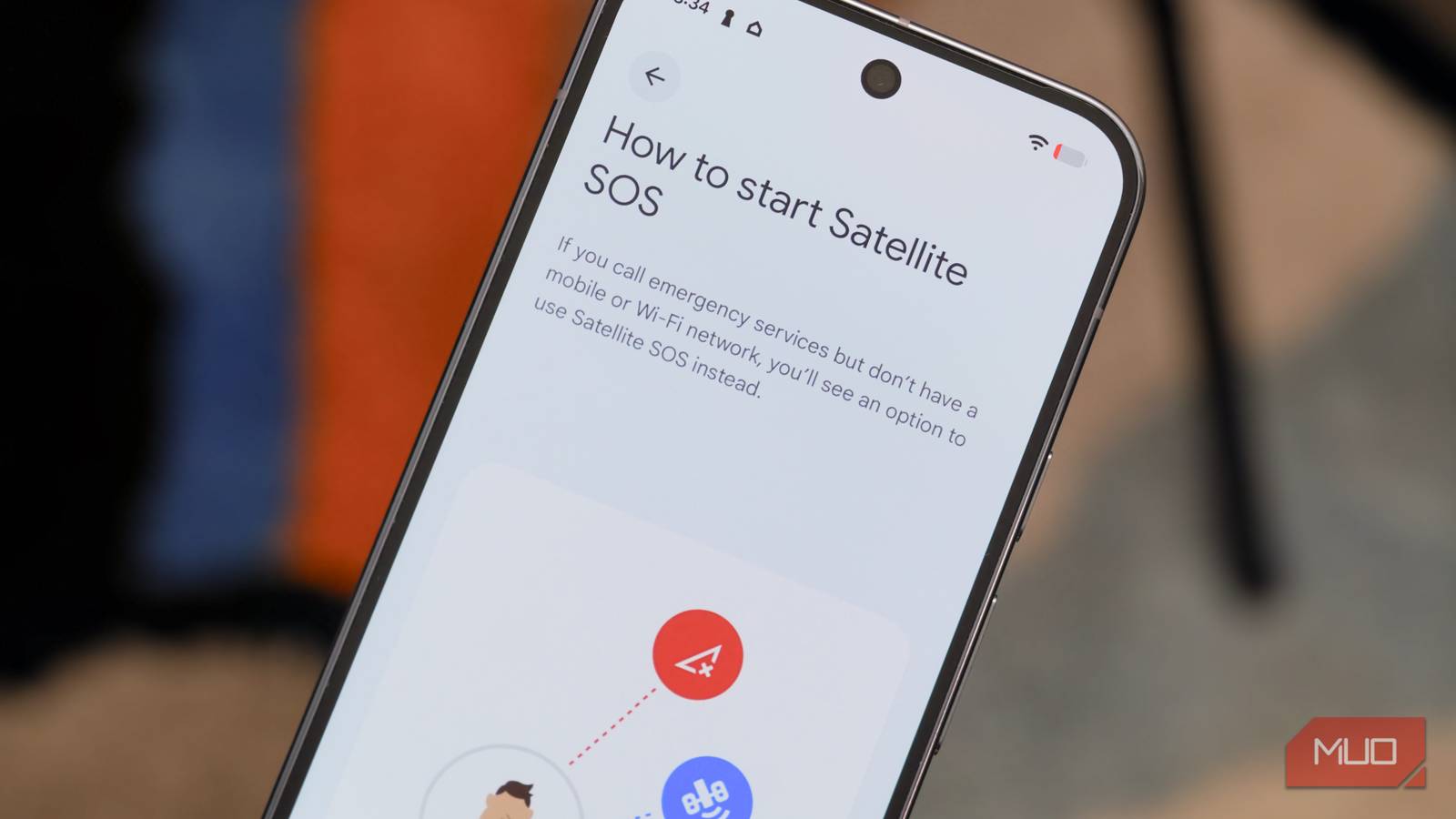
Google Pixel phones crucially offer free satellite connectivity for use in emergencies, which is a rare feature on Android phones. iPhones have a similar Emergency SOS via Satellite tool, and Apple expanded the utility to support non-emergency messaging. But on Android, many phone brands have left satellite messaging support up to carriers to provide. Google Pixel phones have Satellite SOS built right into Android 16, and it’s the start of a robust safety and emergency suite available in the Personal Safety app.

I switched from a flagship to the Pixel 10a and the software made me forget about the specs
It’s easy to rag on the Google Pixel 10a for reusing the Tensor G4 chip, but the software and battery life more than makes up for that.
Satellite SOS
Contact emergency services even if cell service is unavailable
Satellite SOS is a critical safety feature that serves as a fallback when traditional cellular service is unavailable. Let’s say you’re on a hike, lose cell service, and someone twists their ankle. Emergency calls aren’t going through, and you’re stranded. In 33 countries, including the United States, Canada, and the United Kingdom, Satellite SOS can help. Newer Pixel phones have a modem capable of connecting with overhead satellites, so a clear sky and a working phone is all you need to get help in an emergency. Messages are relayed from your phone, to the satellite, back down to the ground station, and to first responders that can assist.
You might be surprised to learn that you can demo a few of Google’s best Personal Safety features right now, including Satellite SOS. To do so, open the Settings app, tap Safety & emergency, and press Satellite SOS. Then, tap the Demo button at the bottom of the page. You’ll be able to try the Satellite SOS experience firsthand without contacting emergency services. This is a neat way to showcase your Pixel phone’s exclusive capabilities, and it’s also a great way to stay prepared. In the event you require Satellite SOS in an emergency someday, you’ll already know how to use it after trying the demo mode.
Your Pixel has a hidden emergency feature you should test right now
Satellite SOS is a feature hopefully no one will have to use — but there’s a critical demo mode that helps you prepare in the event you do.
Car Crash Detection
Notify your emergency contacts and first responders if you’re in a crash

While the Satellite SOS feature requires a newer Pixel with a compatible modem, the Car Crash Detection feature works with almost any Pixel, including the Pixel 3 and newer. With Car Crash Detection enabled, your Pixel phone uses a collection of hardware sensors and software algorithms to determine if you have been involved in a car crash. When your phone detects motion consistent with a motor vehicle accident, it will vibrate, sound an alarm, and ask if you need help in a pop-up message.
You have 60 seconds to respond and let your Pixel know you’re okay, in the case of a minor crash or an accidental trigger. Your phone will automatically call emergency services, and you can say Cancel aloud or tap the I’m OK button on the screen to abort the call. If those 60 seconds pass without the Pixel user speaking or tapping the screen, their phone will automatically call emergency services on speakerphone, tell dispatchers about the car crash, and share the approximate location of your device.
Car accidents are dangerous, and quick responses are crucial. When Car Crash Detection is turned on, your Pixel tries to alert emergency dispatchers of a potential crash even if you are unresponsive or can’t get to your phone. It’s one of those features you hope you’ll never need, but will be happy to have enabled if you do.
Crisis Alerts
Get real-time updates on natural disasters, severe weather, and local emergencies

Crisis Alerts are a modern approach to notifying smartphone users of potential emergencies, weather events, or natural disasters. Many phones receive emergency alerts or severe weather notifications. However, Crisis Alerts takes that one step further, using Google Search and news information to provide more current and accurate information that may not be included in an official emergency alert. Tapping a Crisis Alert opens Google Search results related to the issue, so you can stay informed. Here are the types of information used for Crisis Alerts, according to a Google support document:
Google may send alerts using publicly available information, published feeds of alerts, and its own collections. If a crisis is posted that affects your location, Google will notify you. Google posts crisis alerts based on various factors, like internet connectivity in the affected area, official info from governments and other authorities, and the impact on the ground. Alerts are typically available in the primary languages of the affected area and English. The alert will be displayed in the language available on your device, provided a match is available for the localized content.
Crisis Alerts are available in every country and language, meaning all Pixel users can use them to stay safe.
Safety Check
Let someone you trust make sure you make it home safely

Finally, there’s Safety Check — an important feature for anyone who wants to keep others in the loop about their whereabouts. Essentially, it’s a tool that checks in with you periodically at scheduled intervals. Say you’re walking home and want someone to know you’ve made it to your destination. Safety Check will send a notification when it’s time to check in, and you’ll have 60 seconds to choose one of the following options:
- I’m OK. Don’t Share
- Start sharing now
- Call 911
If you don’t respond within a minute, Safety Check sends a message to your emergency contacts including your name, real-time location, your phone’s battery percentage, and a message (if you provided one at the start of Safety Check). It’s a helpful way to keep the people you trust updated about your current location and the progress of your trip, if you aren’t able to check in using Safety Check on your Pixel
Why you should use the Personal Safety suite
Google puts a major emphasis on safety and emergency features for the Pixel brand. The company’s Personal Safety app is available on other devices, and some features, like Safety Check and Crisis Alerts, aren’t Pixel exclusive. To get all of Google’s best safety features — including Satellite SOS and Car Crash Detection — you need a Pixel device. It’s worth using and knowing about them, because you want Personal Safety features in the event you’re involved in an emergency situation.

- Brand
-
Google
- SoC
-
Tensor G5
- Display
-
6.3″ Actua display
- RAM
-
12 GB
- Storage
-
128 GB, 256 GB
- Battery
-
4970 mAh
Google’s flagship smartphone, the Google Pixel 10 features the Tensor G5 processor, an outstanding triple-camera system, and seven years of software updates. This is a phone you can rely on for years to come.
