

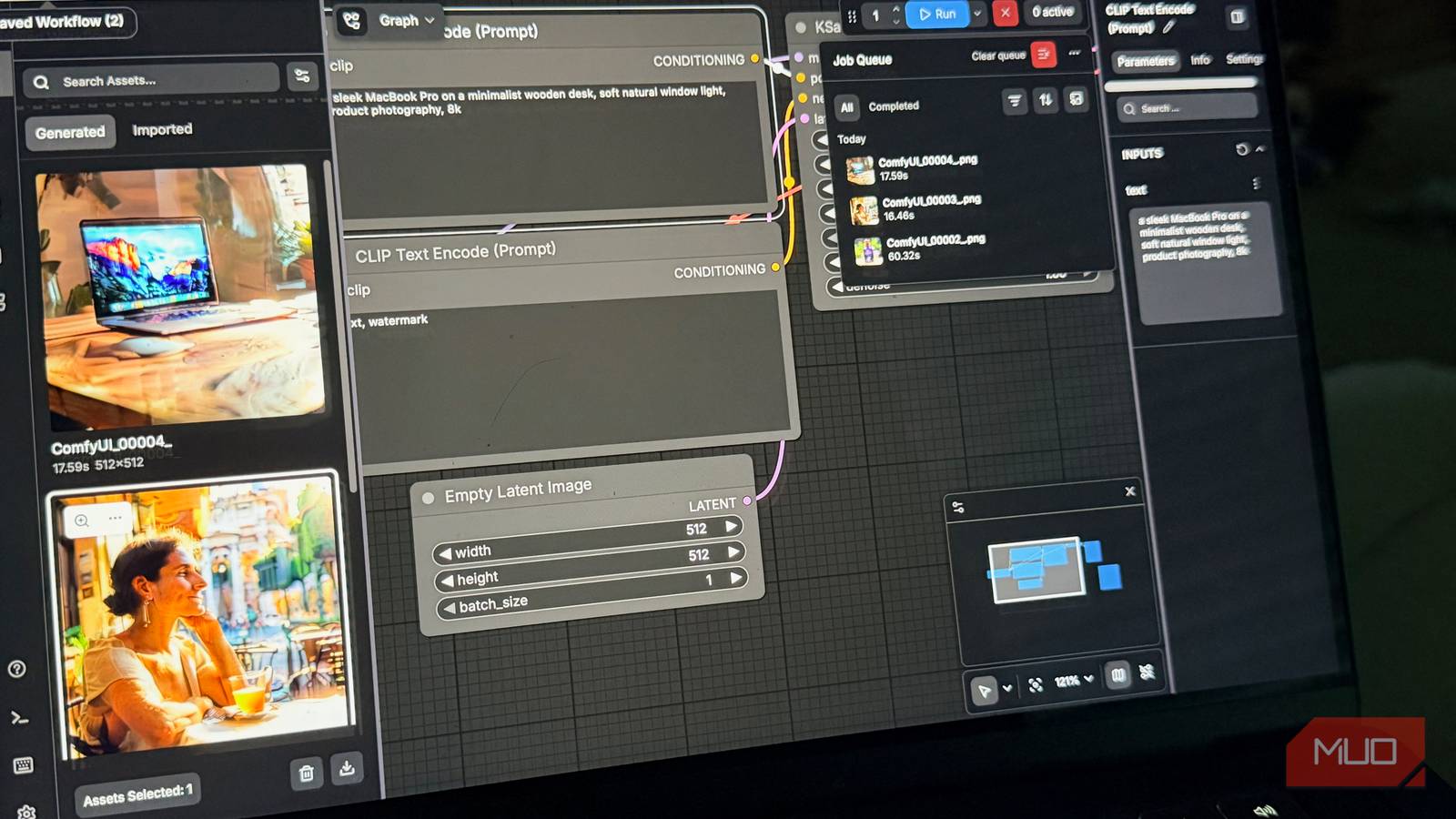

I still remember the exact moment I knew something had changed when it came to generating AI images.
I typed a prompt, clicked generate, and watched my MacBook Pro produce an image. No spinning wheel telling me I was out of credits. No softened, sanitized version of what I asked for. No watermark stamped across the corner. Just the image, sitting in a folder on my machine, completely mine.
I’d been putting this off for over a year. That was a mistake.
5 open-source apps that are so good you’ll never need to pay for them
Five free apps that actually replace paid ones.
The real cost of “convenience”
I’ve been quietly unwinding my dependence on cloud AI image tools for a while now. A few months ago, I wrote about how Krita’s free AI Diffusion plugin had, for my purposes, made Adobe Firefly largely redundant. I’m a writer, not a designer. I use AI image tools for article imagery, quick concept visuals, and the occasional placeholder. Firefly is genuinely good. But once I found a free alternative that matched my actual needs, I had to ask myself what I was really paying for.
The honest answer was: mostly convenience.
That same question eventually pushed me to run Stable Diffusion and its many prompts locally. If I was already willing to swap a little polish for total control in my image workflow, why was I still leaning on cloud-based generation at all? Midjourney lives behind a subscription wall and inside Discord, which has always felt like an odd home for a creative tool. DALL-E is bundled into ChatGPT Plus, which means you’re paying for the whole package whether you use the image generator or not. The free tiers on most platforms either watermark your output or cap your generations so aggressively that you can’t build a real workflow around them.
I kept thinking there had to be a better way. I just kept assuming it wasn’t available to me.
The Mac myth that cost me a year
Why Apple Silicon isn’t the dead end you think it is

Every time local AI image generation came up, I’d read a few lines, hit some mention of CUDA or Nvidia, and quietly close the tab. The whole ecosystem seemed built around Windows machines with dedicated graphics cards. I have a MacBook Pro with an M4 Pro chip and 24GB of unified memory, which has plenty of horsepower, but it doesn’t have NVIDIA hardware. It doesn’t support CUDA. I assumed that meant I was entirely locked out of the local AI image-generation conversation.
That assumption cost me a year.
Apple Silicon does run Stable Diffusion. Instead of CUDA, it uses Metal Performance Shaders, Apple’s own GPU acceleration framework, and ComfyUI, the tool I ended up using, supports it well. The experience is different from running on a high-end Windows GPU rig: generation is slower, and the setup looks nothing like the Windows tutorials you’ll find most online. But “slower” doesn’t mean “unusable.” On my M4 Pro with 24GB of unified memory, images generate in a timeframe that works comfortably for my workflow. The 24GB of unified memory means I’m not hitting the memory constraints that trip up lower-spec machines.
What I wish someone had told me earlier: the barrier on Apple Silicon is about ecosystem differences, not raw capability. Your machine can handle it.
Why ComfyUI is the right choice for Mac users
What went wrong with AUTOMATIC1111

If you look for local Stable Diffusion tools, you’ll encounter several options. AUTOMATIC1111 has been the most widely recommended for years and has a huge community around it. I tried it first. On a modern Mac with a current Python version, it fought me the entire way, with dependency conflicts, build errors, and version mismatches that took hours to untangle. I eventually gave up on it.
ComfyUI is different. It’s more actively maintained, handles modern Python versions without complaint, and on Apple Silicon, it runs cleaner and faster than AUTOMATIC1111 in most benchmarks. The interface is node-based, which looks like a spiderweb at first, but it clicks surprisingly fast. For anyone starting fresh on a Mac today, ComfyUI is the obvious choice.
How to set up ComfyUI on a Mac
Installation overview: Terminal, Homebrew, and PyTorch

Setup involves installing Git and Python via Homebrew (if you haven’t already), cloning the repository, installing PyTorch for Apple Silicon, and running a dependencies install — all from Terminal. It’s not a one-click app, and I won’t pretend otherwise. But the process is straightforward if you follow Mac-specific instructions, and ComfyUI’s documentation clearly covers Apple Silicon. From scratch, it took me less than an hour to get my first generation, and most of that time was just waiting for a model file to download. While ComfyUI now offers a standalone Mac desktop app, I opted for the manual Terminal installation to ensure I had total control over my environment updates.
You’ll also need a Stable Diffusion model, a large file in the range of 4-7GB that you download separately and drop into a folder. There are hundreds of models available, tuned for different aesthetics and purposes. A well-reviewed photorealistic model is a good starting point for article imagery.
Once it’s running, the workflow feels entirely different from anything in the cloud.
You type a prompt. You click generate. An image appears. You do it again. And again. No counter ticking down in the corner. No monthly statement waiting to reflect on how creative you got this week. The only cost is electricity.
What surprised me was how quickly it became unremarkable. Within a few sessions, generating locally just felt like using any other tool. The lack of hurdles stopped feeling like a bonus and just became the new normal. That shift in expectation is where it really hooks you. The point where you can’t imagine going back.
Honest tradeoffs before you commit
The learning curve on models and prompting

I want to be honest about the tradeoffs, because this is not a frictionless setup.
On Apple Silicon specifically, you’re working outside the NVIDIA-optimized stack that most Stable Diffusion tutorials assume. Generation is measurably slower than on a comparable Windows machine with a dedicated GPU. If you want pure, blistering speed, a Windows machine with a modern NVIDIA GPU is still king.
The model you download shapes everything. Your first few outputs may disappoint you until you find a model and prompting approach that clicks. Your best bet is to grab a well-reviewed base model and tweak your settings from there.
And the installation requires patience and some comfort near a terminal. If you’ve never used command-line tools at all, budget more time than you think you need.
Running Stable Diffusion locally is worth the setup
There’s a frustrating trend with AI tools right now: everything is a subscription, and your creativity is treated like a metered utility. That model works well for the companies building the tools. It’s less obviously great for the people using them.
But looking back, I realize most of what I actually need is available outside that model entirely. Krita’s AI plugin handled one part of it. Running Stable Diffusion locally through ComfyUI handled another. Neither is as polished as Adobe’s offerings. Both are free, uncensored, and fully mine.
If you’ve been frustrated by content filters rejecting legitimate prompts, by watermarks on free tiers, or by the slow accumulation of subscriptions you barely use, local image generation is worth the setup friction. Especially if you’re already on Apple Silicon and assumed, as I did, that the door was closed to you.
It wasn’t. I just had to actually try it.
