


The Roku Streambar I have in my bedroom started buffering in the evenings when I wanted to just chill and watch some TV. The obvious checks came up clean. Roku’s own network test, found under Settings > Network > Check connection, kept reporting “Connection check was successful” with a simple OK button. My other devices streamed fine on the same network.
So the Roku insisted it was healthy while buffering two or three times an episode. The tool that I finally found is a diagnostic screen Roku ships on every device but never mentions anywhere, reachable only by a button sequence on the remote, like a cheat code for your own hardware.
Roku hides a full Wi-Fi diagnostic behind a remote code
Press Home five times, then Up, Down, Up, Down, Up

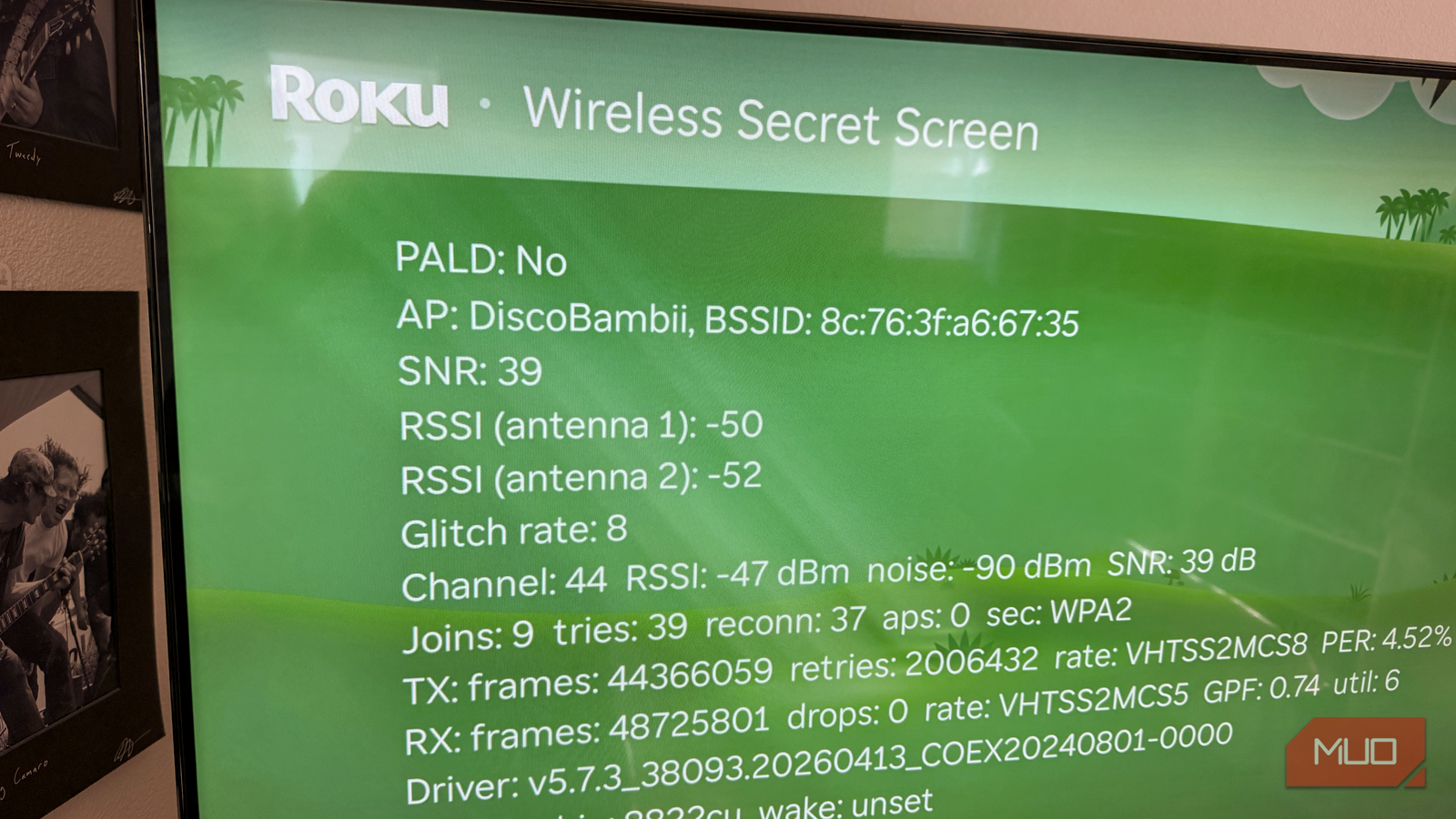
From the home screen, press Home ×5, Up, Down, Up, Down, Up and the wireless secret screen appears. It’s one of several hidden screens documented for years by people poking at Roku remotes, and easily the most useful. Where the official network check gives you a a very simple good/bad message, this screen shows raw radio telemetry: signal strength, noise, error rates, channel, and logs, all updating in real time.
These numbers refresh live, so you can leave the screen open if you want to move your router around or change settings and see how the readings change. It’s a lot more direct and clear than just making changes, rebooting the Roku, and using the network check.
Three numbers explained my buffering
SNR, RSSI, and PER tell you where the problem lives
The screen is dense, but three readings do most of the work. SNR (signal-to-noise ratio) measures your signal against background interference; above 20 dB is workable, above 40 dB is excellent, and below 20 dB is where buffering lives. RSSI is raw signal strength in dBm, where closer to zero is better; -50 to -70 dBm streams fine, and below -70 dBm you’re in trouble. PER is the packet error rate, the percentage of frames failing and getting retried, and you want it near zero.
The thing is, my signal readings were excellent. My SNR sat at 39 dB and my RSSI was at -47 dBm on channel 44, numbers that should deliver flawless 4K. The problem was further down the screen. The glitch rate read 8, the transmit PER was 4.52% with over two million retried frames, and the join counters showed the real issue: 9 joins, 39 tries, and 37 reconnects. My Roku had been silently dropping and rejoining my network dozens of times, which could indeed cause buffering and dropouts.
That’s a very different problem than weak Wi-Fi, and it probably explains why Roku’s standard advice about moving the router closer never helped in my case. The signal was fine, but the device’s wireless stack was flapping (rapidly dropping and reconnecting its network interface).
The fix was hiding behind a second secret code
A soft factory reset helped

Because the diagnosis pointed at the Roku rather than the router, the fix came from another hidden screen. Pressing Home ×5, Fast Forward ×3, Rewind ×2 opens the platform secret screen, which includes a soft factory reset: it clears caches and network state without touching your accounts or settings. Roku makes you type an on-screen confirmation code first, which makes sense for a button with “factory reset” in the name. Once I did this, my device restarted, pulled its channel and system updates, and came back in a few minutes with everything working as before.
Then I reopened the wireless secret screen again. The glitch rate was 0, as was the number of reconnects. Transmit PER was down from 4.52% to 1.45%, and the noise floor a little quieter at -92 dBm. The counters reset with a reboot, so those zeros get a partial asterisk. The evening test mattered more: by 6 pm my Streambar could see 44 access points, the noise floor climbed five ticks, and the glitch rate spiked to 36 as the neighborhood came home and got online. Exactly the conditions that used to bury my evenings in buffering, and the connection rode it out: reconn stayed at 0. I set about watching some Avatar: The Last Airbender to see how the buffering went. Two episodes in and it all looked pretty good. No buffering or reconnects that I could see.
If your readings show the opposite, a weak or noisy signal, the fix lives on the router side instead: reposition it, or get off the channel your router picked automatically, which can often be the worst one available. And if nothing budges the numbers, running a cable to the TV might be your best option.
Wireless Resets can bounce the Wi-Fi hardware without a reboot

Select the Resets button on the wireless secret screen, and you’ll find a Wireless Resets submenu: Driver reset, Chip reset and driver reload, Chip reset test, and P2P down. Driver reset restarts the Wi-Fi software stack, and the chip reset power-cycles the radio itself, a surgical version of unplugging the whole device that fixes a stuck connection without a full reboot.
Not every code out there works, either. The bitrate override menu (Home ×5, Rewind ×3, Fast Forward ×2) appears in every secret-screen roundup on the internet, but it did nothing on my Streambar running Roku OS 15.2. Judging by the community thread asking Roku to bring manual bitrate control back, it’s likely been retired from current firmware.
I understand why Roku hides this screen. The company’s whole pitch is simplicity, and a wall of dBm readings would terrify the average user faster than any buffering wheel. There are also plenty of ordinary Roku settings worth tweaking before you go spelunking in diagnostic screens, too.
But maybe a read-only version of this data could end up in the network settings, not behind a secret Konami-style code. The official check said everything was fine for weeks; three numbers on a hidden screen got to the real issue in one evening.

- Brand
-
Roku
- Operating System
-
Roku OS
- Downloadable Apps
-
Yes
- Resolution
-
4K
- Ports
-
USB, HDMI, Optical
- Audio codecs
-
PCM, Dolby Audio
