


I’ve been using Material Files as my default file manager for the longest time. However, the app does have its issues. For one, it directly deletes any files without sending them to the recycle bin, which has been an issue on more than one occasion.
When looking for a more feature-rich alternative, I came across MiXplorer, an open-source app that has everything you would expect from a file manager, and it’s completely free to use should you choose to skip the Play Store version of the app.
Cleaner UI, better than Files
MiXplorer’s interface prioritizes function over flash
At first glance, the visual style of MiXplorer feels very Android 4.x/5.x era with flat colored squares, dense text, and less breathing room, and it reads like a power user dashboard. However, I like that it prioritizes function over polish, giving you quick access to what you need to manage.
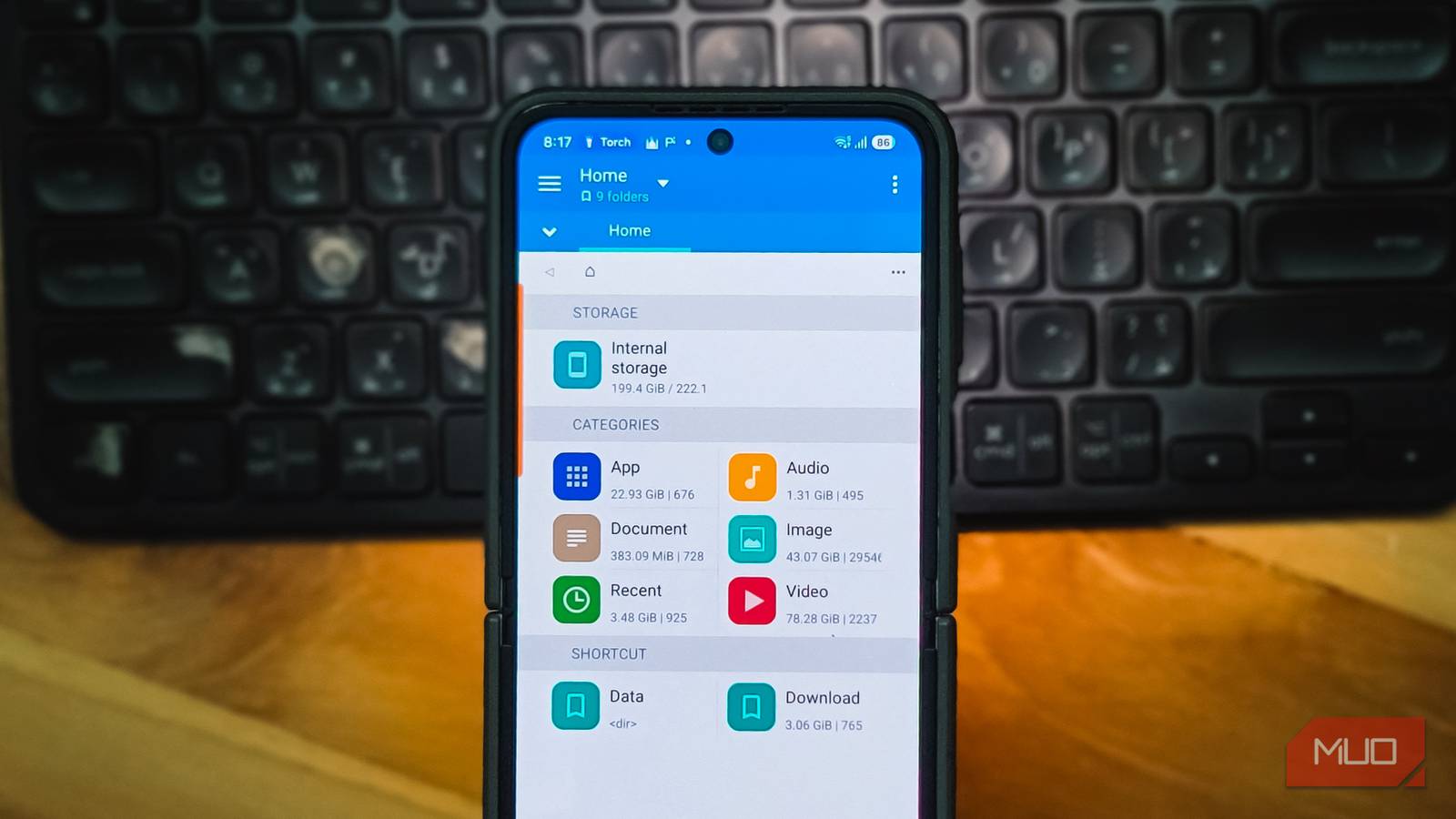
The home screen is split into three clear sections: Storage, Categories, and Shortcuts. Storage shows your internal storage with the used and total space right next to it. Categories break files down by type, showing how much space apps, audio, documents, images, and videos are eating up. So, if you need to quickly free up some space, this is a great place to start.
You can also access your categories with a quick swipe to the left, which opens the bookmarks side panel. This panel is more than just a shortcut drawer. It lists everything from internal storage and root access to individual app directories, your recycle bin, and even social media folders like WhatsApp and Twitter (Now X).
The bottom toolbar offers a search button, a view mode selector with seven layout options (compact, columned, detailed, wrapped, minimal, grid, and gallery), a button to create new items (folders, files, databases, encrypted containers, and more), and a sorting menu with options to arrange by name, size, date, or type. Google’s Files app, on the other hand, gives you a big Recent tab, oversized Material You cards, and not much else without scrolling.
MiXplorer is rich in features
Far more than the basics you’d expect from a file manager

Apart from the basics where you can find, copy, move, open, and delete files, MiXplorer sends your deleted files to its built-in recycle bin with an option to restore. You also get an option to permanently delete the file, but the recycle bin is an essential safety net that I wish Material Files had offered from the start.
The app handles archive files natively. You can pack and unpack ZIP, 7z, TAR, RAR, and a long list of other formats without needing a separate app. There’s also a built-in text editor, an ePub and PDF reader, an image viewer with GIF and SVG support, and even a media player.
The overflow menu reveals an undo button, a file filter, a lock option to secure the app, and a tools section. You can open your current directory in a terminal app, run an FTP/HTTP server to share files with other devices on the same network, or set up Auto Tasks that automatically copy or move files between folders based on rules you define. Useful if you regularly shuffle files between locations.
Quick access to cloud storage services
Manage files across multiple cloud accounts from one app

One of the things that drew me to MiXplorer was the idea of managing all my cloud storage services from a single interface instead of bouncing between separate apps. MiXplorer supports 19 cloud storage providers, including Google Drive, OneDrive, Dropbox, Mega, pCloud, and others. You add them through the bookmarks side panel by tapping Add storage and signing in.
I tested it with OneDrive first, and it connected without any issues. Files from my OneDrive account appeared right alongside my local storage, and I could copy files between the two with a simple drag and drop in dual-pane mode.
Google Drive is a different story. In 2024, Google restricted third-party API access, which means connecting MiXplorer to Google Drive now requires manually verifying the app through Google’s developer console. There are free workarounds, but it adds an extra step that most users will not want to deal with. Other cloud providers like OneDrive and Dropbox connect immediately with no fuss.
If you use multiple cloud services and want one place to browse and move files between them, MiXplorer handles it well. Just know that Google Drive is the one provider where the setup is not as smooth as the rest.
Plenty of customization
Tweak nearly every visual and functional element

MiXplorer’s default look can feel a bit dated, but the app makes up for it with deep customization. The skins system lets you change the color of nearly every element in the interface, down to individual text elements, section headers, and toolbar backgrounds. You can tweak colors using hex codes and style tags, or download community-made themes if you prefer something ready to go.
Skins can also be exported and imported as separate backup files, so you can move your custom look to a new device or restore it after a fresh install.
Beyond appearance, the customization extends to how the app behaves. You can choose which shortcut buttons appear in the toolbar and which ones stay hidden. The bookmarks panel is also customizable. You can create collapsible sections to group bookmarks together, which helps a lot if you keep a large number saved.
There is also a settings export/import feature covering general app preferences, kept as a separate file from skins and bookmarks. The three export types are independent, so you can restore your full setup (layout, colors, shortcuts, and preferences) without starting from scratch. The tweaking options are not the most intuitive at first, and there is a learning curve involved, but they give you precise control over both how the app looks and how it works.
MiXplorer is the only file manager you’ll ever need
MiXplorer is not the prettiest file manager on Android, and the learning curve is steeper than what you get with something like Google’s Files app. But once you get past the initial setup and configure it to your liking, it is hard to imagine going back to anything more basic.
If you have been putting up with Google’s stock apps due to the lack of better alternatives, MiXplorer is one app that delivers on the power-user promise without charging you for it. The free version from XDA is the full app with no limitations, and the paid MiX Silver on the Play Store exists as a way to support the developer.
