

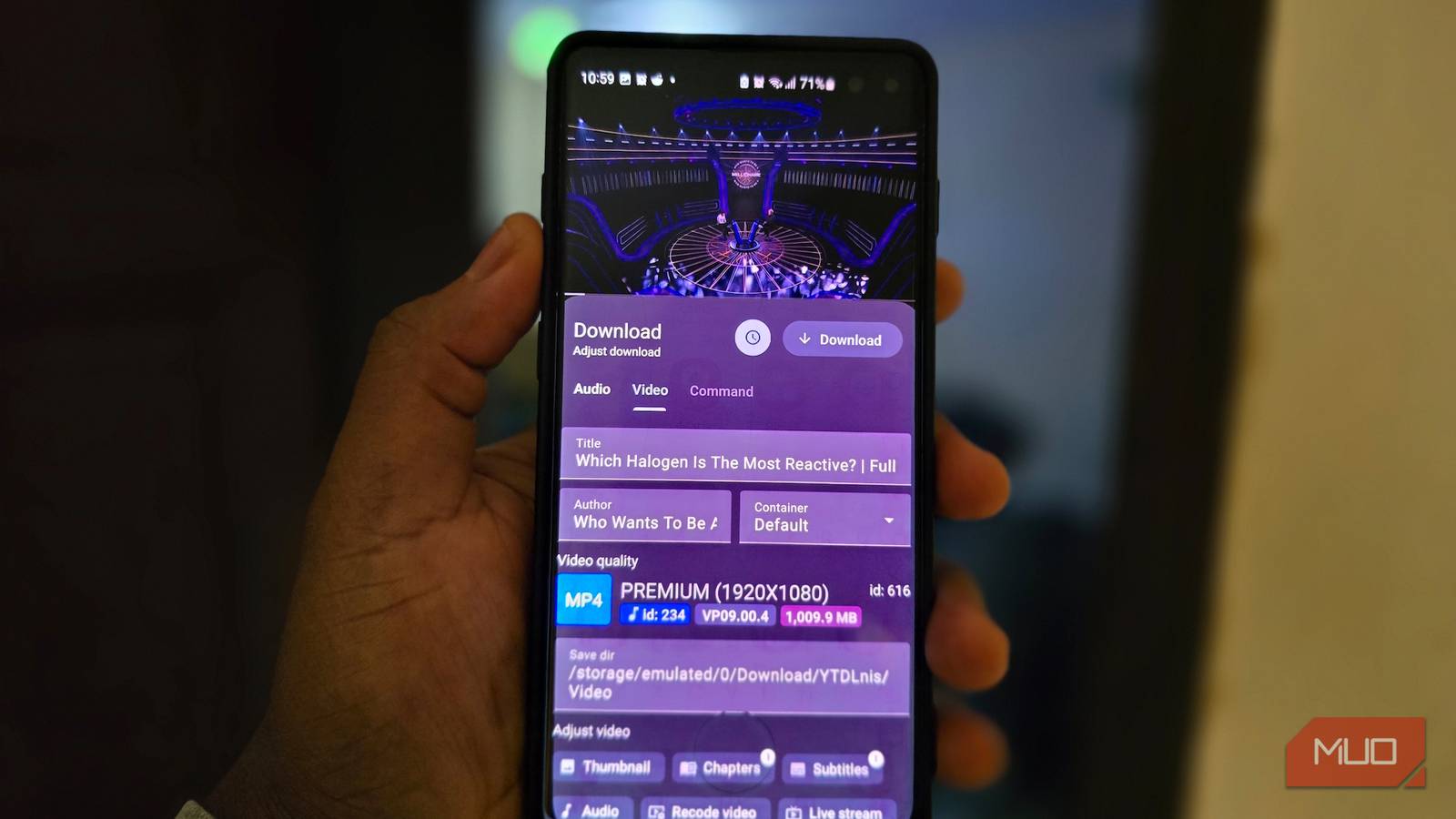

I’d always mentally filed yt-dlp under “excellent tool I’ll use when I’m already at a keyboard.” Its Android setup involves Termux, Python, pip, and optional FFmpeg, which is perfectly reasonable if you’re comfortable with the command line. I just don’t want to go through all of that when I’m on my phone and only need a local copy of a video I’m allowed to download.
Then I found YTDLnis. It wraps yt-dlp in a polished Android interface without sanding off the control that makes yt-dlp worth using in the first place.
Getting yt-dlp onto Android no longer feels like homework
The blinking cursor can sit this one out

YTDLnis is free, open source, and runs on Android 7.0 or newer. Installation involves grabbing the APK from the project’s official download page, installing it, and opening the app. I’d go with the GitHub release if you want YTDLnis’s built-in updater and the extra features that the stricter FOSS builds leave out.
That’s a very different setup from yt-dlp’s official Android route. Going that way means installing Termux, granting storage access, setting up Python and pip, then adding yt-dlp and optionally FFmpeg. The process isn’t especially difficult, but it assumes you’re comfortable using a Linux terminal on Android.

YTDLnis handles most of that plumbing for you. Version 1.9.0, current at the time of writing, bundles Python 3.14 in its GitHub and F-Droid flavors, while its package system can manage supporting tools such as FFmpeg separately from the main app. That’s handy because FFmpeg can handle several media jobs people often pay separate software for, including conversion, compression, audio extraction, and trimming. yt-dlp also gets its own update controls, so you don’t have to wait for a full YTDLnis release whenever an extractor needs fixing.
I’d still open the Updating section after installation and make sure yt-dlp is up to date. Websites change often enough to break extractors, and YTDLnis can either check for newer yt-dlp builds manually or handle those updates automatically.
Sharing a link is where YTDLnis clicks
The Share button does most of the heavy lifting
The everyday workflow is quite straightforward for an app built around yt-dlp. When I find a page with media I’m allowed to save, I tap Android’s Share button and send the link straight to YTDLnis. You can also paste a URL or search from inside the app, but sharing directly became my default pretty quickly.
YTDLnis pulls in the available information and opens a Download Card where you can choose audio or video, change the filename and destination, pick a format, and start the download. Video options can expose the container, codec, estimated file size, subtitles, chapters, and available audio tracks. For audio, you can use the source thumbnail as cover art, crop it into a square, or split an upload with chapters into separate tracks.
Seal also does the straightforward open-source Android video-downloading job well, but YTDLnis separates itself once you dig into its format controls. Tapping the format itself opens a much deeper selection of resolutions, containers, codecs, and estimated file sizes laid out together, so you can choose exactly what you want without translating that decision into a string of yt-dlp arguments. That was the point where it stopped feeling like a basic Android downloader to me.
The same applies to a lot of its other controls. You can embed subtitles, give playlists reusable filename templates and their own folders, queue several downloads, schedule them for later, process entire playlists, and run multiple jobs at once. The queue keeps the active download’s progress and ETA visible alongside anything waiting or scheduled.
You don’t have to configure every download manually, either. Quick Download can immediately start a job using your preferred defaults, while the deeper controls are there when you need them. From the Download Card, you can trim a file using timestamps or chapters, add metadata and thumbnails, split it by chapters, or use SponsorBlock to skip sponsored segments and other marked sections from the finished file.
You may set up sensible defaults first and leave the deeper controls for the downloads that actually need them. That keeps the normal workflow quick while still giving you access to yt-dlp’s finer controls when you want them.
The terminal is still hiding underneath
The command line kept a spare key
YTDLnis could have been a perfectly fine friendly front end for yt-dlp, but it gets much more interesting once you realize how easily it lets you reach back into the tool running it.
Command templates let you save reusable yt-dlp arguments, while Extra Commands can tack raw options onto downloads you configure through the GUI. I tried that with a simple --embed-metadata template, and it showed up right inside the Download Card’s Command tab. If YTDLnis doesn’t expose some niche flag you depend on, you can still use it without abandoning the graphical workflow.
Version 1.9.0 also reworked the built-in terminal around Termux’s terminal view and Android’s shell. I could open it and run yt-dlp --version the same way I would from a regular shell, with packages such as Python and FFmpeg available there too.
There’s a nice bit of irony in that. I installed YTDLnis because I didn’t want to type yt-dlp commands on my phone, and yet the terminal is sitting there for the rare moment when I actually want one.
Cookies get a graphical treatment too. YTDLnis can create a cookie record through an in-app browser session for sites that require authentication, and it can import cookies you already have. I’d treat that as a way to access your own signed-in session, not as a workaround for DRM or other access controls.
I’d keep the GUI and the escape hatch
YTDLnis hasn’t changed how I feel about yt-dlp on a PC, where scripts and precise command-line control still make plenty of sense. It has changed how I think about using yt-dlp on Android.
Most of the time, I’d rather share a link, pick the format I want, and get on with my day. If I eventually need some obscure flag, a saved template, or a real terminal session, YTDLnis still gives me access to all of it. I just don’t have to greet every download with a blinking cursor.
