



Whether it’s a movie or a playlist, streaming Atmos passes through your plan, your hardware, and an app setting before it reaches your speakers or headphones. Any of them can drop it to 5.1 or stereo, and you might not even notice at first.
Dolby Atmos is a surround format that lets mixers place each sound in three-dimensional space, overhead included. On streaming services, it rides inside Dolby Digital Plus, a lossy codec, so even a perfect setup won’t match the lossless TrueHD track on a 4K Blu-ray. It also isn’t the same thing as Netflix’s spatial audio, a separate headphone feature. And because the Atmos data sits on top of a regular 5.1 or 7.1 mix, anything in the chain that can’t read it simply plays the mix underneath.
Your subscription decides before your hardware gets a say
Ad-free doesn’t automatically mean Atmos
The first clue as to whether you should be hearing Dolby Atmos is the Atmos badge, and even that isn’t consistent. HBO Max shows Dolby Vision and Dolby Atmos right on the title page, while Netflix won’t even show you the badge unless you’re a Premium subscriber and the device you’re viewing it on (not my Mac) supports it, too. In other words, the badge might be missing even if you’re paying for it. I couldn’t find the badge on Disney Plus, even though I’m pretty sure we pay for the top tier account.
Netflix requires Premium for Atmos, but neither the plan picker web page nor the pricing page says anything about it. The requirements for Atmos can be found in a separate help article, which shows the ad-free standard plan stops at “good” sound quality. HBO Max requires Premium to get Atmos audio, and some cable providers don’t sell Premium, so you may be out of luck if you’re going through a cable system.
Amazon only puts Atmos on ad-free accounts, according to MacRumors, and the ad-supported tier streams Dolby DIgital 5.1 only.
As for audio, Apple Music supports it in the standard subscription, and has a ton of Spatial Audio tracks, too. Amazon Music Unlimited has thousands of tracks mixed in Dolby Atmos, but requires the Unlimited tier subscription. Tidal supports Dolby Atmos in both individual and family plans. Spotify, however, doesn’t support Dolby Atmos.
Make sure you have the right tier to get Atmos; HBO Max Standard, for example, is ad-free, but still doesn’t enable Atmos.
Your TV is the most likely place Atmos gets flattened
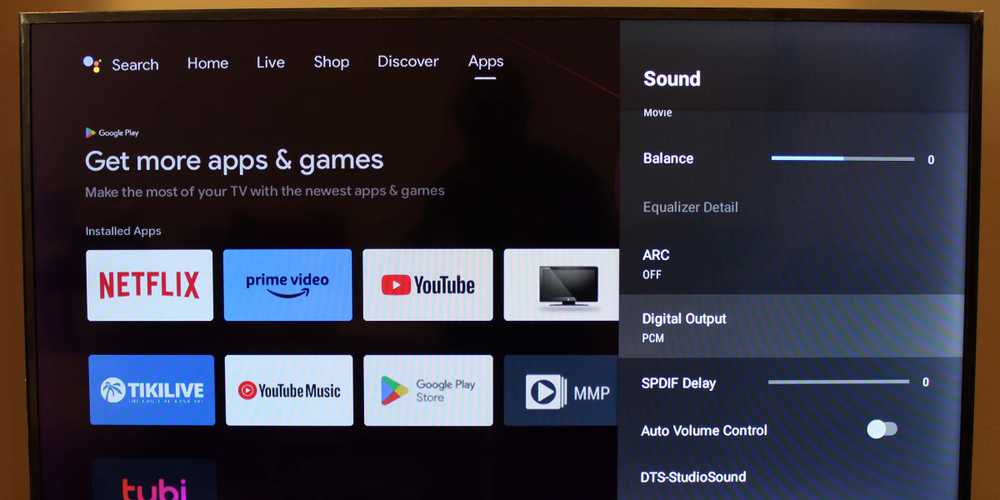
Samsung’s support page says that PCM outputs only to left and right channels, you’ll want to pick Auto or Pass-through at Settings > All Settings > Sound > Expert Settings > Digital Output Audio Format.
LG calls it Digital Sound Out, and LG itself says PCM limits output to two-channel audio; Auto or Passthrough both carry Atmos, and Pass-through skips the TV’s own system sounds.
On a Roku TV, you’ll need to drop into Settings > System > Audio > S/PDIF and ARC, Auto pass-through may convert formats your soundbar doesn’t report as supported to stereo PCM.
Sonos says some TVs won’t pass Atmos even when the source can, and usually re-encode it to Dolby Digital 5.1.
Your cables matter less than you might think, unless we’re talking optical cables. Roku says optical is limited to stereo PCM or compressed 5.1. Plain ARC cables work just fine to decode the Atmos services typically embed in Dolby Digital Plus, according to What Hi-Fi.
If you have eARC, it can be off by default, so you may have to set it up to make sure it’s outputting Dolby Atmos.
Streaming boxes play it safe when they aren’t sure
Mobile and computers rely on the apps

FIre TV will drop to stereo output if it doesn’t detect Dolby support, though you can still force Dolby Digital Plus. Roku’s volume modes can force stereo, but you can also check Settings > Audio > Digital output format.
Apple TV 4k needs a path your TV might not have, so you can check to see if your box is set to Dolby Digital 5.1, which re-encodes everything to compressed 5.1, which doesn’t include Atmos. Tidal says Apple TV’s Atmos output doesn’t work over HDMI ARC and needs eARC. If your TV is ARC only, you can put the Apple TV into the soundbar’s HDMI input instead and see if that helps.
On phones and computers, the app decides what you hear. Netflix supports surround on Windows, but only in Edge or via the netlix app. Chrome finally got 4K but still lacks Dolby Atmos.
Netflix says you can install Dolby Access, then set Spatial sound to Dolby Atmos for home theater or Dolby Atmos for Headphones under Settings > System > Sound.
Your headphones only matter if the app can recognize them.
Further, your headphones only matter if the app can recognize them. Apple Music’s Automatic setting plays Atmos, but only with Apple or Beats Bluetooth headphones and select built-in speakers. Wired or other headphones need Always On set in Settings > Apps > Music > Dolby Atmos.
Spotify doesn’t offer Atmos in any form, so if it sounds like spatial when you’re listening through your AirPods, it’s likely Apple’s Spatialize Stereo is processing regular stereo.
Netflix doesn’t do Atmos on headphones, but its sparate spatial audio feature (Premioum-only) only works with headphones from the brand of the mobile device, like AirPods or Beats with iPhones, Pixel Buds Pro with Pixels, and Galaxy Buds with Samsung Galaxy phones.
Even with all the fixes, you’re probably still compromising
Streaming audio, including Atmos, isn’t lossless by definition, even when all the settings are correct. Netflix also points out that not every title on its service has Atmos in every language. With headphones, Atmos is a virtual render, so sticking with the stereo master makes sense.
If you have a Sonos system, you can generally find if it’s getting Atmos in Now Playing and About My System. Apple Music’s Now Playing screen will only say Dolby Atmos if your headphones (like these great Technics EAH-A1000s) are capable of it.
Just remember to work in order: check your plan, your TV output, your TV box settings, your cables, and then your app.
