


Many computer operating systems have built-in programs created by the manufacturer that can handle specific tasks. But there are other apps that you can use that will handle all kinds of files at once.
One such app is VLC, the open-source media player that supports a huge number of file types. You can look at videos and pictures, listen to music files, and even stream videos. It’s a popular media player for all kinds of computers.
However, I was getting sick of VLC freezing all the time, and eventually, stumbled upon Kodi—and I haven’t looked back.
Kodi can handle tons of files
Organization is key
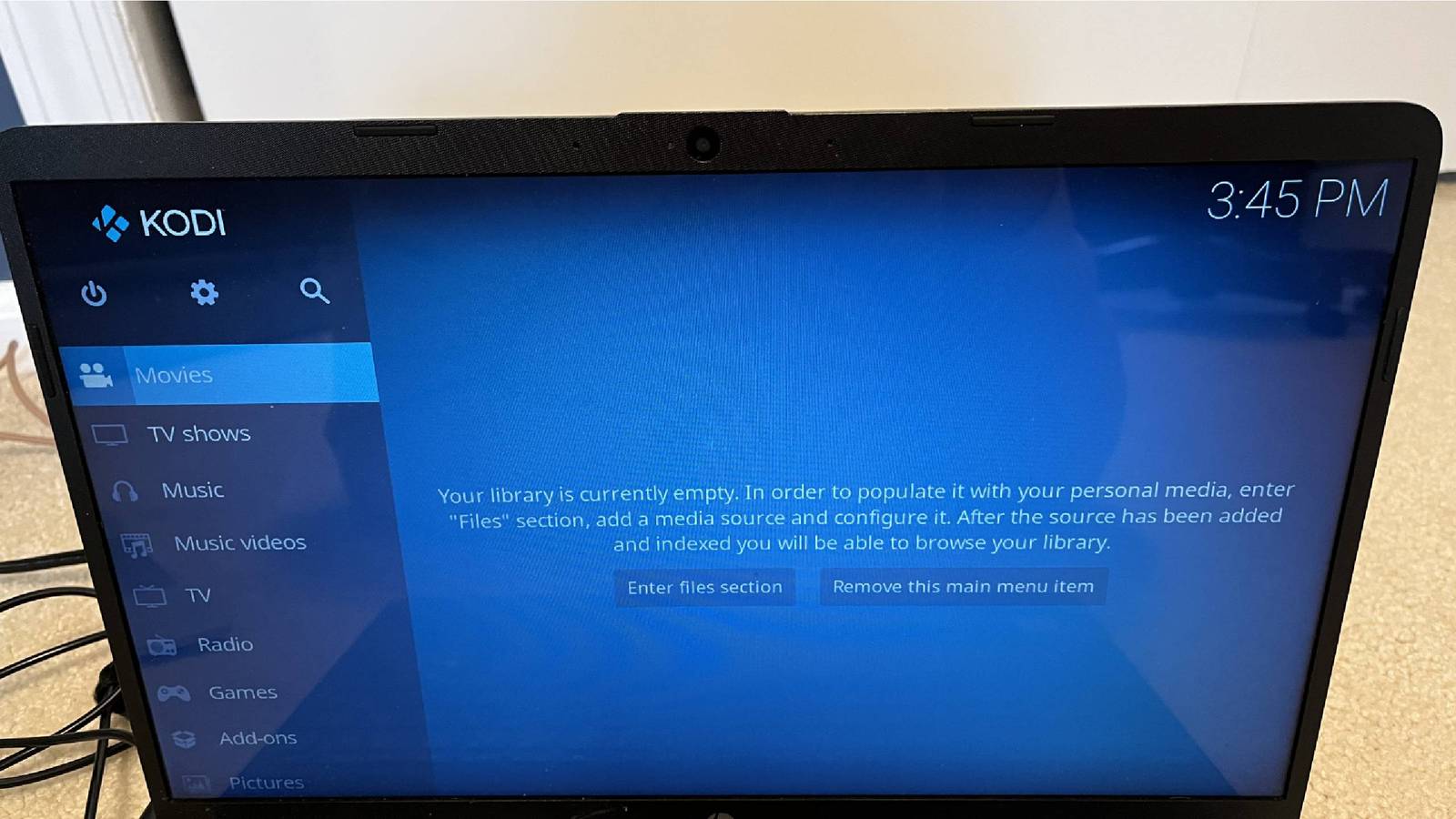
Kodi works on macOS, Windows, Linux, Android, Raspberry Pi, iOS, tvOS, and webOS, so you’ll be able to get the most out of it no matter where you decide to boot it up. I used Kodi on my Windows laptop and found it to be simple and easy to set up. Once I downloaded and installed Kodi, it opened up full screen on the computer, making me feel immersed in the content.
Once I began to poke around, Kodi felt less clunky than VLC. VLC has menus that resemble those from older operating systems; it feels fresh and exciting. The side menu lists all the different file types Kodi supports, such as Movies, TV Shows, Music, and so on.
You can store all your files in their corresponding menus, making it simple to find what you’re looking for whenever you need it. The great part about this is that Kodi works across platforms, meaning you can upload it to your Windows laptop and then watch it on your Apple TV 4K. You can also install Kodi on any smart TV.
Another feature I really like is that if you’re storing your own files, Kodi can import metadata from the web about them. Let’s say you’re adding movies or TV shows that you’ve downloaded. You can upload them to Kodi, and it’ll add a movie poster and background information about the cast to the file.
These are the Kodi features that really make the switch worth it
It can do more than store

Watching your personal stash of movies and TV series isn’t the only thing that Kodi can do. It can take almost any audio and video file and organize, label, and store it for you. If you want to showcase your photo albums from a recent trip, upload them to Kodi and display them on a projection screen or large TV for everyone to see. I recently did this after a trip and, rather than screen mirroring my phone and having it come out a bit blurry, I uploaded the albums to Kodi and flipped through them with ease.
Kodi aims to keep you engaged in the app, so you don’t leave and use other apps. But it doesn’t do that using dark patterns or negative loops. It’s just really quite useful.
For example, want to know what the weather is like near you? Log in to Kodi and, after selecting a weather service, Kodi will not only give you what the weather is like at that moment but also what it will be later in the day. Alternatively, if you’re tired of relying on cable or streaming services to stay up-to-date on shows, you can utilize Kodi’s PVR function to stream and record live TV through integrations with backends such as MediaPortal, MythTV, NextPVR, and Tvheadend. Along with saving live TV, you can save your entire music library in one place. You don’t need to go to iTunes separately and listen to your music.
It also supports high-end audio and video files, including 4K Ultra HD, Dolby Atmos, Dolby Vision, and HDR. I had only expected Kodi to store audio and video files, and I was pleasantly surprised at all it can handle.
Kodi provides users with everything in a well-designed and organized layout. The side menus are easy to read, and the fact that it opens in full-screen mode is a significant advantage, as you can focus on the files you want to view or upload to store. You can also change the appearance with different skins, giving you the ability to customize your player.
VLC is great, but you’re not stuck with one media player
I’ve used VLC for a long time, but sometimes, you just need a change. Given how good Kodi is and how well it organizes my movies and TV library, it was a no-brainer to make the switch. So, if you’re finally looking to make the break from VLC, I’d strongly suggest you give Kodi a try.

- OS
-
Windows, macOS, Linux, Android, iOS/iPadOS, tvOS, Android TV, Raspberry Pi, …
- Developer
-
XBMC Foundation
- Pricing model
-
Free, open-source
- Initial release
-
June 29, 2004
Kodi is a free, open-source media-center application that enables you to organize, stream and play videos, music, and photos from local or network storage on a wide range of devices. It supports plug-ins, live TV/DVR, and a “10-foot” user interface optimized for TVs, while being self-hosted and under your control.
