

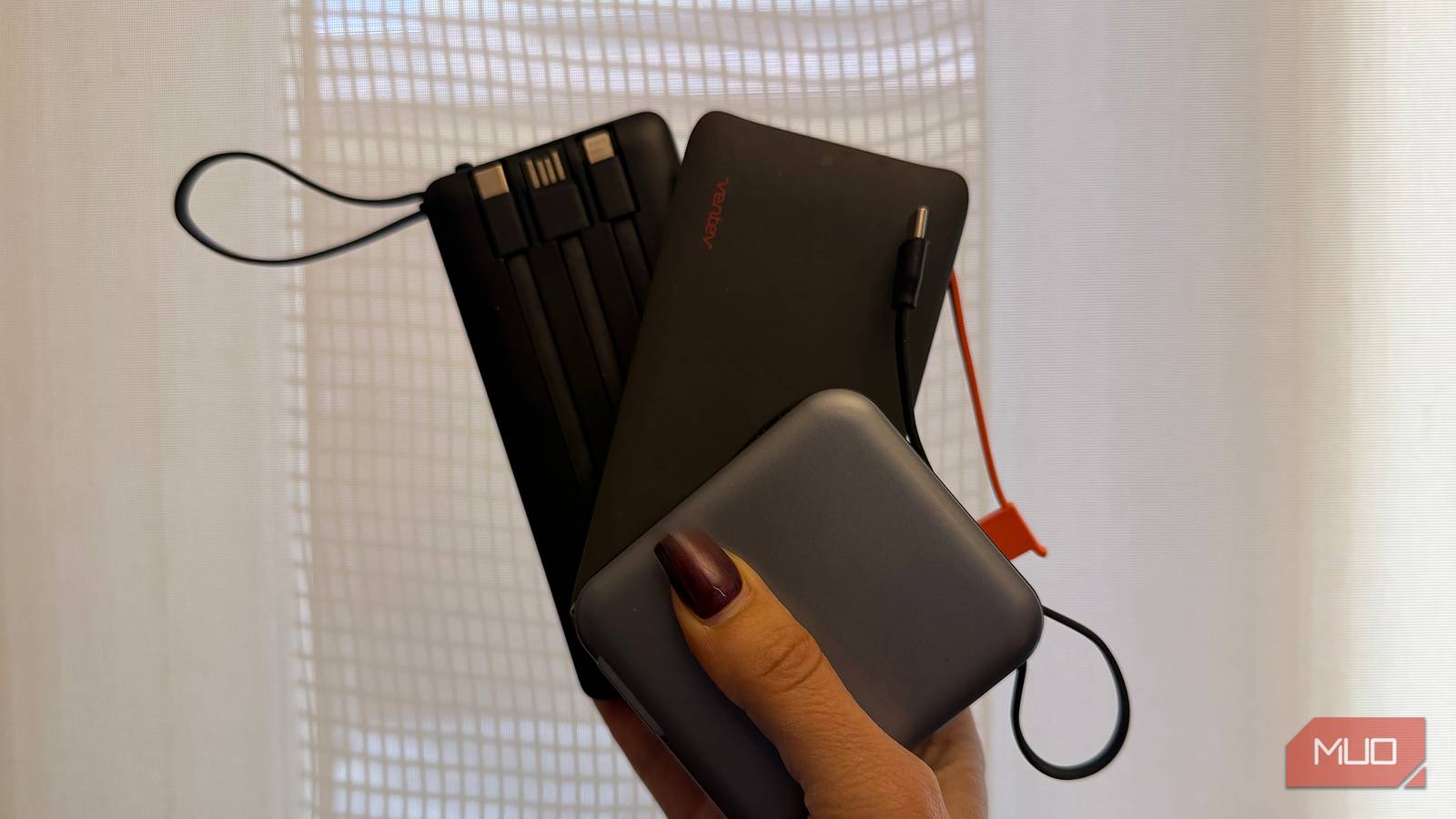

I own a good dozen portable power banks that I have acquired over the years. Shockingly, they all still work, even if the ones I bought a decade or more ago are slow to charge and have smaller than ideal battery capacities. Some have multiple ports; the newer ones add niceties like MagSafe capability, built-in screens to show charging status (and more), and other important features your next power bank needs to have. But almost all of them have one thing in common that I find crucial to a portable power bank: a built-in cable.
Before you argue that built-in cables are prone to damage, fraying, or fail to work over time, I have not experienced this with any power bank of the kind that I own. The cables fit neatly inside so they’re protected from damage when not in use. Further, most power banks with built-in cables have secondary USB-A or USB-C ports for using your own cable as well, as a backup or when you happen to have one nearby. That means even if the built-in cable goes kaput, the charger is still functional. There are a few reasons I find a design with built-in cables to be essential.
No cable needed
Forgetting cables isn’t an issue
How many times have you needed to charge something, gone digging through your bag, and realized you have forgotten the necessary cable? It’s happened often to me, so much so that I now keep duplicate backup cables for important items in my travel backpack, so I don’t run into the problem again. This includes USB-A-to-USB-C, USB-C-to-USB-C, an Apple Watch puck charger, and even a 3.5mm headphone adapter. But what happens when you’re headed out for a day trip and want to pop your power bank into your purse, fanny pack, or pocket? Are you going to coil a cable around it, too?
If a power bank has built-in cables, you don’t have to worry about messily bringing along a separate one. What’s more, if you forget, you end up carrying around dead weight you can’t even use. There’s nothing more frustrating than pulling out a power bank to recharge your phone at somewhere like a concert or outdoor event only to realize you don’t have the necessary cable. Instead, you’re left with loads of power in your hands with no way to get it to your phone.
Convenient charging
Neat and tidy
Most power banks with cables have them recessed inside the unit in a clever way. I have one, for example, that has three different built-in cables that line up in recessed slots in the back for pulling out as needed. Another one has the cable built into the side of the square unit that can also be pulled up to double as a hook. The latest models have retractable cables that disappear into the unit, then extend as needed for an even longer length. Bottom line: they don’t add any bulk or make the power banks awkward to carry.
Now, picture carrying a power bank in your pocket with a cable sticking out. Chances are you’ll opt for a super short cable for easily stuffing it into your pocket or bag, which limits how you can use the phone while it’s charging. If you use a longer cable so you can keep the charger in your bag while you use your phone connected to it, the cable can easily disconnect as you move, which gets annoying really quickly. It can also easily get tangled. A built-in cable stays in place.
Other viable charging options
Keep it powered

Built-in cables, or at least one built-in cable, is a non-negotiable for me when it comes to a portable power bank. In fact, I recently got a powerful 65W high-output power bank that has some really cool features, except for a built-in cable. On a recent business trip to Sweden, I chose to leave it at home and take a less powerful one with a built-in cable instead. Another power-related feature I love, though it isn’t a dealbreaker, is built-in AC plugs. Use this to recharge the power bank directly from an outlet in places like the airport or train. While at the airport on the same aforementioned trip, a young woman plugged her phone into an outlet by the floor while waiting in line for the ladies’ washroom. It would have been far simpler, not to mention more sanitary, to plug in a portable charger instead, so it never touched the floor.
With the latest iPhones and Google Pixel 10 series phones offering built-in MagSafe/Pixelsnap charging, along with other Android devices (and older iPhones) compatible with MagSafe cases, built-in wireless charging is worth using, too. A few power banks I have incorporate wireless charging surfaces as well, a useful backup if there’s no built-in cable, and you forget one at home. This will charge at a slower rate, but it’s better than nothing.
Power on the go
Built-in cables are essential

Portable power banks are so convenient: I often travel with multiple ones to keep me stress-free, especially for trips when I know I’ll be out and about from day to night. That might be at a trade show for work or on a beach vacation while listening to tunes from my phone and a Bluetooth speaker. Note that power banks need to be in your carry-on luggage when traveling by air. It’s a good idea to take them out of your bag and put them into the tray at the security checkpoint since they can trigger a bag check (especially if you travel with multiple ones like me!) Built-in cables lighten the load without adding bulk. They’re convenient and, in my opinion, the most essential feature of any power bank beyond offering sufficient power.
