


Close Menu

    Subscribe to Updates

    Get the latest Tech news from SynapseFlow

    What's Hot

    NASA to Cover 34th SpaceX Resupply Mission Space Station Departure

    June 13, 2026

    Majority Move M4 review: an underwhelming JBL Xtreme competitor

    June 13, 2026

    Capability Access Manager taking up storage in Windows 11

    June 13, 2026
    Facebook X (Twitter) Instagram
    • Homepage
    • About Us
    • Contact Us
    • Privacy Policy
    Facebook X (Twitter) Instagram YouTube
    synapseflow.co.uksynapseflow.co.uk
    • AI News & Updates
    • Cybersecurity
    • Future Tech
    • Reviews
    • Software & Apps
    • Tech Gadgets
    synapseflow.co.uksynapseflow.co.uk
    Home»Reviews»WhatsApp introduces parent-managed accounts for pre-teens
    WhatsApp introduces parent-managed accounts for pre-teens
    Reviews

    WhatsApp introduces parent-managed accounts for pre-teens

    The Tech GuyBy The Tech GuyMarch 12, 2026No Comments1 Min Read0 Views
    Share
    Facebook Twitter LinkedIn Pinterest Email
    Advertisement


    Today, WhatsApp unveiled parent-managed accounts for pre-teens. These are currently rolling out globally, and they come with new controls to limit pre-teens’ WhatsApp experience to messaging and calling.

    Advertisement

    Parents will set up the pre-teen’s account, and the account will be controlled by the parent, including by deciding who can contact the account and which groups they can join. Parents can also review message requests from unknown contacts and manage the account’s privacy settings. All of this is gated by a parent PIN on the managed account.
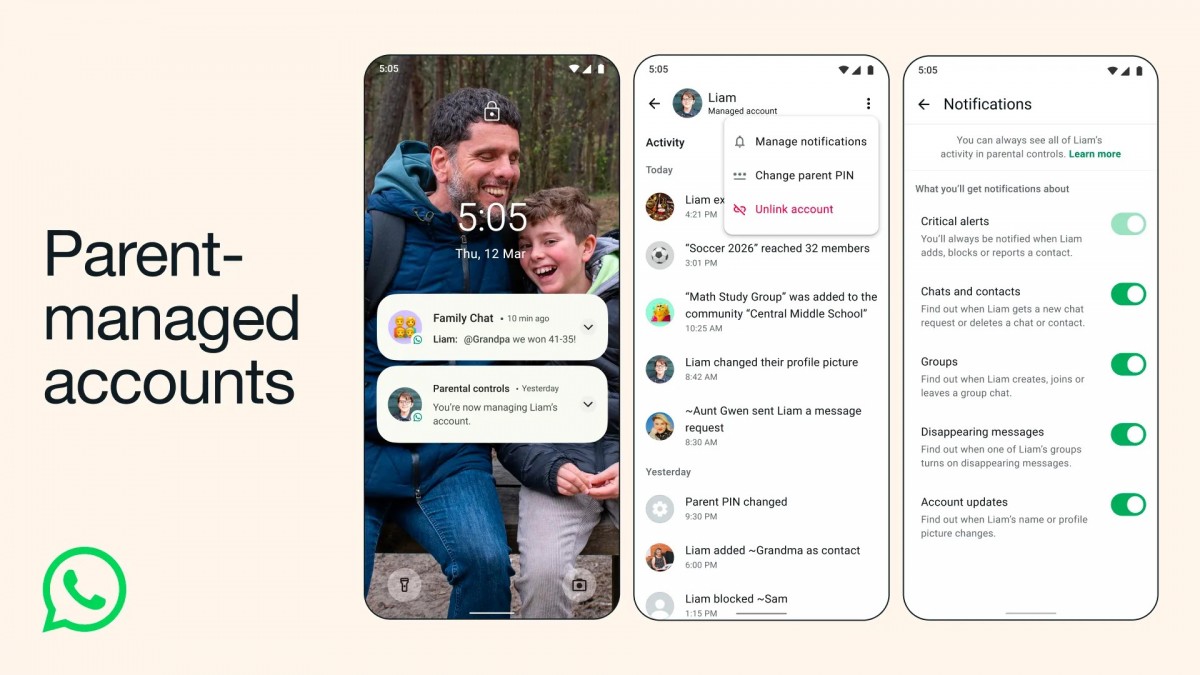
    WhatsApp introduces parent-managed accounts for pre-teens

    As usual with such rollouts, it might take a while before this becomes available to you. To use it, download WhatsApp on your child’s device and when setting up an account you need to select More options and then “Create a parent-managed account”. Then you register and verify your child’s number, and enter their birthday and confirm their age. After that, you’ll scan a QR code on their phone that will link their WhatsApp account with yours, and create your six-digit parent PIN.

    Source

    Advertisement
    Share. Facebook Twitter Pinterest LinkedIn Tumblr Email
    The Tech Guy
    • Website

    Related Posts

    Majority Move M4 review: an underwhelming JBL Xtreme competitor

    June 13, 2026

    Samsung is finally bringing a basic Android feature to Galaxy phones

    June 12, 2026

    Amazon’s Echo Hub just became the control freak your smart home needed

    June 12, 2026

    vivo X Fold6 confirmed to feature a special edition Dimensity 9500 SoC

    June 12, 2026

    Corsair Galleon 100 SD review: Stream Deck meets K70, complete with all the bells and whistles

    June 12, 2026

    The Galaxy Watch Ultra 2 could be a battery champion

    June 11, 2026
    Leave A Reply Cancel Reply

    Advertisement
    Top Posts

    You don’t need a NAS to self-host — I proved it with hardware from my closet

    June 7, 202672 Views

    Spotify is giving one of its best playlists a big visual upgrade to give subscribers ‘a closer connection’ to its New Music Friday curators — and I think it could be the update it’s always needed

    June 12, 202618 Views

    The iPad Air brand makes no sense – it needs a rethink

    October 12, 202516 Views
    Stay In Touch
    • Facebook
    • YouTube
    • TikTok
    • WhatsApp
    • Twitter
    • Instagram
    Advertisement
    About Us
    About Us

    SynapseFlow brings you the latest updates in Technology, AI, and Gadgets from innovations and reviews to future trends. Stay smart, stay updated with the tech world every day!

    Our Picks

    NASA to Cover 34th SpaceX Resupply Mission Space Station Departure

    June 13, 2026

    Majority Move M4 review: an underwhelming JBL Xtreme competitor

    June 13, 2026

    Capability Access Manager taking up storage in Windows 11

    June 13, 2026
    categories
    • AI News & Updates
    • Cybersecurity
    • Future Tech
    • Reviews
    • Software & Apps
    • Tech Gadgets
    Facebook X (Twitter) Instagram Pinterest YouTube Dribbble
    • Homepage
    • About Us
    • Contact Us
    • Privacy Policy
    © 2026 SynapseFlow All Rights Reserved.

    Type above and press Enter to search. Press Esc to cancel.

    Ad Blocker Enabled!
    Ad Blocker Enabled!
    Our website is made possible by displaying online advertisements to our visitors. Please support us by disabling your Ad Blocker.