



Security researchers at Bitdefender have demonstrated three attack techniques in which Windows’ bind links can be used to evade endpoint detection and response (EDR) products.
Bind links are a legitimate Windows feature implemented by bindflt.sys and used by Store apps, Windows Sandbox, and Windows containers. They are a kernel-level redirection mechanism creating a virtual path that transparently maps onto the real backing path.
However, if the bind link is altered so the backing path points to a file controlled by an attacker, then that file is accessed effectively invisibly. Under certain circumstances, this could lead to loading hidden malware while all the system sees is a visible link pointing at a known innocuous file.
For example, report the researchers, if the backing path is, “Pointed at a DLL, it becomes file-binding: a process loads an attacker’s file from a path it trusts.”
The security problem arises because defenses are heavily reliant on paths. If it is a valid and expected Windows path, most defenses ignore or allow it. Bind links appear to be valid, so they are ignored even though they may have been manipulated to invisibly lead to malicious content. “The attacker changes file resolution and lets a trusted Windows component do the rest.”
It should be said that Microsoft assessed Bitdefender’s findings as low severity since it requires admin access. Bitdefender’s response is that criminals regularly obtain administrator access.
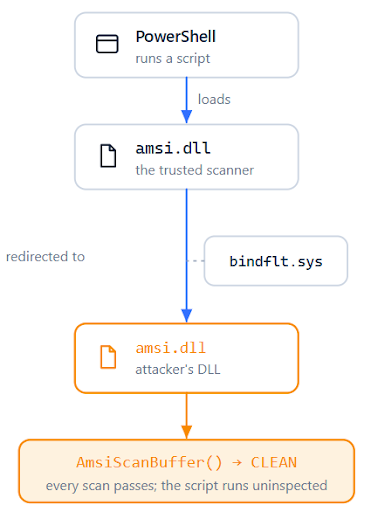
Bitdefender researchers describe three attack techniques that manipulate bind links. The first is ‘file-binding’, or simple path hijacking. Using this technique, the researchers provide an example of defense evasion – specifically evading AMSI.dll (the Antimalware Scan Interface). PowerShell is one of the Windows apps that invokes AMSI to check its script (others include Windows Script Host, the JavaScript and VBScript engines, and Office macro execution paths).
PowerShell normally starts and loads amsi.dll to scan script content before execution. But if an attacker has prepared the battlefield, a bind link will hijack the link and redirect it to the attacker’s fake dll. This is invisible to normal user-mode and most EDR file-system monitors. Scanners usually see the virtual path as if it were the real one, while receiving data from the false backing path without knowing it.
AMSI can be neutralized without doing anything to it or PowerShell; and it doesn’t simply apply to AMSI – any DLL path that is trusted by another process can be targeted with a bind link redirecting to whatever the attacker wishes to be used.
The second attack technique is termed ‘process-binding’. It is file-binding applied to executable images (and could be used to by-pass EDR detection). If the process trusts the file path as the target, a bind link can redirect it to a meaningless file. Winver.exe would be a good example and is often used in other disguised attacks.
When the EDR is loaded, it checks the file path and assumes it to be correct. So, it ‘believes’ it is examining what it should examine but actually looks at the harmless winver.exe. It finds nothing amiss, and moves on. The file containing the attacker’s instructions becomes invisible to the EDR and the user. “A kernel process-creation callback fires, a product records the image path, a policy engine checks whether that path is trusted, a UI tool displays the process by the path it got from the kernel. If the reported path is the source path, the process looks like the trusted executable,” explain the researchers.
But there is one problem with this approach. Although invisible to the EDR, the link is global and can be detected by other scanners. “A scanner, analyst, or EDR component that re-opens paths can notice the inconsistency.” To solve this, say the researchers, “The attacker needs two filesystem views: one where the trusted name resolves to the payload, and another where the payload path resolves back to the clean file.”
This can be provided by Bitdefender’s third attack technique: silo-binding. It requires a user defined Windows silo, which is not a simple task but can be achieved if an attacker has already gained administrator level access.
A silo gives the processes it contains an isolated view of the system: its own file paths, registry, and object names, walled off from everything outside. A bind link within the silo is not a global link and cannot be detected outside of the silo. The result is that a path can resolve to one file within the silo, but a different file everywhere else.
Inside the silo, the attackers can point to their own malware. But that malware can be detected by scanners operating from outside the silo. This is prevented by a second link redirecting from the payload back to the clean original file. The effect is the attackers’ payload can be run but cannot be detected by scanners operating outside the silo.
“The two links describe opposite journeys for the same pair of files, and the bindflt.sys decides which one applies depending on the execution context. Inside the silo, opening the trusted path gives the payload, so the malicious code runs. Outside the silo, any tool that goes looking for the payload is quietly redirected to the clean original,” explain the researchers.
They give examples of how silo-binding can subvert built-in Windows security defenses: AppLocker bypass, Windows Firewall bypass, and Sysmon poisoning. Then they tested whether an EDR would detect standard Mimikatz. Without silo-binding, it did – which was to be expected. But with silo-binding, it did not.
Bind links are a legitimate and valuable tool within Windows. But they also provide attackers with a strong post-compromise evasion tool. The most powerful technique is silo-binding, which extends both file-binding and process-binding. Bitdefender disclosed its findings, but Microsoft classifies the threat as low severity because it requires local administrator privileges.
Bitdefender’s response is to point to the BYOVD (bring your own vulnerable device) attack method. This also requires administrator access, but has become a common, industrialized, and ‘standard’ component of modern ransomware attack playbooks. Requiring admin access is not ‘game over’, says Bitdefender. “(BYOVD) is not a nation-state level of sophistication: by now most professional ransomware groups have an EDR killer in their toolkit and reach for it as a standard step before encryption. Bind-link abuse hands those same attackers another way to blind the endpoint agent that needs no vulnerable driver at all, only a documented Windows feature and the administrator rights they already have.”
Related: Microsoft Teams Relay Servers Abused in DragonForce Ransomware Attack
Related: ‘BlackSanta’ Malware Activates EDR and AV Killer Before Detonating Payload
Related: Ransomware Groups Increasingly Adopting EDR Killer Tools
