


There are plenty of premium streaming boxes to choose from, including the Apple TV 4K, Google TV Streamer, and Fire TV Cube. But undoubtedly, one of the best options on the market is the Roku Ultra.
Not only is it one of the most affordable, but it also offers most of the premium streaming features people actually want, such as Dolby Vision and Dolby Atmos support, and Wi-Fi 6. It also comes with more powerful hardware than its streaming stick counterparts, the Roku Streaming Stick Plus and the Roku Streaming Stick 4K.
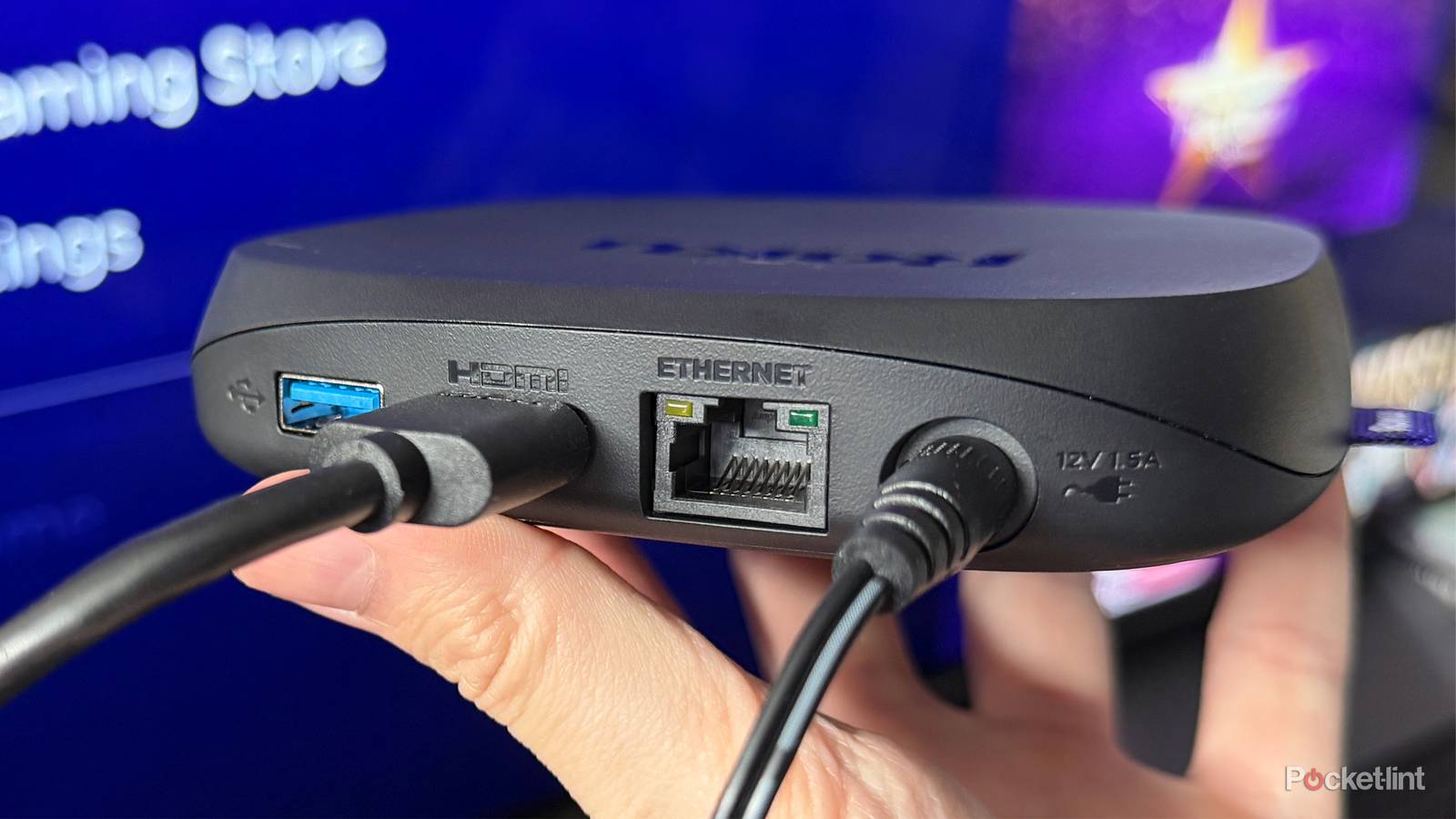
Another advantage the Roku Ultra has is that, because it’s a streaming box rather than a stick, it has ports, including a USB 3.0 port and an Ethernet port. While the USB 3.0 port is handy if you want to watch your own media on the Roku Ultra, I want to focus specifically on the Ethernet port, because it can be a bit deceptive.
Yes, the Ethernet port on the Roku Ultra is useful if you want a reliable, hardwired connection to your router, but just because the Roku Ultra has an Ethernet port doesn’t necessarily mean you should use it. Like the Ethernet port on many smart TVs, the Roku Ultra’s Ethernet port has a glaring limitation.

- Dimensions
-
4.9 x 5.0 x 1.0 inches
- Connective Technology
-
Bluetooth® streaming, 802.11ax dual-band MIMO Wi-Fi 6 (2.4 GHz / 5 GHz), 10/100 Base-T Ethernet
- Brand
-
Roku
- Audio outputs
-
Digital stereo over HDMI, DTS Digital Surround pass through over HDMI, Dolby Atmos decode via HDMI (with compatible speakers)
The Roku Ultra has refreshed for the first time since 2021. A new backlit remote, faster performance, and Wi-Fi 6 support separate this 2024 edition from the past generation.
The Roku Ultra’s Ethernet port could be slower than your Wi-Fi
The Ethernet port has a speed limitation

Typically, you’d associate an Ethernet port with faster internet speeds than Wi-Fi. After all, it connects directly to your router, so there’s no wireless interference to worry about. However, the claim that a wired Ethernet connection is always faster than Wi-Fi isn’t universally true, and it certainly isn’t the case with the Roku Ultra.
Here’s why: the Roku Ultra’s Ethernet port supports only 10/100 Ethernet. In practical terms, that means it tops out at a 100 Mbps download speed. On the other hand, the Roku Ultra also supports Wi-Fi 6, which can deliver significantly faster download speeds than 10/100 Ethernet, assuming your internet plan is fast enough to take advantage of it.
So yes, you can run an Ethernet cable to your Roku Ultra for a more stable connection, but it may not necessarily be faster. If your Wi-Fi is strong, chances are you won’t notice any meaningful difference. In some setups, depending on your home’s layout and network configuration, wiring your Roku Ultra could be more hassle than it’s worth.
Should you use Ethernet or Wi-Fi on your Roku Ultra?
There’s an easy way to find out

If you’re curious whether it’s worth connecting your Roku Ultra to Ethernet, there’s a simple way to find out: run an internet speed test on your device.
To do this, go to Settings > Network > Check Connection on your Roku Ultra. When you select Check Connection, your device will automatically begin testing its internet connection. After it’s done, you’ll receive a report in the About section, and there are two things in particular you should look at to see if it’s worth connecting it to Ethernet. Those are your Roku Ultra’s Signal strength and Internet download speed.
If you run the test and your Roku has a “Good” or “Excellent” signal strength and its download speed is above 100 Mbps (as you can see in the image below), you’re fine to continue using Wi-Fi and shouldn’t worry about using the Ethernet port.

Conversely, if your signal strength is poor and the download speed is less than 100 Mbps, then opting for Ethernet is your best bet. When I ran the test, I got a connection speed of 267 Mbps, more than double what the 10/100 Ethernet port could offer, and excellent signal strength, so I discovered connecting my Roku Ultra to Ethernet isn’t really worth it.
In all fairness, most streaming services only require around 25 Mbps of download speed for 4K streaming, so the Ethernet port on the Roku Ultra is fast enough to handle that. But if you’re looking to save yourself the hassle of wiring an Ethernet cable to your router (which can be really easy or very hard, depending on your home and where your router is) and your Wi-Fi is faster than 100 Mbps, you really don’t need to worry about using it.
This same philosophy applies to smart TVs, as many of them come equipped with a 10/100 Ethernet port like the Roku Ultra.
Personally, I keep devices like my gaming PC and PS5 connected to Ethernet because they have Gigabit Ethernet ports that can actually take advantage of faster network speeds and provide a stable connection for downloading large games and playing multiplayer titles. But for 4K streaming, Wi-Fi standards like Wi-Fi 5 and Wi-Fi 6 are more than capable of delivering the connection speed you need without using an Ethernet port, provided there is a good signal to your router.
