

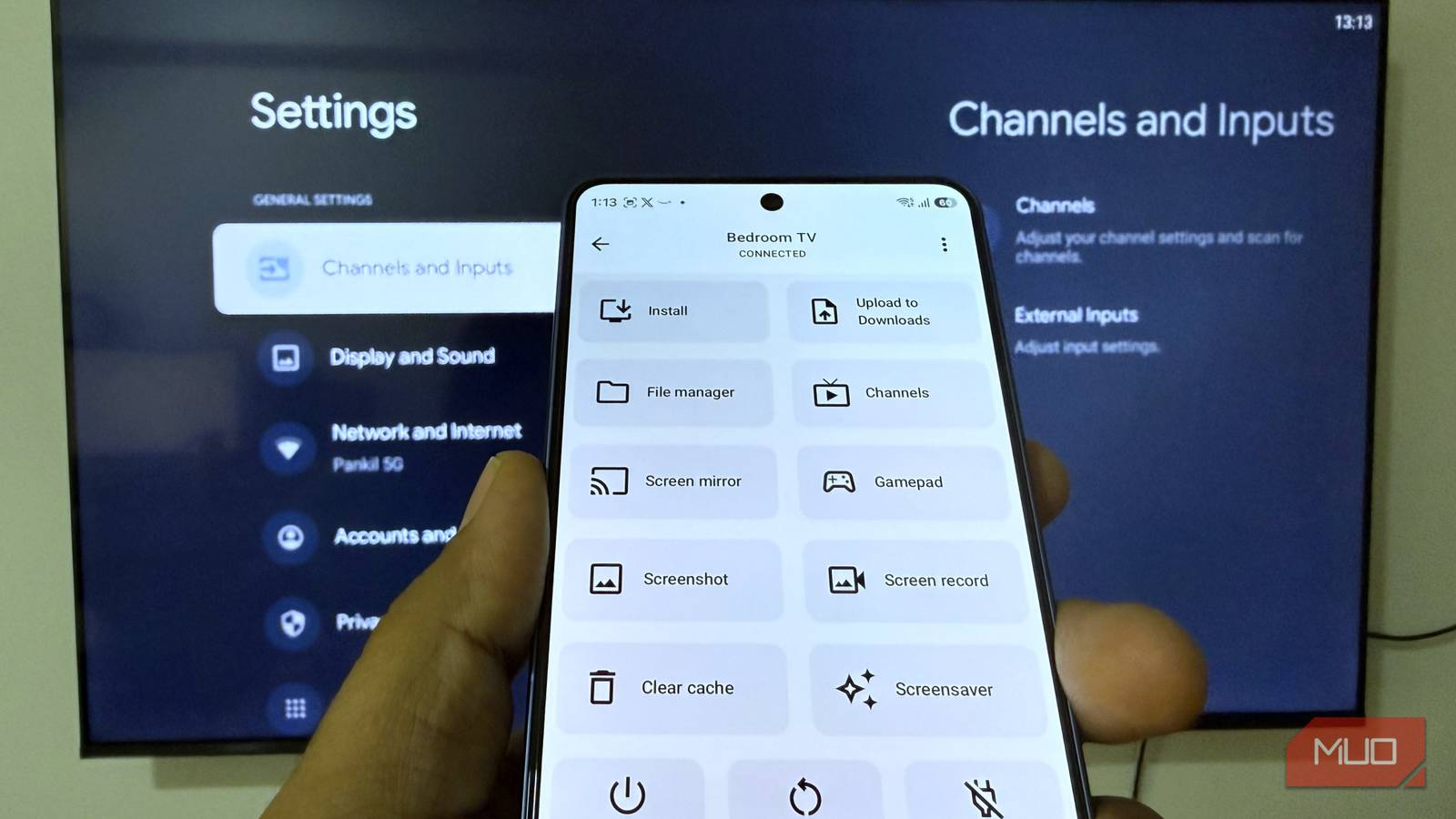

Android TV is great when you’re just watching something. The moment you try to manage it, though, things become slightly clunky. You have to rely on the boring remote to navigate a layered interface, which feels annoyingly slow. Also, things like sideloading apps, moving files, and even taking a simple screenshot aren’t as direct as you’d expect.
atvTools solves this exact problem. Instead of interacting with your Android TV’s interface, it lets you manage it directly from your phone, where everything feels faster and more intuitive.
Setting up atvTools on your phone is as easy as it gets. Simply download the app on your phone, make sure your phone and TV are connected to the same Wi-Fi network, and choose your Android TV once it appears. In most cases, that’s all you need to do. If your Android TV doesn’t appear as an available device, though, enable USB debugging in the Developer Options menu and try again.

- OS
-
Android, iOS
- Price
-
Free, Pro version available
Manage TV apps and files remotely
Skip your TV’s interface
Google Play Store already lets you install apps directly on your TV from a phone or computer. But if you ever need to sideload an app, things get unnecessarily complicated. You first need to download the APK file on your phone or PC, transfer it to your TV using an app like Send Files to TV, and then use a file manager app to install it.
With atvTools, the whole process is much more simple. You can head to its Install tab, select the APK file downloaded on your phone, and install it directly. There’s no need to transfer it or install it manually.
Managing apps already installed on your TV is just as smooth. Instead of diving into your TV’s settings, go to the Apps tab in the atvTools app, and you’ll see all the options you need. From here, you can open the app, create its shortcut, uninstall it, and even manage its permissions.
There’s also a File Manager option, which lets you browse your TV’s local storage directly on your phone. This lets you easily transfer files between your phone and TV. And it doesn’t just stop here. The Info tab in atvTools gives you information like your TV’s storage status, CPU and RAM usage, and even network speeds. It’s the kind of monitoring you don’t realize you were missing until you actually have it.

If your TV has Bluetooth, you need to install this free app
This app makes the TV experience so much smoother
Capture screenshots, run shell commands, and clear cache
No need to touch the TV remote


Android TV is quite flexible, no doubt about that. But there are some tasks that take too many steps to be convenient. For instance, anytime I need to capture a screenshot of what’s on my TV, I need to rely on the TCL TV app, which is not the most convenient solution. atvTools, on the other hand, not only lets me take screenshots but also record the screen.
Running shell commands on an Android TV is another thing that requires a bit of setup. You have to enable developer options, connect via ADB, and use a computer or terminal app to finally run any command. It works, but it’s not exactly user-friendly.
avtTools simplifies this with a dedicated Shell tab. From here, you can run commands directly without any setup. There’s even an option to bookmark commands you need frequently so you don’t have to type them again and again. Even things like clearing your TV’s cache and mirroring your phone’s screen take only one tap.
Use your phone as a TV remote or gamepad
No need to find the lost remote


The Google TV app already lets you use your phone as a remote. But with atvTools, there’s no need to switch apps because it has a built-in remote feature. Plus, there are also shortcuts for things like Power Off, Restart, and Sleep, which save you from digging through menus.
Where it really stands out, though, is the gamepad feature. Instead of simply mimicking your remote, your phone can also act as a controller for games. Of course, it’s not a replacement for an actual gaming controller, but for casual games or even trying cloud gaming, it’s more than ideal.
You’ll need the Pro version to do most things
atvTools has replaced a bunch of single-function TV apps on my phone. But if you really want to make the most of all these features, you’ll need to upgrade to the app’s Pro version. That’s because most of its features, like app management, remote control, screen recording, and gamepad are only available with the upgrade.
atvTools Pro is priced around $2 on Android, while the iPhone version is available for $1 upfront. The good thing is, it’s only a one-time purchase and for the convenience it brings, I feel it’s worth it for anyone who has multiple smart TVs in their home. It works with Fire TV devices in a similar way, so you’re not limited to managing Android TVs only.
If I had one complaint about the app, though, it would be stability. Initially, I ran into a fair share of connection issues, random crashes, and instances where the app simply refused to open. But ever since then, it’s been running smoothly, and I hope it stays that way.
