


While working, I try to touch my phone as little as possible. This keeps me focused. But the problem is that messaging does not stop just because I am at my desk. And setting up every messaging app on my PC individually means I have to download each app separately and keep them running all the time.
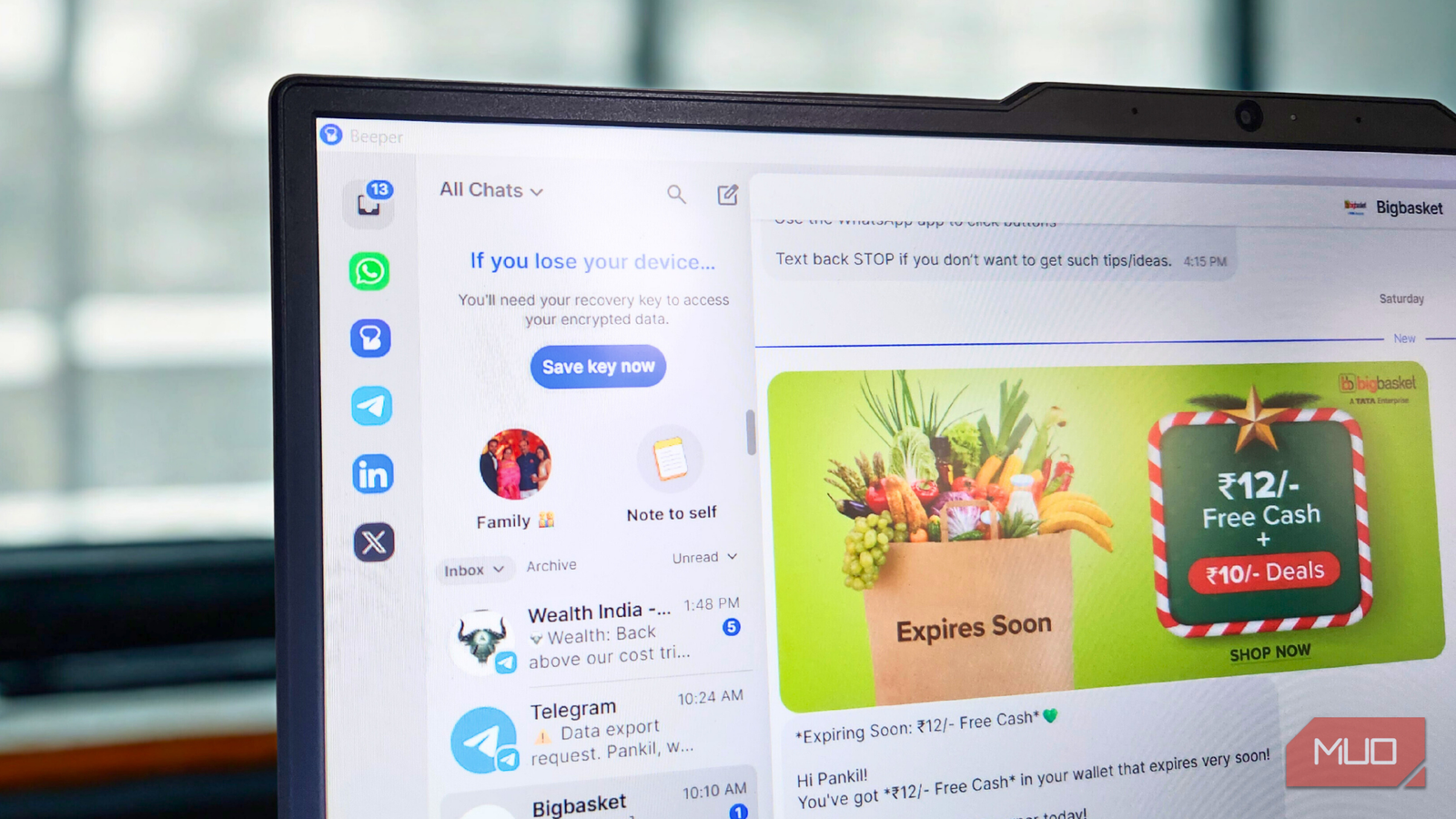
So instead, I did something better. I moved all the messaging services I use to Beeper. Now, all my conversations live in a single window, and I don’t have to switch half a dozen apps just to communicate.

- OS
-
Android, iOS, Windows, macOS, Linux, and ChromeOS
- Price model
-
Free, subscription available
Beeper is an all-in-one chat app that brings all the popular messaging services including WhatsApp, Slack, Messenger, Telegram, and more.
Beeper solves a major problem with messaging
All your inbox in one

The biggest issue with modern messaging is not a lack of apps. It’s actually the opposite. There are far too many apps. Most of my family members are on WhatsApp. Work lives on Slack. Old friends refuse to leave Messenger. Then there are a few people in my circle who swear by Telegram.
This means that, like most others, I have to keep half a dozen apps installed on almost all my devices to stay in touch. Beeper solves this problem. It brings all the popular messaging services under a single interface. This includes WhatsApp, Messenger, Telegram, Google Messages, Signal, Instagram, Discord, Slack, LinkedIn, and a few others.
The best part is, Beeper works everywhere. Android, iOS, Windows, macOS, Linux, and ChromeOS are all supported. It’s also free to use, though there’s a Beeper Plus subscription that unlocks a few extra features.
Easy setup, beautiful interface, and no chaos
Messaging, finally without the mess
Getting started with Beeper does take a bit of time, but it’s still simple. You first need to create a Beeper account and then connect your messaging services one by one. Apps like WhatsApp, Telegram, and Google Messages use device linking to mirror your messages, while platforms like Instagram, Messenger, and Slack require you to log into accounts.
On the free tier, Beeper lets you add up to 5 accounts, which is plenty for most people. But if you upgrade to Beeper Plus, that limit increases to 10 accounts.
Once you’re done with the setup, all the messages from the connected services appear in the All Chats tab. You can also start new conversations or search for a specific one from here. If you don’t want texts from a specific service mixed into All Chats, there’s even an option to exclude that service.
If you want to view your chats on individual services, you can select the messaging service from the left pane or jump between them using keyboard shortcuts like Ctrl + Alt + 1, Ctrl + Alt + 2, Ctrl + Alt + 3, and so on.
I personally keep Beeper open at all times on my second screen. This way, I can simply glance at it and know if I’ve received anything important. What I like the most, though, is the ability to pin conversations from different services. This lets me get to key individuals and groups across platforms in a flash.
Setting up Beeper on an Android or iPhone is just as easy after this. You simply need to download the app, sign in to your Beeper account, and all your connected messaging services will appear right away.
It’s privacy-friendly and has a few extra features
Privacy first, convenience included

Earlier, Beeper relied on something called Beeper Cloud. The app would first connect to Beeper Cloud, and Beeper Cloud would then connect to the messaging network. While it worked, privacy was a major concern with this setup.
That’s no longer the case. Beeper now encrypts messages on your device itself, so you don’t have to worry about them passing through an external server.
You also get a few extra perks for using Beeper over the standalone apps. For instance, its Incognito Mode lets you read messages without triggering read receipts. Send Later lets you schedule messages even if the messaging service doesn’t support scheduling. Chat Reminders can help you circle back to important conversations, and Voice Transcription converts voice messages into text. The only catch is that these are all part of Beeper Plus, which costs $9.99 a month.

I didn’t realize just how much I was spending on subscriptions until I tried this free website
A free app ended up saving me hundreds on subscriptions.
Beeper still has limitations
None of us are prefect

Beeper’s biggest limitation is the lack of native iMessage support. Currently, it only works through Beeper for Mac, which makes things slightly difficult for anyone who relies on iMessage.
Performance can be hit or miss too. You might sometimes receive messages late, miss a few notifications, or like me, experience problems setting up certain services.
Then there’s the pricing. While the free version covers all the basics, a lot of the useful features are locked behind a subscription. For instance, if you want to connect multiple accounts from the same network, like two WhatsApp numbers, you can’t do that on the free tier.
I like using Beeper because it solves one of my biggest issues, which is staying on top of messages while working on a PC. Using Beeper on my phone is just as good, but I haven’t felt the need to rely on it there, since I already have individual apps set up on my phone.
