

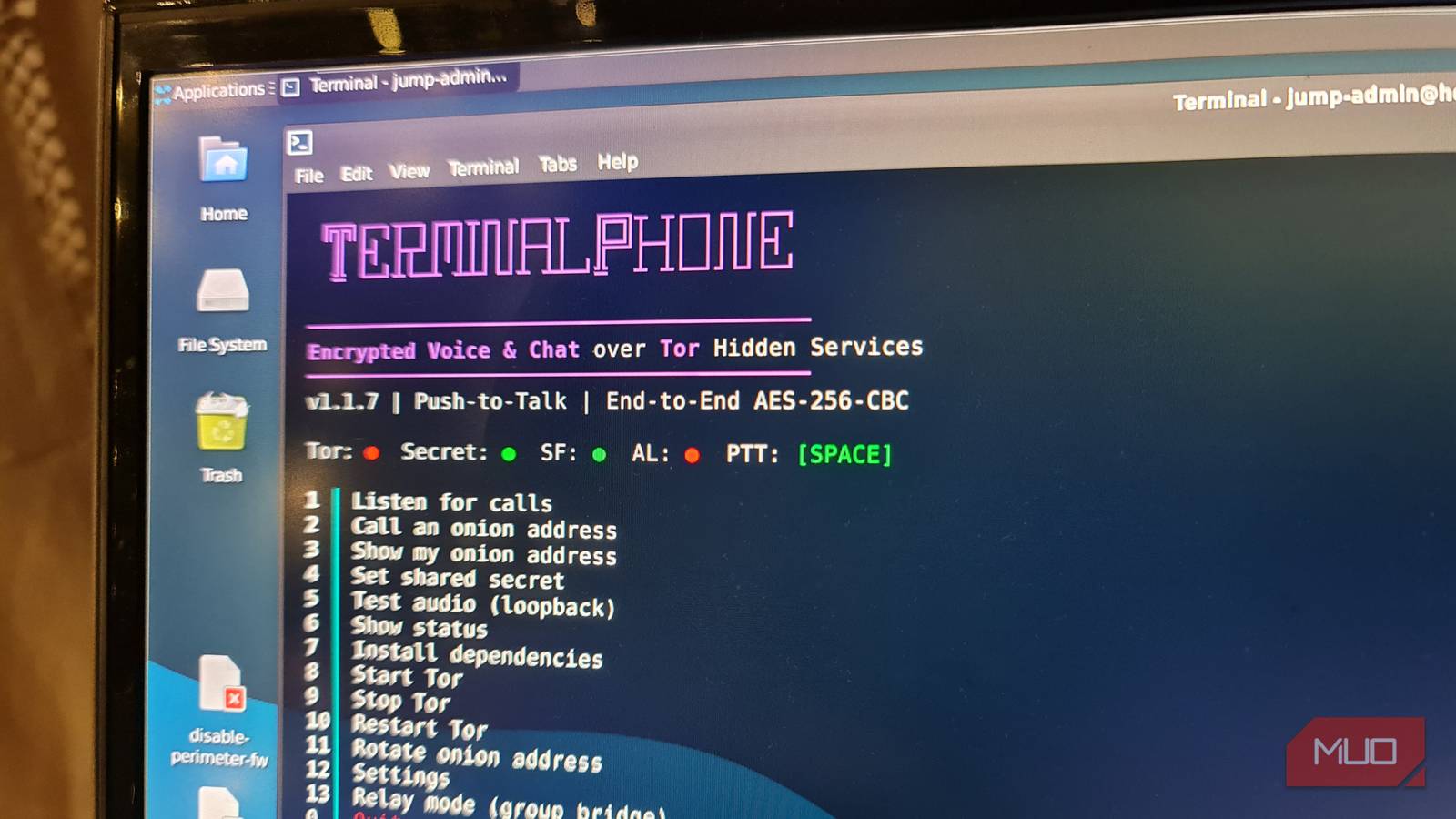

I had no real serious use case for TerminalPhone, and it only popped up on my radar when searching for walkie-talkie-type tools for smartphones. But the idea of turning a Linux terminal into a push-to-talk voice and text messenger that works over the Tor network was just too interesting not to want to try to get it working.
Most privacy-focused messenger tools try to look like polished modern apps, but TerminalPhone goes completely in the opposite direction. It reminds me a little bit of terminal-based web browsers in that there’s no real effort made to make it look fancy.
TerminalPhone is basically a Bash script with a terminal interface, Tor hidden services, encrypted messages, and short voice recording functionality. There’s no phone number required to set it up, no chat bubble waiting for your friendly messages, and absolutely no contact lists.
Given that TerminalPhone only required three commands to install and get working, I anticipated it would be a quick little tick-and-flick experiment. However, what surprised me was how quickly a simple Bash script became a lesson in getting Tor working, ports, and why these weird privacy tools are never quite as plug-and-play as they look.

How to Build a Chat App With React and Firebase
Utilize the powerful combination of React.js and Firebase to build a chat application.
I only wanted to see if a Linux terminal could really feel like using a walkie-talkie
The PTT functionality was there, but it’s what happened between the two terminals that makes this tool so unique
For products supposedly “privacy-focused”, end-to-end encrypted messengers always want something from you before you can talk to anyone. That’s usually an account, or a phone number, a username, or, at the very least, an app you have to download.
TerminalPhone needs none of that. Unlike other decentralized chat platforms like Speek, which still require an app, you only need a Linux terminal and the ability to connect to the Tor network. Here’s how I saw it working in practice:
- Install the TerminalPhone Bash script by cloning its GitHub repository.
- Make the script executable.
- Run the script and install its dependencies.
-
Let it start its own Tor process and generate an
.onionaddress link. - Set a secret that must be used on both your node and your contact’s node.
- Share your address or the generated QR code with the other node.
- Set one node to listen, and the other to dial.
- Connect the two nodes through the Tor network and send encrypted and compressed voice and text messages.
That last part is the one I really wanted to test. Because I wasn’t trying to replace any of the mainstream messaging apps, I just wanted to see how on earth two Linux terminals could find one another and strike up a conversation.
I did kind of assume that at least a sound card and a microphone would be needed to make it work, and that audio wouldn’t magically pass through an SSH session. So, I started with my Linux desktop running on a mini PC as the first node, and spun up a WSL Debian Linux session on my Windows Server to act as the second node.
Unfortunately, my own tendency to overcomplicate things turned a simple one-hour-long project into an entire evening of troubleshooting.
The biggest gotcha was that Tor was already running
TerminalPhone starts its own Tor process, and I made that harder than it needed to be

The installation was not the difficult part. In fact, it’s ridiculously easy with essentially three commands:
git clone https://gitlab.com/here_forawhile/terminalphone.git
cd terminalphone
chmod +x terminalphone.sh
The confusing part was, in effect, my own fault, as I overcomplicated things by installing and testing Tor first. After I confirmed it was working and connecting properly, I launched TerminalPhone, but instead of a working app, it just crashed and hung over and over.
It turns out the issue was my own testing process. I had started the normal system Tor first, which made perfect sense to me at the time. Before blaming TerminalPhone, I wanted to prove the Linux desktop could actually connect to Tor at all. The catch was that TerminalPhone also starts and manages its own Tor process to simplify installation.
Both wanted the same local SOCKS port:
127.0.0.1:9050Because the normal Tor service I installed already had that port, TerminalPhone’s own Tor instance couldn’t even start. From my perspective, it looked like the script was broken. In reality, I was the one who broke it by having an existing Tor session tie up the SOCKS port.
Thankfully, the fix was easy once I understood the issue. Just stop the existing Tor service and relaunch TerminalPhone:
sudo systemctl stop tor tor@default 2>/dev/null
cd ~/terminalphone
bash terminalphone.sh
After that, TerminalPhone loaded fine, and I was able to install the dependencies straight from the menu, allowing its own Tor process to bootstrap properly and generate the identity it needed.
Text worked fast, but voice messages took a little longer to arrive
TerminalPhone doesn’t have the convenience of a chat app, but it was also never meant to

TerminalPhone allows you to connect to another Linux terminal running the Bash script, so long as you have its generated .onion address. It can record a short voice message by holding down the spacebar, then compress it on release, encrypt it on the device, send it over Tor, and reverse the process at the other end.
So yeah, it’s hardly instant messaging or even “walkie-talkie” speeds, but the delay is part of the tradeoff. That delay exists because the data is transmitted securely, anonymously, and because of that decentralized model, there’s no account, phone number, or chat server sitting in the middle.
Once both nodes were up and running happily, I exchanged contact details using the .onion identity and QR code that TerminalPhone conveniently generated for me. I set the Linux desktop terminal to listening mode, and dialed in from the WSL Debian instance.
First, I sent a basic “Hello!” text message, which appeared almost instantaneously on the second node. Then I recorded a short 10-second voice message on the Linux desktop node, which took about 30 seconds to reach the second terminal.
All things fair, 30 seconds isn’t a huge delay given the extensive routing that’s going on between each terminal. And the voice is actually what gives TerminalPhone its walkie-talkie personality. Instead of hitting a PTT button on a physical radio, you hold down the spacebar in a Linux terminal. And rather than my raw voice being sent over the airways (or internet) to be intercepted by whoever happens to be listening in, my voice messages stay safe and encrypted throughout the journey. Yeah, it’s slower, but it’s also far more secure, and something that’s bound to appeal to privacy-focused individuals.
TerminalPhone is more experimental than an everyday messenger, and that is fine
I probably will not use it often, but it’s not designed for people like me

I don’t need TerminalPhone in my day-to-day life. That’s because I already have easier ways to message people that don’t involve opening up a Linux terminal, waiting for Tor, and exchanging long .onion addresses.
And that’s absolutely fine, because convenience is not the point. TerminalPhone proved that a terminal can become a private communications tool without even needing to touch a server along the way. It’s not convenient, it’s not pretty, and it’s definitely not something I’d hand over to a non-technical friend to use. But just because I can’t find a use for it doesn’t mean that a tool like this isn’t invaluable to other people.
People who need privacy, enjoy Linux projects, and love radio-style communication will all find TerminalPhone extremely useful and fun. For me personally, it sits somewhere between a messenger and a genuinely useful, hardcore privacy tool. That’s enough to make playing around with it worth it, and I’m really looking forward to updates and more tools from this developer.

You think you want privacy. You don’t.
We say we want privacy, but our habits tell a different story.
