

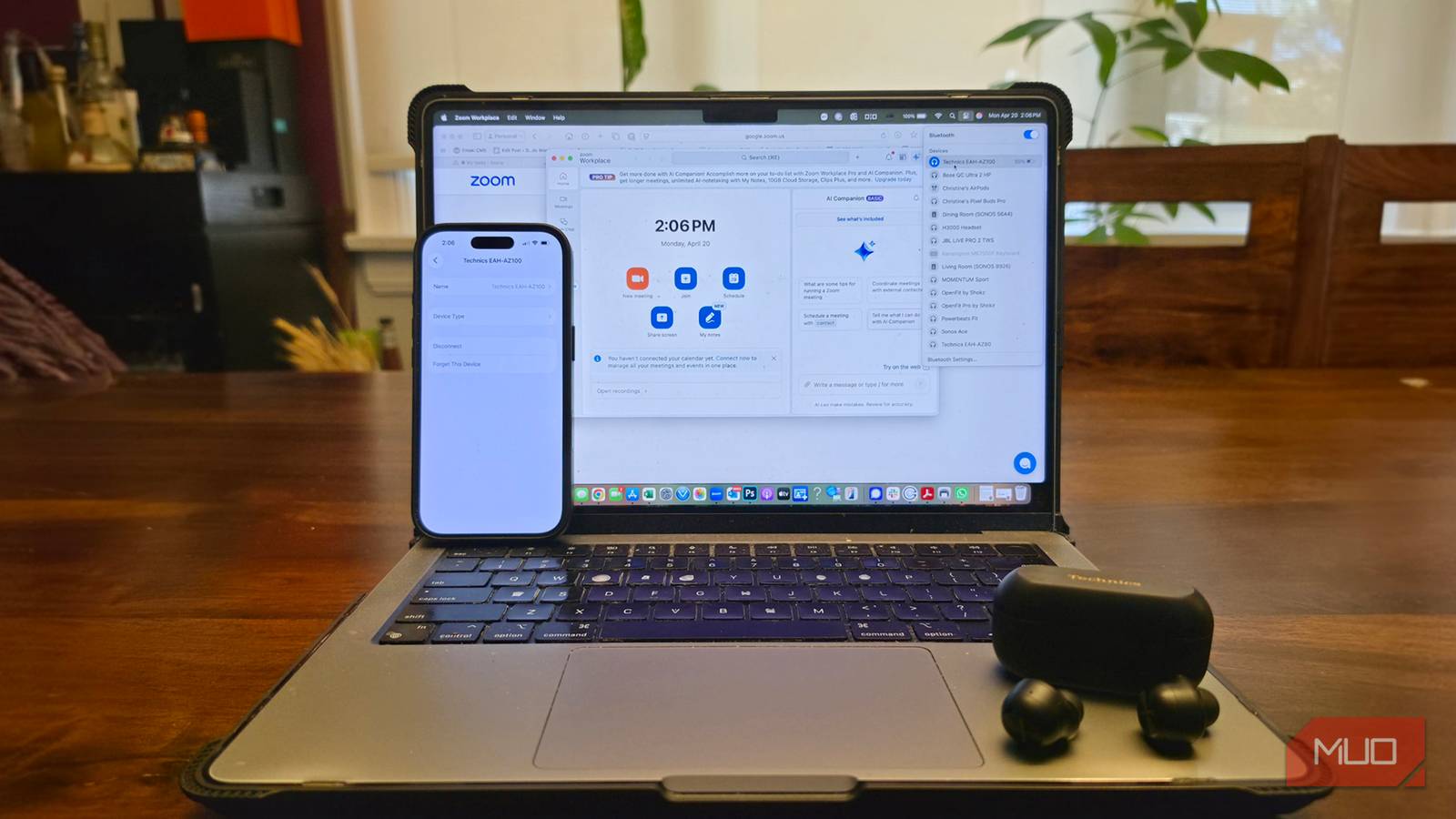

Some people connect headphones to a single device, like your smartphone while you commute or your laptop for video calls from the home office. But sometimes, you want to go back and forth between the two devices, which might require unpairing from one and pairing to the other. But what happens if you’re watching a video on your laptop, listening through your headphones, but a call comes through on your phone? You want to be able to answer it seamlessly using the same headphones. Isn’t it annoying if you can’t?
Bluetooth multi-point connectivity is the simple headphone feature that solves this issue. Thankfully, it’s available in most wireless headphones nowadays, though you may still find some older model or cheaper Bluetooth headphones without it. This feature isn’t one you should overlook, though. It makes a bigger difference than you realize.

You Shouldn’t Buy Headphones if They Lack This Vital Function
With so many devices, maintaining a connection is important.
How multipoint connectivity works
Switch back and forth
Bluetooth multipoint is the ability for headphones or earbuds to connect to more than one source device at a time, so you don’t have to drop a connection to the first to be able to connect to a second. Released way back with the Bluetooth 4.0 spec (Bluetooth 6.0 is the standard at the time of this writing), Bluetooth multipoint works with devices that have A2DP and HFP/HSP, which permits both audio streaming as well as voice conversations via calls.
All Bluetooth headphones with multipoint can connect to two different devices, like a smartphone and a laptop, but there are ones that can even connect to more than that. You can’t play audio from both sources at the same time, like music from your laptop while simultaneously being on a call from your phone. But you can seamlessly switch back and forth between the two without having to manually disconnect one and connect to the other. Worse is when your headphones force a connection to a new device as soon as you turn it on, even if audio isn’t playing, requiring that you auto-connect to the one you actually want to use for audio.
Good headphone choices with multipoint
Swap back and forth with ease
Some headphones require that you enable multipoint first, then connect to a second device. Once both are active, or two of the many devices you have paired (headphones can often save eight or so devices in memory), you’ll be connected to both. The best wireless headphones with multipoint make the process super easy. The best headphones I have tried to date for this feature, which also happen to be my go-to wireless earbuds overall, are the Panasonic Technics EAH-AZ100s. They uniquely connect to up to three devices at the same time, which is great for busy professionals who might want to pair them with a phone, tablet, and laptop, or a laptop with personal and work phones. What I love most about the EAH-AZ100s, however, is that they intelligently switch back and forth to whatever device is currently playing audio, not just which one was the last connected. If I pause a video on my laptop, for example, and start a call on my phone, they recognize this and switch. Whatever device is actively playing audio, it will swap to that one, back and forth with ease, so I don’t have to. And it works incredibly well.
The Bose QuietComfort Ultra 2 wireless noise cancelling headphones are the only headphones I take on long flights now. They not only have multipoint, but they instantly boot up and connect to a nearby active device when you leave them in a low-energy sleep mode. Yes, you don’t even need to turn them off when you put them away so they’re always ready to connect, and the battery drains incredibly slowly in this mode. Whenever I pop them on my ears, I’ll hear “connected, Christine’s iPhone” followed immediately after by “connected, Christine’s MacBook Pro” confirming that it has successfully connected to both.
Why multipoint makes sense
Best places it’ll come in handy

Multipoint might sound like a nice-to-have feature, but once you have and use it, you’ll realize the difference it can make. Initially designed as a business tool, it is useful for those who carry two phones: one for work and one for personal use . You can connect to both phones so you can easily go back and forth from a video on one to a call on the other. It’s also useful for those who swap frequently between a laptop and a phone. I sometimes listen to press briefings on my laptop and once it’s done and the audio ends, multipoint headphones can pick back up with music playing from my phone without me having to unpair from the laptop and pair to the phone.
If you have Bluetooth speakers or a wireless soundbar at home, you might appreciate being able to instantly switch from the audio playing through the headphones to playing from your smart speaker once you get home. You can also instantly switch from private listening from the headphones to shared listening on a portable Bluetooth speaker. There are lots of use cases for multipoint and having headphones that seamlessly support it will fix the annoying issues of having to unpair, pair, and go back and forth when you want to listen from multiple devices.

- Battery Life
-
Up to 30 hours
- Bluetooth
-
Bluetooth 5.4
- Foldable
-
Yes
- Charging type
-
USB-C
- Audio jack
-
2.5mm headphone port
The Bose QuietComfort Ultra Gen 2 have multipoint to connect to two devices at once, like your phone and laptop, an audible assistant confirming the connection each time you put them on. Plus, the sleep mode means they’ll instantly connect every time you take them out of the case and your devices are nearby.
