

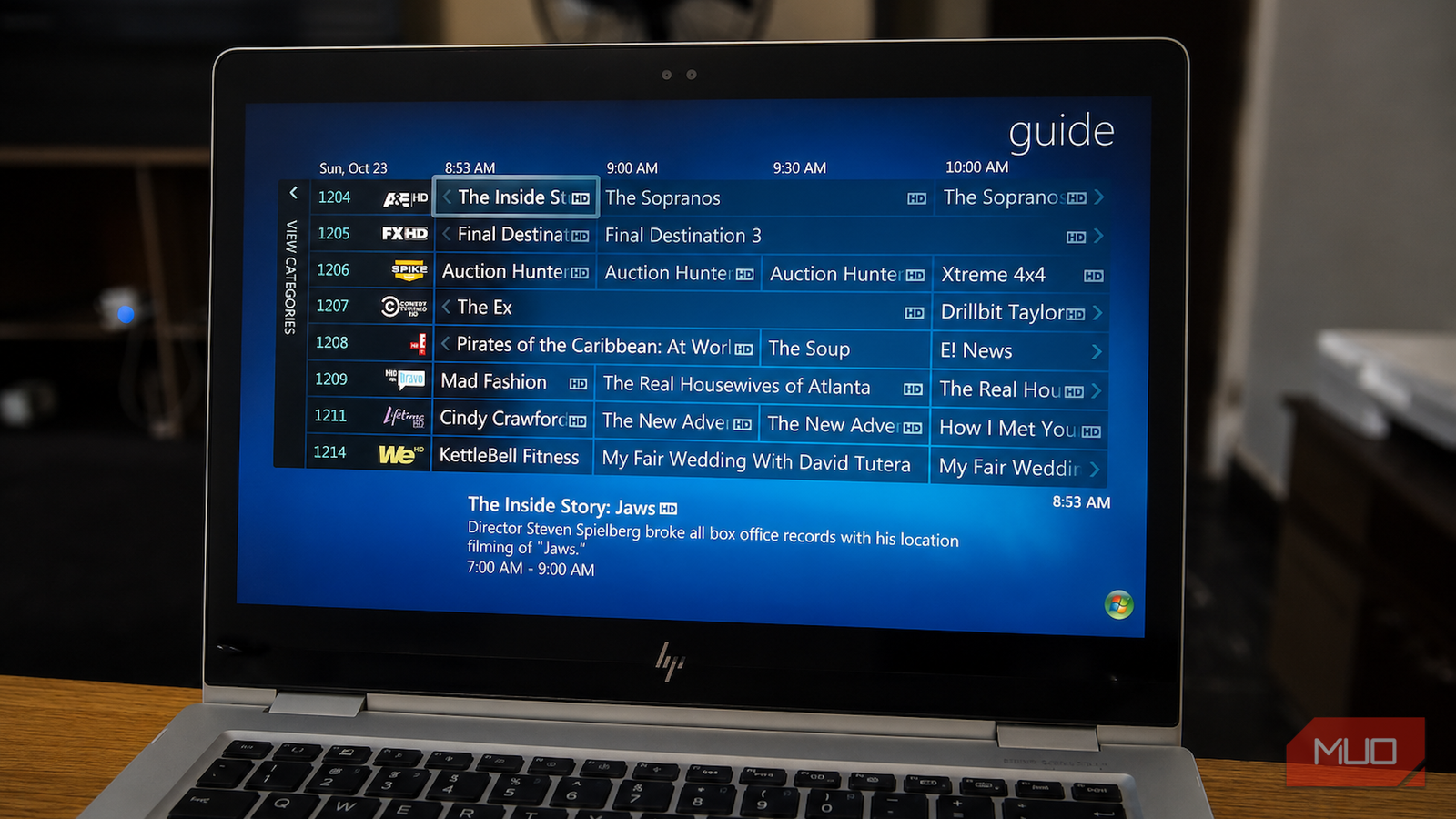

Mention Windows Media Center today, and you will probably be met with a shrug, assuming it is not confused with Windows Media Player. Yet the fragmented home-entertainment systems many of us assemble now, where Plex, Jellyfin, and Kodi all solve the same basic television problem in slightly different ways, resemble the unified experience Microsoft tried to place behind one interface in 2002.
Windows Media Center did not invent every feature it offered. Its achievement was bringing live television, DVR recording, DVDs, personal media, whole-home playback, and eventually online video services together in a polished interface that could be controlled from the sofa. More than two decades later, I am still not sure anyone has reproduced that combination quite as neatly.
The PC that wanted the best seat in the living room
Before smart TVs were even a smart idea

Windows XP Media Center Edition was released to manufacturers on September 2, 2002, before launching in North America in late October. Unlike an ordinary Windows upgrade, it initially appeared only on purpose-built systems such as HP’s Media Center PC. Microsoft made that choice because the experience depended heavily on compatible hardware, including TV tuners, infrared receivers, remote controls, graphics hardware, and certified media decoders.
Its defining feature was the “10-foot interface,” a full-screen environment designed to remain readable from across a living room and easy to navigate with a remote. Live television appeared alongside an interactive electronic program guide, scheduled recordings, and controls for pausing or rewinding broadcasts. The same interface brought together music libraries, photographs, home videos, and DVD playback.
This was not simply Windows Media Player enlarged for a television. Media Center tried to turn the entire PC into a home-entertainment appliance. Even its electronic program guide was provided without a monthly charge, with up to 14 days of listings available in the United States and Canada. That was an unusually generous arrangement when many dedicated DVRs depended on continuing service subscriptions.
It stopped thinking like a desktop

Windows XP Media Center Edition 2005 widened the platform’s availability and introduced dedicated Media Center Extenders. When the Xbox 360 launched in November 2005, every console included Media Center Extender technology, allowing it to access recorded television, videos, photographs, and music stored on a Media Center PC elsewhere in the house. A game console connected to the television could therefore become the front end for a PC running in another room. This relationship now looks familiar to anyone who has turned an old PC into a central media server.
Whole-home media streaming is ordinary now, but it was a much stranger proposition in 2005. Home networks were slower, network storage was less approachable, and most televisions had no meaningful software platform of their own. Microsoft had already sketched out the relationship between media servers, network clients, and living-room playback devices that would later become commonplace.
Media Center eventually became an integrated feature in selected mainstream editions of Windows Vista and Windows 7. Its television support expanded across several regional broadcast standards, while compatible systems could use multiple tuners to record more than one channel simultaneously. Microsoft was no longer merely selling a specialized living-room PC. It was placing a complete television and DVR platform inside ordinary Windows installations.
Digital cable exposed the limits of that ambition. CableCARD, a removable authorization card that allowed compatible third-party tuners to decrypt cable channels, was initially supported only on certified factory-built PCs because of CableLabs security requirements. Windows 7 later allowed qualifying custom systems to gain support by passing Microsoft’s Digital Cable Advisor test.
Microsoft also started pulling internet video into the same interface. An official Netflix application arrived for US users in May 2009, while Windows 7 later added its region-limited Internet TV section. Streaming content could sit beside broadcast television, DVDs, recordings, and personal files instead of being banished to an entirely separate device or application.
Why the living-room PC stayed niche
It was brilliant… once you got it working

Living with Windows Media Center was seldom as effortless as its polished interface suggested. Setup often began with finding a compatible tuner and persuading Windows to recognize it properly. US digital-cable subscribers faced the additional pleasure of obtaining a CableCARD from a cable provider, pairing it with the tuner, and hoping the support representative understood what they were being asked to activate.
Copy protection created an even nastier problem. Cable providers could mark encrypted channels as “Copy Once,” tying their recordings to the PC on which they were created. Reinstalling Windows or replacing important hardware could break the PlayReady licenses and leave a collection of saved programs permanently unplayable. The recordings still occupied the drive, but the system could no longer verify that the user was entitled to play them.
Microsoft also had evidence that Media Center remained a niche product. Opt-in telemetry published in 2011 showed that only 6 percent of Windows 7 users had launched it during the measured period. In 59 percent of those sessions, Microsoft recorded almost no activity, while only a quarter of that already small audience averaged sessions longer than ten minutes.
Those figures help explain why Media Center was never likely to become Microsoft’s highest priority. They do not explain why the company allowed such a sophisticated platform to stagnate instead of simplifying its hardware requirements, modernizing its streaming layer, or separating the enthusiast DVR features from a more approachable living-room interface.
Microsoft turned neglect into a withdrawal
Death by a thousand missing features

Media Center came with Windows 7 Home Premium, Professional, and Ultimate at no additional cost. Under Windows 8, Microsoft moved it into paid upgrade packs. According to Microsoft, this approach meant that royalties associated with broadcast television and DVD codecs would fall primarily on the smaller group of customers who use them.
Once the launch promotion ended, Windows 8 Pro users paid $9.99 for the Media Center Pack. People using the standard edition faced the much larger $99.99 Pro Pack upgrade, which added the Pro features and Media Center. The pricing may have made sense on a licensing spreadsheet, but placing an aging product behind another purchase hardly encouraged a broader audience to discover it.
The removal itself bothers me less than the years of neglect that preceded it. Windows 7 was the last release in which Media Center received substantial development. The Windows 8 version was largely the same legacy application, now separated from the operating system’s regular feature set and placed behind a paywall.
Windows 10 removed Media Center entirely when it launched in 2015. People upgrading from eligible versions of Windows 7 or Windows 8.1 briefly received Microsoft’s basic Windows DVD Player through Windows Update. Everyone else had to pay $14.99 for an application that played DVDs but offered none of Media Center’s tuner, DVR, guide, or whole-home capabilities. Windows users could still play DVDs and Blu-rays through third-party software, but the broader living-room platform was gone.
Microsoft briefly appeared ready to transfer some of Media Center’s television ambitions to the Xbox One. It announced over-the-air DVR support for the console in August 2015, including remote scheduling and streaming recordings to other devices.

Media Center’s remaining online integrations were fading too. Its Netflix application disappeared in September 2015 after Netflix moved away from the Silverlight technology that powered it, another reminder that the platform was no longer keeping pace with the services it once brought together. In June 2016, Microsoft put the Xbox One DVR feature on hold while redirecting development toward more heavily requested gaming features. The promised functionality never returned.
The final major service still supporting Media Center disappeared in January 2020, when Microsoft retired its electronic program guide. Live television and manually timed recordings could still work, but convenient guide-based scheduling and series recording required community tools such as EPG123, often paired with a paid listings provider such as Schedules Direct.
By then, Media Center had not died through one decisive cancellation. Microsoft had gradually withdrawn the services that made it practical, leaving its remaining users to keep an abandoned application alive through community tools and workarounds.
Everything came back, only in separate boxes
Most of Windows Media Center’s core ideas survived, but they stopped living in the same product
Plex and Jellyfin organize personal media through centralized servers, while Kodi provides a television-friendly interface for local files, network shares, and compatible DVR backends. Jellyfin and Channels DVR can manage live television, program guides, and recordings, while HDHomeRun network tuners can distribute over-the-air television across a home network to supported devices. Remote access to a personal media collection, once an enthusiast project in its own right, is now widely expected.
The modern replacements have also advanced far beyond where Media Center stopped. Depending on the server, client, operating system, and playback hardware, they can offer hardware-accelerated transcoding, HEVC and AV1 playback, mobile apps, automatic metadata, downloads, and remote streaming.
What they rarely provide is the same coherence. Rebuilding the experience now may require a properly configured NAS rather than a computer with basic file sharing enabled, backend server software, a network tuner, guide data, and several client applications. Commercial streaming services remain locked inside their own ecosystems, so Netflix, Disney+, Prime Video, and other subscriptions still sit outside even the most carefully organized personal-media library.
There are subscription-free routes. Jellyfin is completely free, while Kodi is free and open-source. Their real cost often appears in the hours spent configuring servers, choosing clients, solving transcoding problems, securing remote access, and explaining to everyone else in the house why the television has stopped connecting to the library.

More polished platforms can introduce recurring charges. Channels DVR costs $8 per month or $80 per year, while Plex Pass costs $6.99 per month. Plex also requires a qualifying Plex Pass or Remote Watch Pass for remote video playback, and raised the price of a new Lifetime Plex Pass from $249.99 to $749.99 in July 2026. That price increase has led my colleague to conclude that Plex is no longer worth recommending.
Not every modern media platform is becoming dramatically more expensive, but these changes show how features that once felt like parts of a self-contained home-media system can gradually accumulate subscriptions, account requirements, and steeper long-term costs.
Microsoft saw the future and walked away
I would not trade a modern media server for an untouched Windows 7 installation. Newer software supports better codecs, higher resolutions, mobile playback, secure remote access, and hardware that did not exist when Media Center was being developed. Nostalgia should not disguise the software’s awkward setup, fragile DRM, and dependence on television standards and external services that Microsoft was no longer willing to support.
What I miss most is the confidence behind the original idea. Microsoft believed one interface could make television, recordings, discs, internet video, and personal files feel like parts of the same library. Today’s platforms are technically more capable, yet the overall experience often feels less unified because every provider wants its own account, application, subscription, and recommendation screen.
