


I wouldn’t be exaggerating if I claimed that everyone uses AI for something or the other nowadays. We’re past the point where it’s a novelty you show off at parties, and it’s the thing sitting in the corner of nearly every workflow now (whether people admit it or not). Somewhere along the way, “I tried ChatGPT once” turned into “I can’t get through a workday without it.” Once a tool becomes that load-bearing, people eventually go beyond just using it for the sake of using it and start trying to build around it.
While we’ve seen countless weird things come out of this, the one thing I didn’t see coming was PewDiePie becoming a big name in the AI world. Yes, that PewDiePie. If there’s one thing I’ve learned this year, it’s that the best tools end up coming from the places you’d least expect. So, of course, when I heard that the tool everyone in my corner of the internet suddenly wouldn’t shut up about had been built by PewDiePie of all people, I knew I had to try it for myself.
PewDiePie built an open-source AI workspace
100 million subscribers and a GitHub repo

For anyone who somehow avoided the last decade of the internet, PewDiePie is the Swedish creator sitting on north of 100 million YouTube subscribers. He makes gaming videos, which is why he’s not exactly the name I expected to see attached to a self-hosted AI project. Yet, here we are.
Turns out he spent the better part of a year building one in public, documenting the whole process on his channel before launching it this May with a video titled, very humbly, “MY trillion $Dollar Project is finally out!” The tool is called Odysseus, and the pitch behind it is that you own your AI instead of renting it. Rather than scattering your workflow across a handful of monthly subscriptions, the idea is that you host the whole thing yourself and keep your data where you can actually see it.
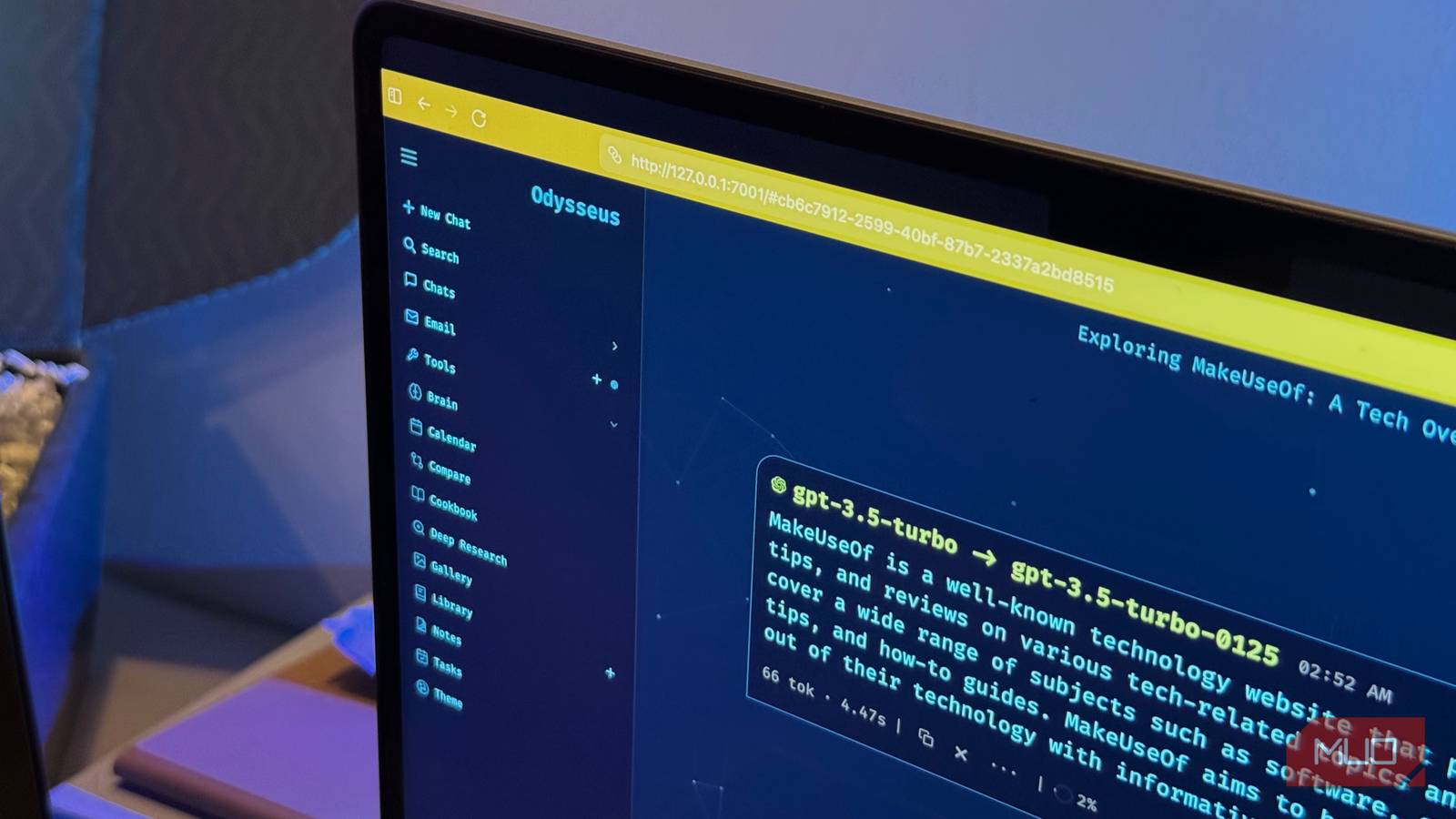
And “workspace” really is the right word, because Odysseus is a lot more than a chatbot wrapper. It bundles chat and agents, deep research, blind model comparisons, an image editor, and a full stack of productivity tools (notes, tasks, a calendar, even email) into a single dashboard that runs on your own machine. You point it at whatever models you like, local or cloud, and in theory everything you’d normally spread across ChatGPT, a research tool, and half your Google account lives in one place.
The GitHub repository for this project has over 81,000 stars at the time of writing, which is an absurd amount of attention for a self-hosted project built by anyone, let alone a YouTuber.
Setting it up required a bit of a fight
The four-minute build everyone promised took me considerably longer

Now, I want to be clear that I don’t have a very powerful laptop. I have a MacBook Air with 8GB of RAM, and running local LLMs isn’t something I’ve really been able to do. So, despite the fact that PewDiePie developed this with the intention of users running it on local LLMs, I couldn’t take that route. That said, he also did think this through and added the functionality to plug in a cloud model instead, so you’re not locked out just because you don’t have the hardware to self-host a model. For me, that meant pointing Odysseus at an API key and letting the actual heavy lifting happen on someone else’s servers. However, before you even reach the point of connecting Odysseus to a cloud or local LLM, you need to get it up and running. In theory, the setup is fairly simple. You clone the repository, copy the example config file, and run a Docker command.
Every walkthrough I had seen described this as a roughly four-minute job with the containers up, healthy, admin password waiting for you in the logs. On a capable machine, I don’t doubt that’s exactly how it goes. On my MacBook, this wasn’t the case. While I’ll not go into everything I needed to do to get it up and running, I managed it after almost an hour of coaxing, cutting, and bargaining with my laptop. Once it got through and ran, the admin password showed up in the logs and I was greeted with a login screen in my browser!
I’ve paid for Claude, Gemini, and ChatGPT for months — this is the one I recommend
Three subscriptions later, I keep opening the same one.
As mentioned above, I resorted to using an API key for a cloud model rather than trying to self-host one. In my case, I went with OpenAI, and all it took was grabbing one API key and dropping it into Odysseus. It then pulls in the available models for you to pick from. It’s worth noting that this isn’t the only route. You can just as easily plug in an aggregator like OpenRouter, which hands you a single key and access to a whole spread of models from different providers, or point it at a local model if your hardware can actually handle one. But since I was already paying OpenAI for other things and just wanted the quickest path to a working setup, going direct made the most sense for me.
Odysseus packs a whole workflow into one dashboard
One dashboard to rule them all
A few weeks ago, I wrote an article for MUO’s sister site, XDA, where I built my own little AI-powered dashboard. It was a single place that pulled together my calendar, email, and my to-do list, so I could stop bouncing between a dozen tabs just to figure out what my day looked like. It was scrappy, but it did the job well. So when I say I understand the appeal of what Odysseus is going for, I mean it fairly literally, since I had chased a smaller version of the exact same idea. Odysseus tries to do a bit of everything, though. And I do mean everything.
Chat

To begin with, you’ll find Chat, which is the part that behaves exactly like you’d expect. It’s your standard conversation-with-an-AI setup, the closest thing here to opening ChatGPT. It’s also the least interesting thing in the app, because the whole point of Odysseus is everything stacked around it. Sitting in that same sidebar is Brain, which is a persistent memory layer that builds up notes around you as you go and refines useable skills over time. This way, context actually carries between chats instead of resetting every time you start a new one. It’s the closest I’ve seen a self-hosted tool get to something like Claude’s Projects, except it all lives on your own machine.
Compare

Then there’s Compare, which I didn’t expect to enjoy as much as I did. You select different models, and can send the same prompt to all of them to compare them side by side. As someone who literally tests LLMs for a living, this is exactly the kind of thing I didn’t know I needed. Normally that comparison happens in a messy sprawl of browser tabs, copy-pasting the same prompt into three different chat windows and squinting between them. Having it all in one view is something I’ve been wanting for a long time!
You can also run the comparison blind, which means you’re reading each response on its own merits before you know which model actually produced it. Only once you’ve settled on a favorite does it reveal who wrote what! The only real limitation is that it’s most useful when you’ve got more than one provider connected. With a single API key, you’re comparing a provider’s own models against each other rather than pitting, say, GPT against Claude against DeepSeek.
Connecting Email and Calendar
We then have Email and Calendar, which are where Odysseus’s “run your whole day from one place” ambition starts to show its seams. This is the part I was most excited about since it’s the closest Odysseus gets to the little dashboard I built myself. Plus, the promise of an AI triaging my inbox and surfacing what actually matters is genuinely appealing. In practice, it’s the one area that didn’t come together for me.

II did manage to get Gmail connected, which felt like a win after the setup I’d already been through. And while Odysseus’s UI in general, impressed me and going through my emails within that retro interface was a vibe, I struggled to find anything unique where I’d actually reach for. The promise is inbox triage, summaries, and draft replies. However, given these are tasks I didn’t outsource to AI in the first place, I found myself with very little reason to keep it connected.
Now, I’ve been using an AI-assisted calendar scheduling app called Reclaim for a long time, so I came into Odysseus’s calendar with fairly specific expectations. Reclaim has spoiled me a little: it automatically finds time for my tasks, defends my focus blocks, and reshuffles things when my day inevitably falls apart, all while staying plugged straight into my Google Calendar. So I was curious whether Odysseus could fold that kind of thing into its all-in-one pitch and let me drop yet another standalone subscription.

The short answer is not really, and it comes down to one decision. Rather than hooking into Google Calendar the way most people would expect, Odysseus leans on CalDAV. This means the calendar I (and most people I know) actually live in doesn’t connect in a straightforward way.
Notes and Tasks
Within Odysseus, you’ll also find a Notes and Tasks tab, rounding out the productivity side of things. Notes is more or less what it sounds like, and is a place to jot things down. It comes with the twist that the AI can read from and write to it, so it doubles as a kind of shared scratchpad between you and the agents. Tasks, meanwhile, go a little further than your average to-do list. Beyond the usual checklist, you can set up scheduled agent tasks, which means Odysseus can actually go off and carry something out on a recurring basis rather than just nudging you to do it yourself.
For instance, you’ll find pre-built tasks like Calendar Classify Events, Chat Session Tidy, Skills Audit and more. You can also create your own from scratch, defining what you want done and how often it should run, so the tool quietly handles recurring housekeeping in the background instead of leaving it all on you. It’s a genuinely clever touch, and probably the feature here that hints most at where something like Odysseus could eventually go.
Deep Research and Cookbook
Odysseus also has Deep Research and a feature called Cookbook. Deep Research is one you might be familiar with. It runs multi-step web research, reads through its sources, and hands you back a formatted report at the end. If you’ve used NotebookLM or any of the big “research mode” tools, you’ll know the shape of it immediately. Odysseus’s own spin is that you can run the same query through more than one model and compare what each surfaces, which, for the kind of work I do, is a nice way to catch what a single model might miss.
Cookbook, on the other hand, is where my hardware and I got a bit of a reality check. It’s meant to be the friendly front door to running models locally: it scans your machine, then recommends models based on what it thinks you can actually handle, with one-click downloads and serving. On a capable rig, I can see it being the gentlest possible introduction to local LLMs. On my 8GB MacBook Air, it scanned my setup and, model by model, politely informed me that almost nothing was a good fit. Everything remotely capable came back flagged as “no fit,” and the handful it deemed “marginal” were the tiny sub-2B models I’d get very little real use out of.
Odysseus surprised me, even if it isn’t for me
If I had powerful enough hardware to run a local LLM, I can see myself using Odysseus every day. Despite its rough edges, the core idea is sound, and I’d rely on it daily. The problem for me is my laptop, and the fact that the version of this tool I actually want to live in is the local-first one my hardware can’t give me.
Relying on a cloud model for all of this works well enough, and it’s the sensible route if you’re on modest hardware like me, but it trades away the whole reason Odysseus exists in the first place. The privacy, the ownership, the not-renting-your-AI pitch all get a little softer the moment your models are running on someone else’s servers. What you’re left with is a capable and genuinely comprehensive workspace that I ended up admiring more than I actually needed.
