

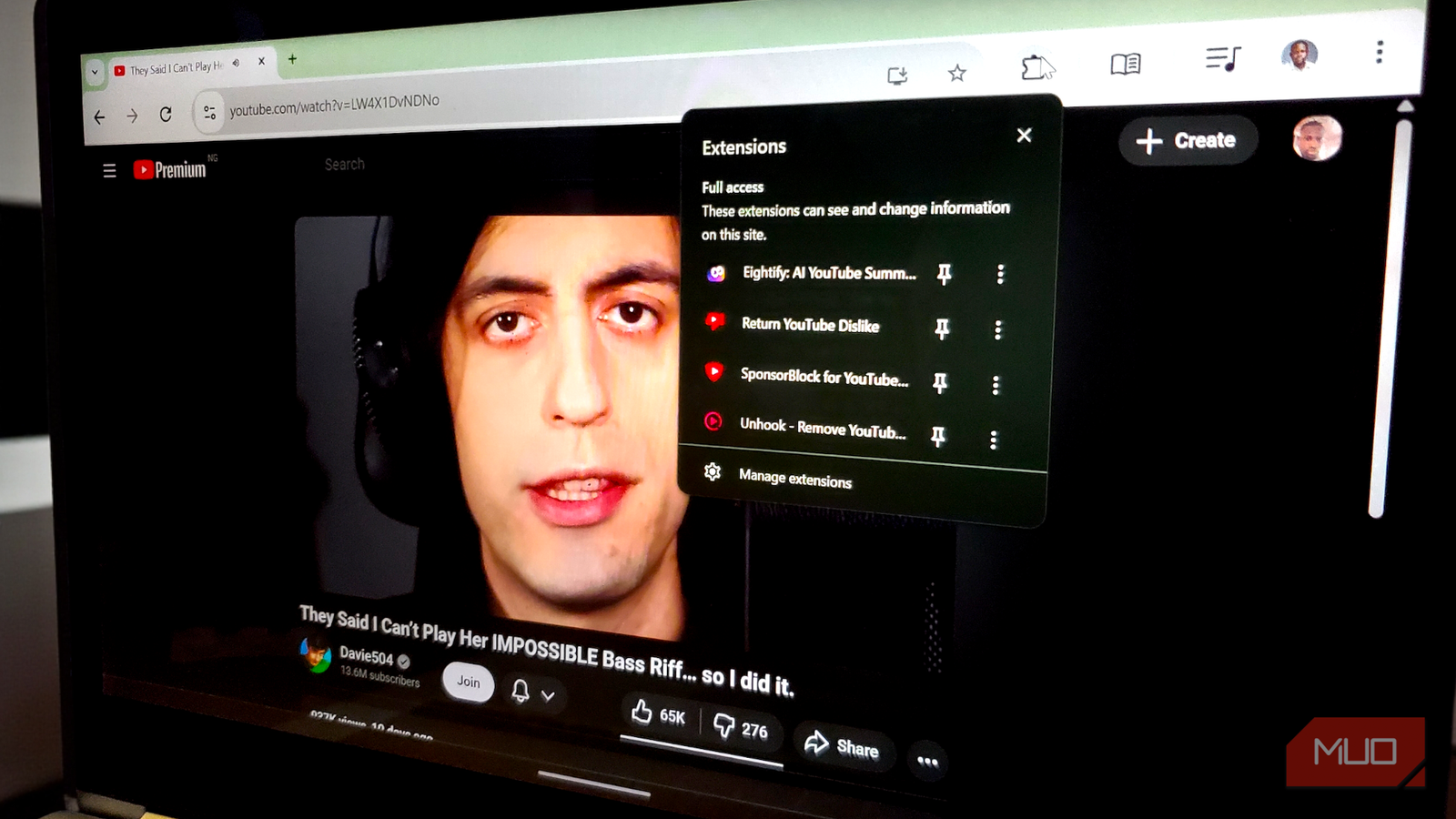

YouTube has evolved into the internet’s most expansive library of tutorials, explainers, documentaries, and niche deep dives. Yet paradoxically, actually watching long-form content on the platform can be frustrating. You are 20 minutes into a 40-minute video when a sprawling sponsor segment appears. The recommendation sidebar tugs you toward distractions, a familiar nuisance if you are sick of irrelevant YouTube suggestions. And you often have no idea whether the hour-long tutorial you are about to start is insightful or misleading.
The good news is that you are not stuck with YouTube in its default, chaotic form. With a carefully chosen set of browser extensions, you can peel away the noise and restore YouTube to what it was supposed to be: a focused space for entertainment and learning.
The ultimate time saver

If you watch YouTube regularly, you have likely developed a sixth sense for when a creator is about to pivot into an ad read. The tone shifts, the background music changes, and soon enough, you are hearing about VPNs, product offers, and the like. And look, creators absolutely deserve to get paid—but those mid-video detours can break the rhythm of an otherwise great documentary or video essay.
That’s where SponsorBlock, an effective crowdsourced fix that tackles the problem at the exact point of annoyance, comes in.

These small YouTube fixes made me love watching videos again
I didn’t quit YouTube. I just gave it a tune-up.
SponsorBlock doesn’t bother with the usual pre-roll ads (most ad blockers already handle those). Instead, it targets the sponsorships baked right into the video itself. The extension is powered by its community, which submits precise timestamps for sponsored segments. Once a section is flagged, the extension automatically skips it for everyone else. And it goes well beyond sponsorships. You can configure it to skip intros, outros, “don’t forget to like and subscribe” speeches, and even the non-music padding in music videos.
Eightify: AI YouTube Summarizer
Digest content at speed
Sometimes the problem with YouTube isn’t the ads, but the video length. I’ve definitely clicked on a 20-minute YouTube video (and I’m guessing you have too) only to realize five minutes later that the whole thing could’ve been a two-sentence email. That’s where Eightify comes in. It feels built for the “too long; didn’t watch” reality. As one of the top AI-powered Chrome extensions to summarize YouTube videos, it hangs out in your sidebar and uses models like Claude and ChatGPT to distill long rambles into clean, punchy takeaways.
You can choose exactly how much information you want, switching between Short, Auto, and Detailed views so the summary matches the level of depth you want. You can also shape the summary’s tone. If you prefer something Insightful, something immediately Actionable, or even something with a touch of Humor, Eightify recalibrates its voice to fit. The interface breaks the output into clean, well-defined sections and highlights key phrases, so the main ideas stand out at a glance.
Most importantly, it turns the entire timeline into an interactive guide. The timestamped summary feature highlights specific moments from the video, each clickable, so you can jump straight to the part that matters and instantly know if a YouTube video deserves your time. And if you prefer a different format, you can switch between a standard bullet list or a Q&A-style breakdown.

- OS
-
Chrome, Android & iOS
- Price model
-
Free (in-app purchases)
Get video summaries in seconds with Eightify. It highlights key points from YouTube videos so you can learn fast without watching the whole thing.
Unhook
Reclaim Your Attention Span

YouTube’s interface is engineered to trap you. The “Recommended” sidebar, the homepage feed, and the endless scroll of “Shorts” are all designed to trigger dopamine hits that keep you clicking. Unhook is the antidote to this addiction. It is a distraction-free mode to make YouTube less distracting, letting you hide nearly every element of the page except the video itself.
With Unhook, you can toggle off the recommended feed, hide the comments section (often a blessing in itself), remove the trending tab, and even blank out the homepage entirely. When you open YouTube with Unhook fully active, you are greeted by a clean, empty search bar. You are no longer reacting to what the algorithm wants you to see; you are intentionally searching for what you want to watch.
The psychological effect is profound. Without the sidebar of “Up Next” videos tempting you, you are far less likely to fall down a rabbit hole. You watch the video you came for, and then you leave.
Return YouTube dislike
Restore quality control

In 2021, YouTube removed the public dislike counter, framing the decision as a way to protect creators from coordinated harassment. I actually supported that rationale in a recent piece. However, somewhere between then and now, I have run into a new problem that makes me miss the button more than ever: the surge of AI-generated videos that look authoritative but offer little or no usable information.
Return YouTube Dislike revives this missing signal by placing the dislike bar back where viewers expect it. The extension blends archived numbers from before the removal with fresh, crowdsourced data from its user base, then uses those inputs to estimate the current dislike count. When you click into a supposedly helpful fix, guide, or explainer and see an overwhelmingly negative ratio, you avoid wasting time on content that might mislead you or even cause more problems.
It’s time to enjoy YouTube once again
These four extensions team up to tackle the biggest headaches of watching long YouTube videos: slogging through sponsorships, wondering whether a video is actually worth your time, getting pulled into the algorithm’s infinite maze, and having no quick way to judge quality. Put them all together, and YouTube stops feeling like a productivity sinkhole. Instead, it becomes a place where you can learn, explore, and enjoy videos without the usual friction. They’re all free, lightweight, and take only a few minutes to set up.
