

Close Menu

    Subscribe to Updates

    Get the latest Tech news from SynapseFlow

    What's Hot

    BlueHammer Vulnerability Exploited in Ransomware Attacks

    June 30, 2026

    Tesla and SpaceX Shaping Demand and Supply of 20% of US Energy Grid

    June 30, 2026

    GMKtec EVO-T2 review: An impressive AI mini PC that goes some way to addressing the imbalance between the best Intel can offer over AMD

    June 30, 2026
    Facebook X (Twitter) Instagram
    • Homepage
    • About Us
    • Contact Us
    • Privacy Policy
    Facebook X (Twitter) Instagram YouTube
    synapseflow.co.uksynapseflow.co.uk
    • AI News & Updates
    • Cybersecurity
    • Future Tech
    • Reviews
    • Software & Apps
    • Tech Gadgets
    synapseflow.co.uksynapseflow.co.uk
    Home»Reviews»I tried a hidden video trick in iOS 27, and it saved me a ton of frustration
    I tried a hidden video trick in iOS 27, and it saved me a ton of frustration
    Reviews

    I tried a hidden video trick in iOS 27, and it saved me a ton of frustration

    The Tech GuyBy The Tech GuyJune 30, 2026No Comments3 Mins Read0 Views
    Share
    Facebook Twitter LinkedIn Pinterest Email
    Advertisement


    If you’ve ever been on vacation and chose to record video instead of taking photos only to avoid missing the fun moments, thinking you’d pause and take screenshots later, you might have ended up questioning your decision later. 

    Advertisement

    You see, the process involves multiple steps, starting from hunting for the right frame, pausing, and taking a screenshot. If it doesn’t look good, you go back to the video, pause somewhere else, and try taking another screenshot. You see where I’m going with this?

    It’s a specific little misery that iOS 27 has now quietly fixed, and I genuinely can’t believe it took this long.

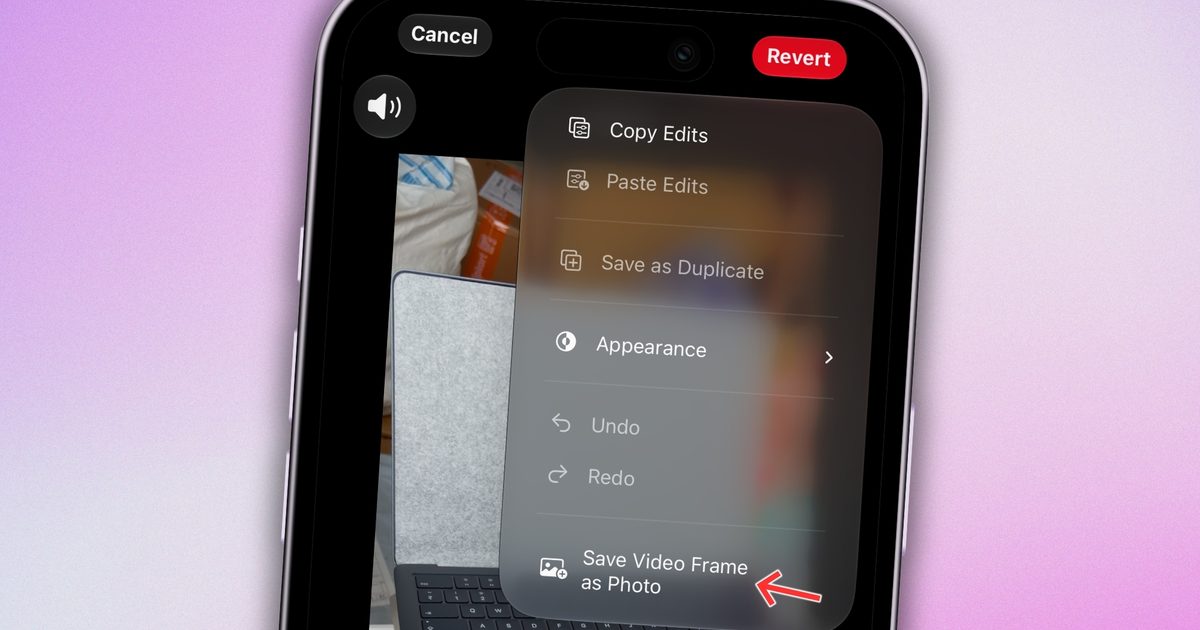
    How does the new “Save video frame as photo” feature work?

    The new “Save Video Frame as Photo” option in the Photos app does exactly what it sounds like. You can save a single frame from a video directly to the gallery as a photo, without the hassle of capturing screenshots. You can use it in two ways.
    Art, Collage, Person
    Shikhar Mehrotra / Digital Trends

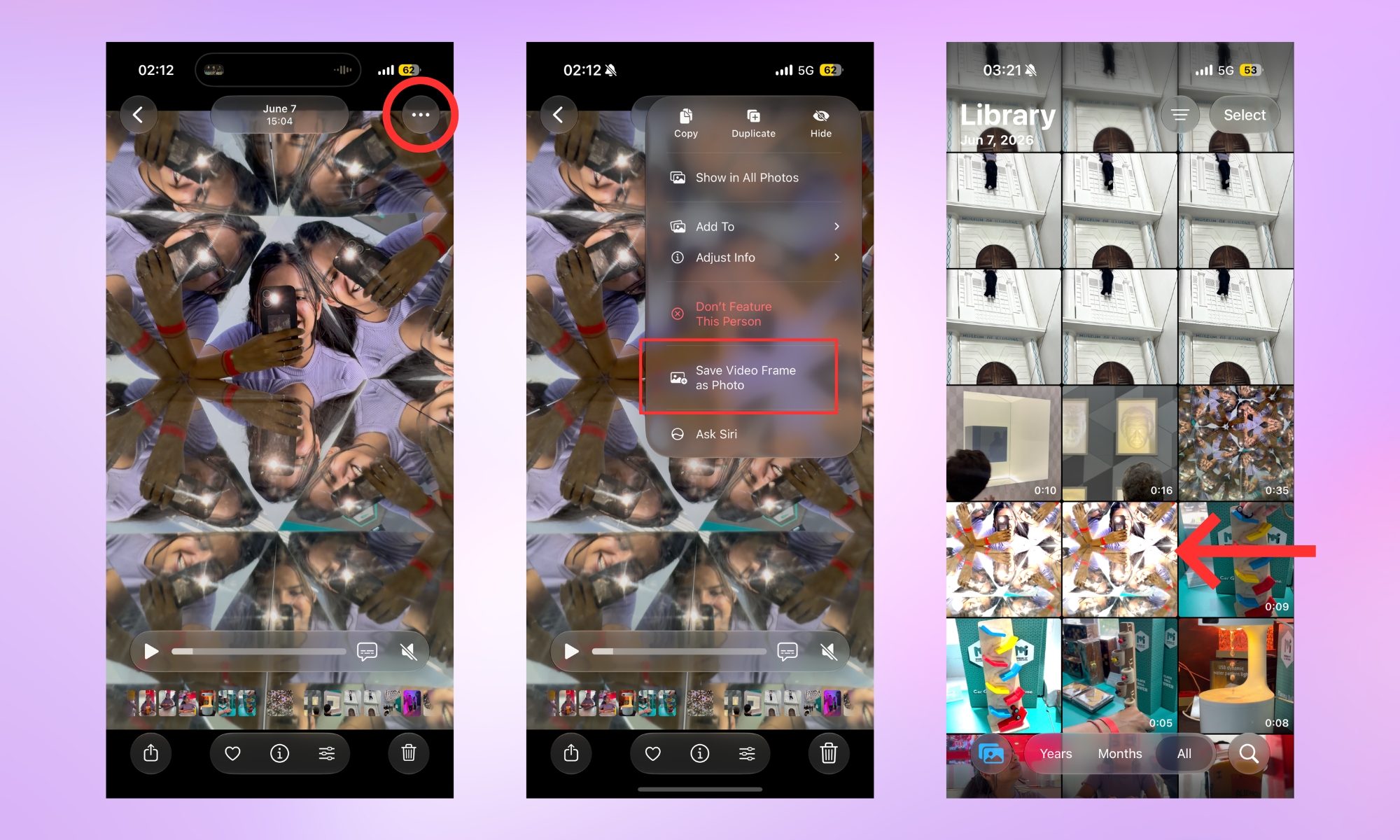
    The first one lets you use the feature quickly and save a video frame as a photo in as little time as possible. Open the video in the Photos app, scrub to the moment you want, pause, tap the three-dot menu at the top right of the screen, then tap the “Save Video Frame as Photo” button. 

    You should see a “Saved Video Frame” dialogue box pop up at the bottom of the screen. The saved frame shows up in your library, right next to the video you’ve extracted it from.
    Electronics, Phone, Mobile Phone
    Shikhar Mehrotra / Digital Trends

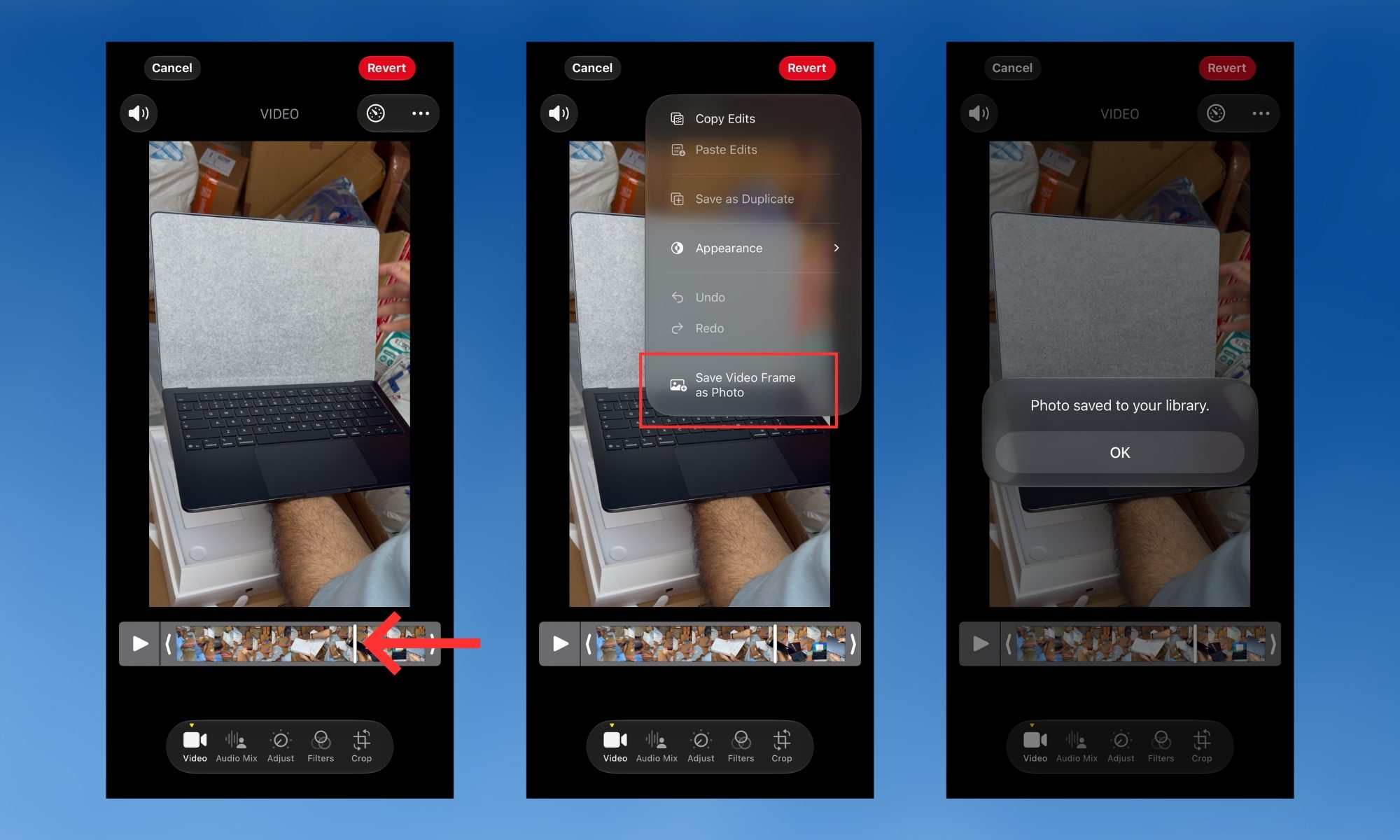
    However, if you need frame-by-frame flexibility, open a video, then tap the hamburger menu at the bottom to enter the edit menu. Use the timeline at the bottom of the screen to scrub through the video one frame at a time. 

    Once you find the exact moment, tap the three-dot menu again and tap “Save Video Frame as Photo.” You should see a “Photo saved to your library” message on the screen. Tap the “OK” button below it, and you’re good to go.
    Electronics, Person, Computer
    Shikhar Mehrotra / Digital Trends

    The feature is genuinely better than capturing screenshots

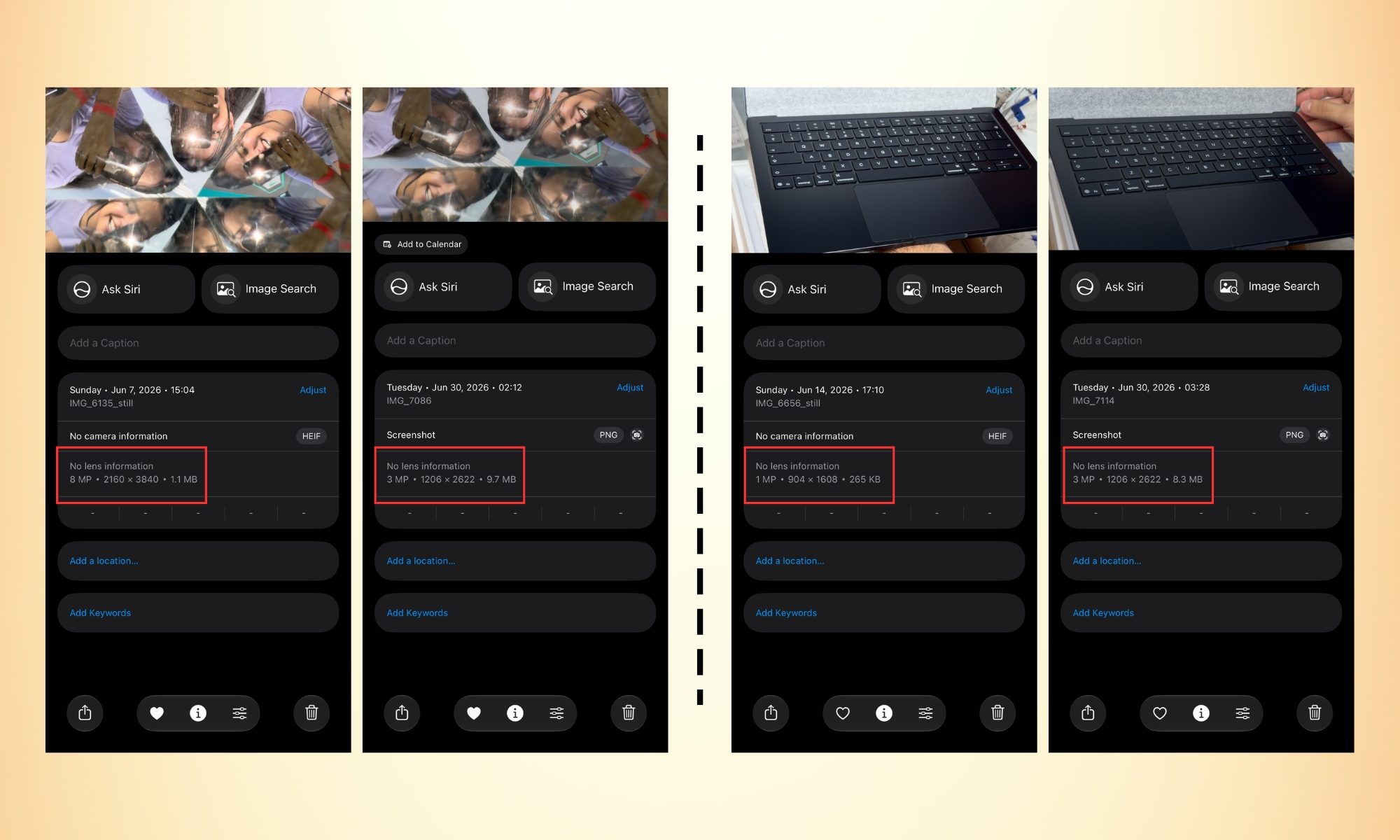
    The difference in quality here is worth understanding. Saving a video frame as a picture is the same as taking a picture when you’re recording a 4K video at 60 fps; the saved frame comes out as an 8 MP photo (in Apple’s HEIF format). 

    Screenshots, on the other hand, save as PNG files that are lower in resolution but larger in file size. In a nutshell, the frame-extracted picture has both a smaller file size and a higher resolution than screenshots. 

    Furthermore, it doesn’t capture unwanted visual elements, such as the video progress bar at the bottom or a notification pop-up that shows up at the exact moment (I hate those).  

    It’s one of those iOS 27 features Apple didn’t announce onstage, and yet once you know it exists, you’ll wonder how you ever managed without it.

    Advertisement
    Share. Facebook Twitter Pinterest LinkedIn Tumblr Email
    The Tech Guy
    • Website

    Related Posts

    GMKtec EVO-T2 review: An impressive AI mini PC that goes some way to addressing the imbalance between the best Intel can offer over AMD

    June 30, 2026

    Future OLED Macs, iPads set for tempting display boost

    June 30, 2026

    BT and Verizon agree to combine their international enterprise operations

    June 29, 2026

    Sage CRM review 2026: The pros & cons explained

    June 29, 2026

    Soundbars are better than ever, but there are still obvious flaws

    June 29, 2026

    A YouTuber 3D printed an entire outfit, but the comfort and cost are more complicated than you’d think

    June 29, 2026
    Leave A Reply Cancel Reply

    Advertisement
    Top Posts

    You don’t need a NAS to self-host — I proved it with hardware from my closet

    June 7, 2026169 Views

    Spotify is giving one of its best playlists a big visual upgrade to give subscribers ‘a closer connection’ to its New Music Friday curators — and I think it could be the update it’s always needed

    June 12, 202690 Views

    The iPad Air brand makes no sense – it needs a rethink

    October 12, 202516 Views
    Stay In Touch
    • Facebook
    • YouTube
    • TikTok
    • WhatsApp
    • Twitter
    • Instagram
    Advertisement
    About Us
    About Us

    SynapseFlow brings you the latest updates in Technology, AI, and Gadgets from innovations and reviews to future trends. Stay smart, stay updated with the tech world every day!

    Our Picks

    BlueHammer Vulnerability Exploited in Ransomware Attacks

    June 30, 2026

    Tesla and SpaceX Shaping Demand and Supply of 20% of US Energy Grid

    June 30, 2026

    GMKtec EVO-T2 review: An impressive AI mini PC that goes some way to addressing the imbalance between the best Intel can offer over AMD

    June 30, 2026
    categories
    • AI News & Updates
    • Cybersecurity
    • Future Tech
    • Reviews
    • Software & Apps
    • Tech Gadgets
    Facebook X (Twitter) Instagram Pinterest YouTube Dribbble
    • Homepage
    • About Us
    • Contact Us
    • Privacy Policy
    © 2026 SynapseFlow All Rights Reserved.

    Type above and press Enter to search. Press Esc to cancel.

    Ad Blocker Enabled!
    Ad Blocker Enabled!
    Our website is made possible by displaying online advertisements to our visitors. Please support us by disabling your Ad Blocker.