


I’ve kept a local music library for years because I like knowing the files are actually mine, even when my internet connection decides to become ornamental. Plenty of great open-source, free music players for Windows make my large library easy to manage, too. Unfortunately, the one feature that kept making streaming apps look annoyingly sophisticated was synchronized lyrics.
Spotify can put each lyric line on screen at almost the exact moment the singer reaches it. My folders full of MP3s and FLACs, meanwhile, were still relying on whatever metadata happened to come with them.
LRCGET fixed that for me. It scans a local music library, fetches lyrics from LRCLIB, and gives those files a far more polished lyric experience without asking me to abandon my collection for somebody else’s ecosystem.
Getting lyrics onto my library took a few clicks
This was much less of a project than I feared
LRCGET is the official desktop client for LRCLIB, a free, community-powered lyrics database. Version 2.2.0 is available for Windows, Linux, and macOS, and I tested the Windows build.
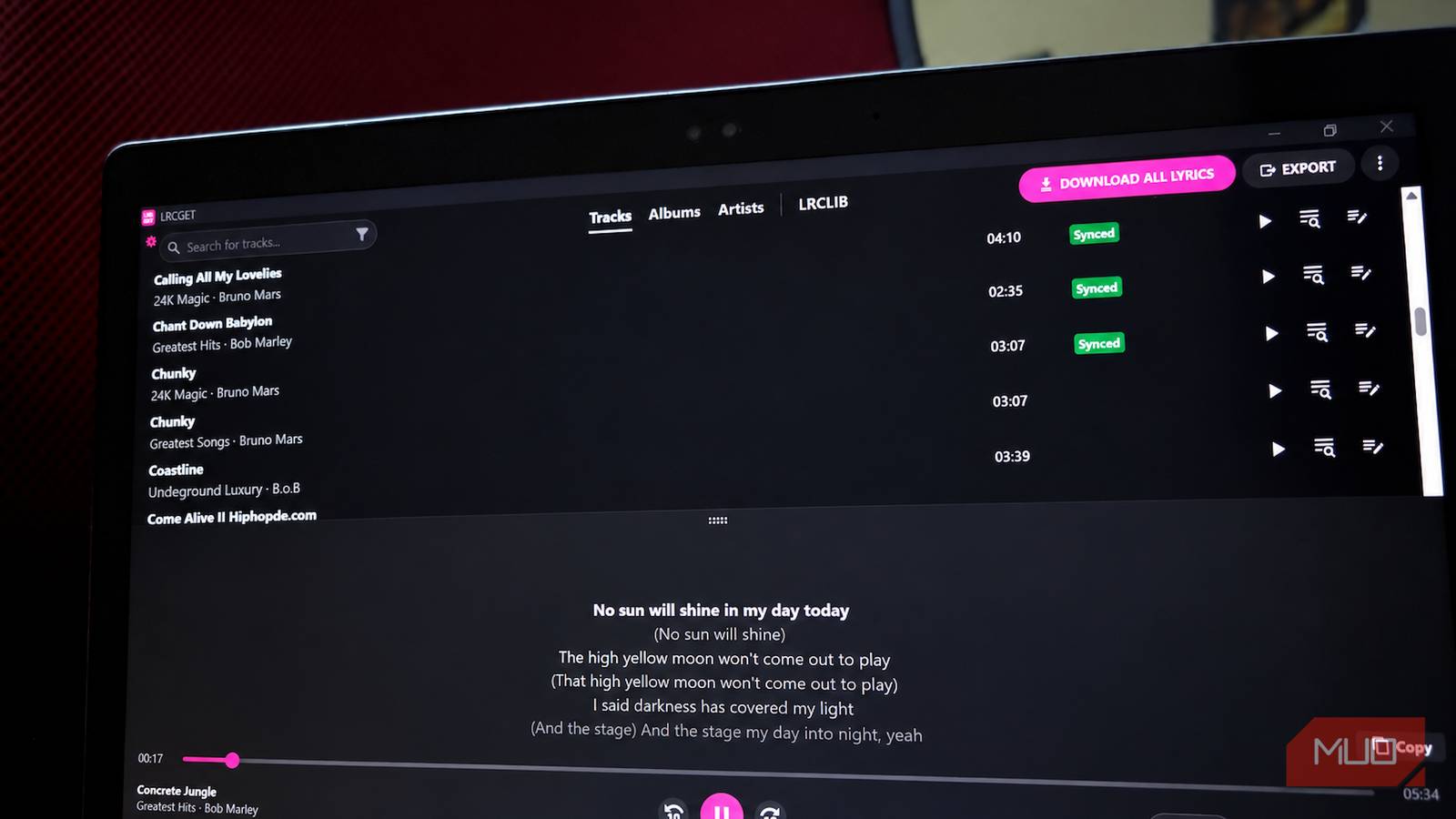
On first launch, I pointed LRCGET at my Music directory and let it scan the collection. The app then organized everything into searchable Tracks, Albums, and Artists views, with playback controls running along the bottom. It works directly with the library you already have, so there is no ceremony involving folder migrations or importing your music into another proprietary catalog.
Your existing metadata does some of the heavy lifting here. If you’ve got a library accumulated across MP3, FLAC, AAC, and other audio formats, you’ll know how quickly years of inconsistent tagging can turn into archaeology. Accurate song titles, artist names, albums, and track information give LRCGET better clues when it goes looking for a match.
The download controls are flexible enough to avoid carpet-bombing the entire library every time. You can target every track, only songs missing synchronized lyrics, or only songs with no lyrics at all. LRCGET can also export lyrics automatically after downloading, and later scans are incremental and skip files that haven’t changed.
My 177-track download was also where LRCGET stopped looking quite so pristine. Synchronized lyrics came in for plenty of songs, some only found plain text, others returned nothing from LRCLIB, and I ran into the occasional response-decoding error. One track could match perfectly while the next drew a blank, which is about what I’d expect from software trying to reconcile my metadata with a community-run database.
The download controls are flexible enough to avoid carpet-bombing the entire library every time. You can target every track, only songs missing synchronized lyrics, or only songs with no lyrics at all. LRCGET can also export lyrics automatically after downloading them, and later scans are incremental and skip files that haven’t changed.
The editor can rescue lyrics that are almost right
This is where perfectionists can lose an afternoon

Successful tracks get a green Synced badge in the library, and pressing play brings the lyrics to life right away. When you expand the lyrics panel, the current line follows along with the song, highlighted as playback moves forward. That was the feature I came for, and after seeing it work across several tracks, I could easily have called the experiment a success and moved on.
Instead, I wandered into the editor and found a lot more machinery hiding behind the nice green badge.
LRCGET keeps plain and synchronized lyrics in separate editing views. On the synchronized side, each line gets its own start and end time while the song plays directly above the timeline. Current versions also support word-level timing, which lets you split a line into individual words and sync those more precisely. The main lyrics viewer can then use that extra timing data for karaoke-style word highlighting.

You probably won’t need to go that deep with a song that matched cleanly. If a line appears too early or lingers a little too long, though, LRCGET gives you plenty of ways to fix it. Timing can be nudged in 100 ms steps, individual lines can be replayed, several lines can be selected at once, and playback can be slowed all the way to 0.5x while you work. If you add the keyboard shortcuts, the editor then resembles subtitle software. Which, makes sense given how much control it gives you over timing.
That level of control also means a mostly correct result doesn’t have to be thrown away just because a few lines are off. You can clean up the timing yourself, import existing .lrc files from a file or the clipboard, and publish finished lyrics back to LRCLIB if you want to contribute the fix.
If most of your listening happens on Android, this kind of desktop cleanup pairs nicely with a player such as Musicolet for an owned music collection. LRCGET can handle the fiddly lyric work on the PC, leaving the phone to do what it is actually good at: playing the music.
Exporting puts the lyrics back where I want them
Now the lyrics can travel with the music

LRCGET 2.x introduced one behavior that may not be obvious if you used earlier releases. Downloaded lyrics are now stored inside LRCGET using its Lyricsfile format, and the app leaves your music folders alone until you decide to export them.

The export menu offers plain .txt files, synchronized .lrc files, and experimental embedding for supported MP3 and FLAC tracks. I chose .lrc, and my run finished with 88 tracks exported, 10 skipped, and no export errors.
File Explorer made the result ordinary because One Day.m4a by B.o.B now had One Day.lrc sitting beside it, and the same pairing appeared across the rest of the successful exports. An LRC file is basically a lyric sheet with timestamps attached, which gives a compatible player enough information to know which line should be on screen at any point in the song.

That also means LRCGET never has to become your primary music player. You can prepare and correct the lyrics there, then keep listening in whichever compatible app you already prefer. That might be one of Windows players aimed at hi-res and local audio or one of the offline music players available on Android. If your library follows you into the car, I’ve also found an Android Auto music player that works without an internet connection useful for the same reason.
Spotify can keep one less advantage
LRCGET solves a very specific problem, and I think that focus is a large part of why it worked so well for me. It never asked me to reorganize my library, switch players, or rethink how I listen. I pointed it at the music I already owned, corrected the tracks that needed attention, and exported the results. My collection is still sitting in exactly the same folders as before. It just has synchronized lyrics now.
