


I’ve tried countless note-taking apps over the years — OneNote, Google Keep, and everything in between — from the ultra-minimalist to the overwhelmingly feature-packed. Yet none have made me want to write quite like Anytype.
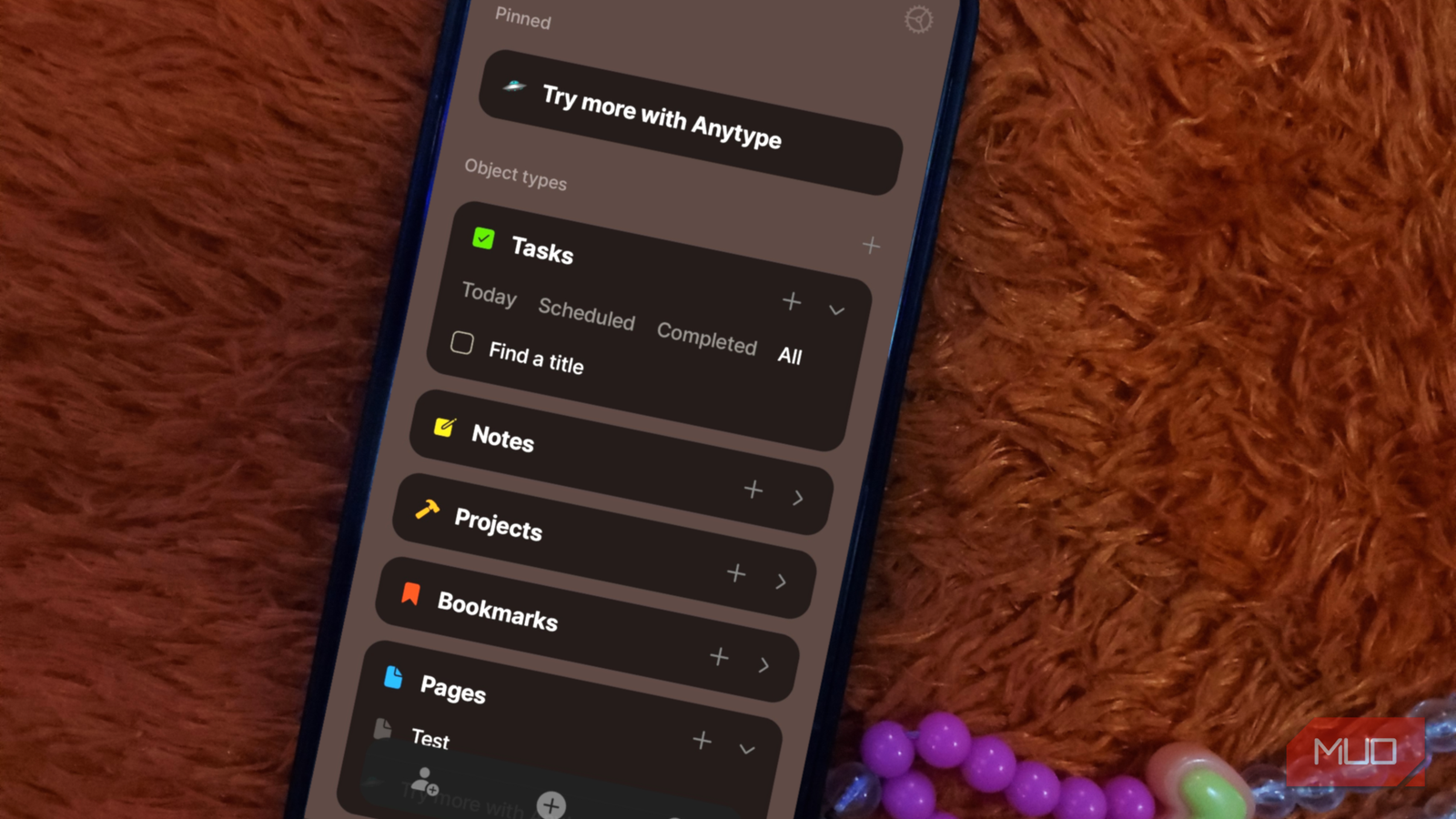
The first time I launched the app, I was struck by its design. The dark interface, softened by warm, subtle accents, feels refined and deliberate. Every icon, transition, and menu is designed to make the experience elegant and intuitive. It’s the kind of design that makes you want to stay in the app a little longer, just to appreciate the details.
But a beautiful interface alone isn’t enough to keep you writing more and more.

- OS
-
Mac, Windows, Linux, iOS, Android, and Chrome Extension
- Developer
-
Anytype
- Price model
-
Free (paid plans available)
Anytype is a great space for creative thinking
Beautiful, intuitive, and addictive
Anytype’s interface is dark, warm, and inviting, with subtle motion and elegant details that make writing a pleasure. But while its aesthetics are striking, what truly sets it apart is the way it treats your ideas.
When you first open the app, a short onboarding tutorial introduces you to its key concepts: Objects, Blocks, Widgets, Lists, Types, Properties, and Templates. The terminology might sound technical at first, but it quickly sticks. Objects are the foundation of everything you create in Anytype. Everything you create is an object. Blocks form the content within each object, while Types define what the object is, and Properties add extra context, like tags, due dates, or status indicators.
Instead of relying on rigid folders or fixed hierarchies, Anytype treats every note, page, task, or file as an individual object interconnected with the rest. Each new space you create comes with a few default object types: Pages for long-form writing, Notes for quick thoughts, Tasks and Projects for managing your to-dos, and specialized types like Files, Audio, Video, Images, and Bookmarks. There are also Queries and Collections, though I haven’t explored those yet. You’ll find the Try More with Anytype page pinned at the top of your new space, but you can unpin or delete it once you’re comfortable with the basics.
Creating within a space is effortless. Tap the plus (+) icon, and a blank page opens (by default as a Page object, although you can change it to whatever you need). Inside that page (or alternate object), the forward slash (/) command lets you insert text, images, tasks, or whatever you like, and each element will be automatically linked to its corresponding object type. Add a task, and it appears under Tasks. Upload an image, and it’s instantly visible under Images.
If you prefer a more structured approach, you can also create new objects directly from the homepage. Tapping the plus sign beside Tasks creates a new task; doing the same under Pages or Projects creates those respective objects. Within each page, you can layer blocks—style blocks, which include headings and checkboxes, callouts, dividers, and more—while linking to other objects as needed.
Beyond Spaces—the core of the app—you can also create Chats, which are basically Spaces but with multiple participants. They’re perfect for co-writing, planning, or brainstorming together without leaving the app.
My main workspace, which I call Ada’s Space, holds everything from running lists of article ideas to detailed project timelines. For this article, I even created a duplicate space and a sample chat to demonstrate how flexible the system can be. I’ve deleted the default Get Started Mobile tutorial page, so now my homepage shows just three Spaces, although you can have up to ten on the free plan.
Within each Space, you can invite collaborators, create new objects, or search through everything you’ve made with just a few taps. The icons are intuitive and clearly labeled: the person icon for inviting collaborators, the plus icon for creating objects, the search icon for quickly finding what you need, and so on.
Write to your heart’s content without any fear
Share when you want, stay private when you don’t
In a world of apps that seize every opportunity to track you and mine your data, Anytype is a refreshing exception. All Spaces and Chats are fully private by default, and only members you explicitly invite can access them. When you do choose to share, you have complete control over permissions: Editor links grant full editing rights, Viewer links provide read-only access, and Request approval links let you review new members before granting them access. Each Space or Chat supports just one active invite link at a time, and switching between permission types automatically creates or disables links accordingly.
For those who want to share content more broadly, Anytype lets you publish individual objects as standalone web pages. You can customize the URL after the slash and even reserve your personal subdomain on the .org domain if you upgrade your membership. This makes Anytype versatile enough to serve as a private thinking space and a simple publishing platform.
Anytype’s approach to encryption goes beyond what most note-taking apps offer. Instead of using a conventional username and password, your login is secured through a unique key. It’s your responsibility to keep this key safe—you can retrieve it later in your profile settings—but losing it also means losing access to your data. The system may feel unconventional at first, but it’s a thoughtful trade-off for true privacy.
I can’t stop taking notes now
Anytype’s beautiful, flexible interface removes the friction that so often keeps me from opening my notes app. The fact that it keeps my data under my control is just the cherry on top.
There is a learning curve, especially if you’re coming from simpler apps like Apple Notes or Google Keep, but the tutorial pages make it easy to get started. After just a few days, I found myself thinking in terms of objects and types.
Anytype is available on both mobile and desktop. While the free tier is generous, the premium features—such as custom subdomains—are worth considering if you plan to use it as a publishing platform. Most importantly, it might just make you want to write more. And isn’t that the point?
