


I recently had the pleasure of borrowing a Samsung Galaxy Z Fold 8 for a month or so, just after launch — thank you, Samsung!
But when the time came to send it back, I’d made a fatal error.
The courier arrived hours before I was expecting, and in my absolute rush, I didn’t complete a full factory reset. Problematic, yes, but not an absolutely awful situation as it may seem at first glance, as I thought I could remote factory reset the device, and all would be well.
Well, the process was not what I was expecting at all. I located the device, pressed the remote wipe button, and it was removed from my device list successfully. But on the other end, absolutely nothing happened, and everything went completely wrong.
Finding the phone was simple
But I’m not entirely sure why

Okay, maybe not that mysterious. The general creed of Android’s Find Hub is that if you don’t have reception, you won’t be able to connect to the device, track its location, or send it commands such as a factory reset.
That’s where my problem becomes interesting, and I have a couple of ideas about what might have happened.
As soon as I knew the factory reset process wasn’t going to complete at home, and I had to package up the device and hand to the courier, I bolted to my computer to sign into Find Hub. That means the location I picked up was likely driven by the phone maintaining a connection to my Wi-Fi, despite being removed from the house.
I also don’t have a driveway, and my home is accessed through some steps, so the driver parked right on the edge of the Wi-Fi signal. I’ve had enough calls drop when leaving the house to know roughly where the line is!
But, then again, that might not be the whole story. Find Hub documentation confirms that an offline device isn’t necessarily out of reach due to the Find Hub network.
Your Android device stores encrypted recent locations with Google by default and participates in the Find Hub network, a crowdsourced network of Android devices that use end-to-end encrypted location information to help Android users find their lost devices.
So, this means that the Z Fold 8 may have returned my search as it was turned on in proximity to another device using Find Hub. I don’t know what device the courier uses as a daily driver, but this could also explain why I could still see the Samsung’s location after it left my house.
No signal, no wipe
Find Hub works in mysterious ways
I don’t know which specific combination of features was at work here. But I do know that I could apparently access features offered by Find Hub, such as the ability to make a noise, plus the option to factory reset the phone.
The remote factory reset option, though, didn’t work how I thought it would.
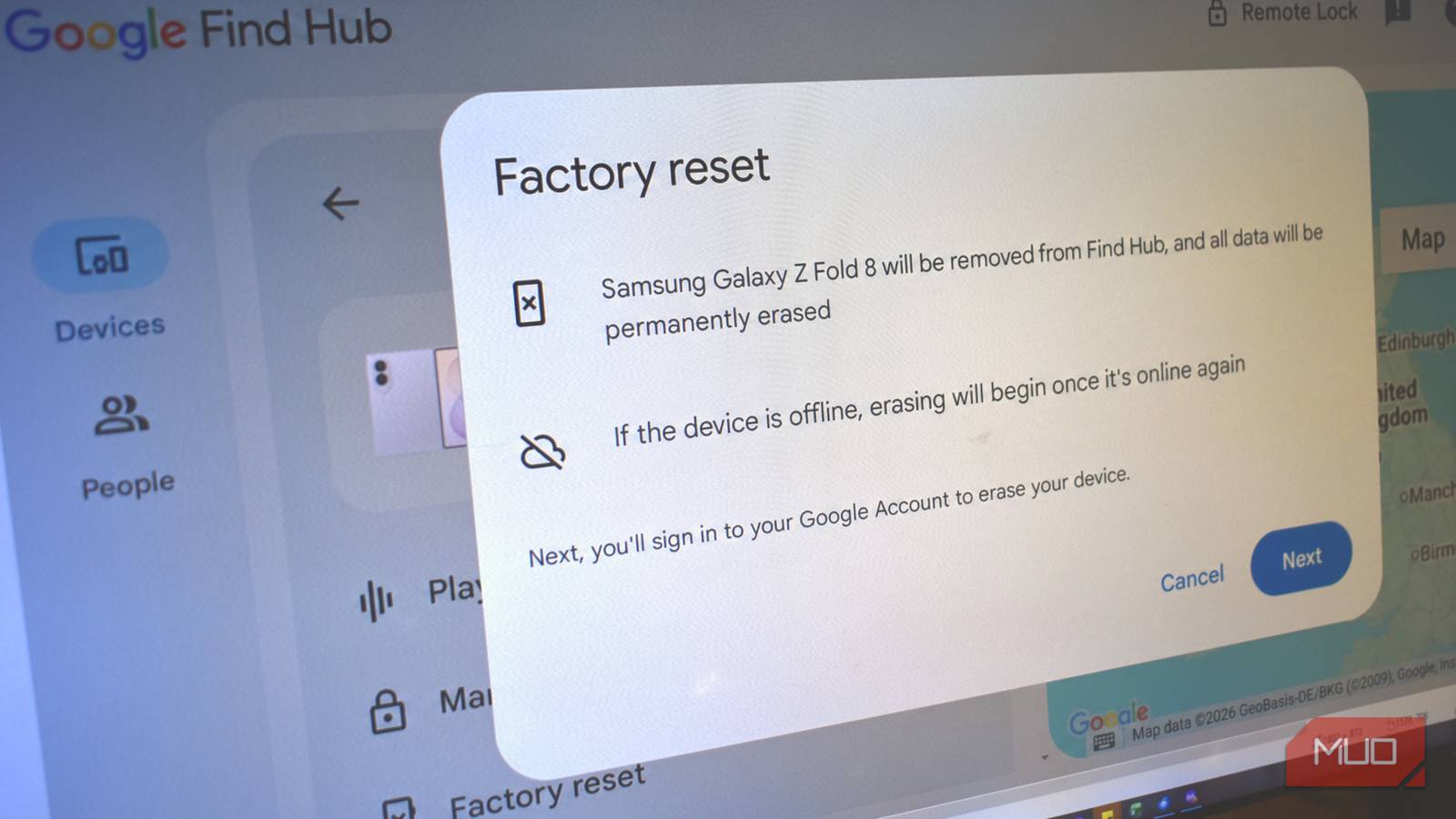
Google’s Find Hub remote location network states that you can still locate, secure, and erase your device when online. You hit the factory reset option, click through the warning that explains you’re about to wipe the device, and crack on with the wiping. The warning also specifically states “If the device is offline, erasing will begin once it’s online again.”

This is where my remote device wipe tale becomes hazy, because from what I could tell, the device was online, because I could see its location. The factory reset process “completed” without issue, and the Samsung Galaxy Z Fold 8 was removed from my device list.
I had no reason to believe the remote factory reset process hadn’t worked, as there was no notification or error messaging saying “device offline” or “this action has been queued” or similar. There is no “action pending” notification or otherwise; the windows close, the phone is removed, leaving me thinking that I’d remarkably somehow got the job done.

No notification or confirmation
What actually happens is that Find Hub takes the remote factory reset request, accepts it, and then queues it for the next time the phone is online. That’s a perfectly reasonable option, so long as Find Hub actually tells you that the device is offline and the command hasn’t run or completed.
A Find Hub help page also confirms that it should give some indication that your Google Account successfully wiped the device.
Find Hub also collects identifiers that associate your Android devices and accessories with your Google Account and information about actions taken through Find Hub, like whether your Google Account was used to lock or erase your device and whether the action was completed successfully.
Checking through the Z Fold 8’s remaining links to my Google account, I can see there was no notification or otherwise about the remote wipe completing — so why remove it from my account to begin with? Removing it from the account is a clear signifier that the process is complete, as per Google’s Find Hub issues page.
Find Hub is great, but it didn’t work how I thought
But let’s be real: I’m also the problem
All of this could have easily been avoided if I’d backed up and wiped the device before the courier arrived. It’s my fault this whole process became the issue it did to begin with.
Still, it’s clear there are some issues with Find Hub, particularly around how it presents devices as online or offline, and whether the command to factory reset the device has completed, followed by device removal from your Find Hub.
Thankfully, in my case, I was sending the phone back to Samsung, who confirmed that the remote wipe hadn’t worked, but they would do it for me. But if you end up in a similar situation, it might be that you can’t rely on Find Hub to work exactly how you think.
