


I thought my password habits were pretty good. I save all my passwords in a password manager, with two-factor authentication enabled on my email and other accounts. And I am that person who keeps telling my friends to stop reusing the same password everywhere.
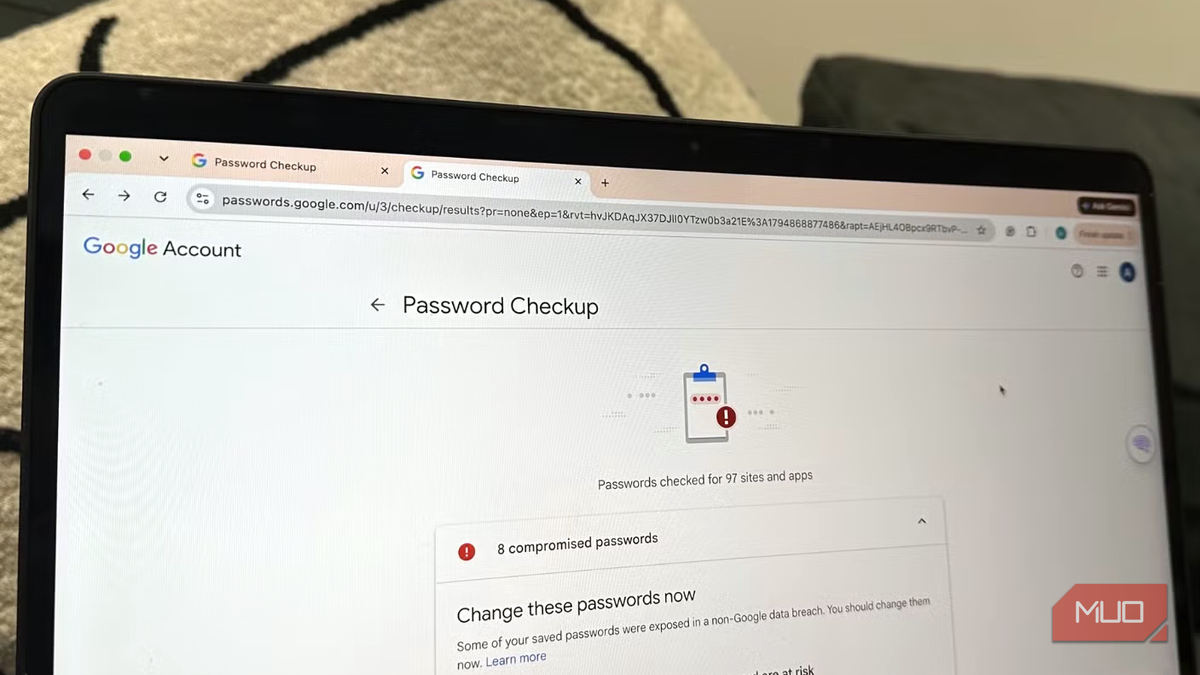
So, when I ran the free checkup built into my browser, I was sure to see good results. Instead, it told me eight of my saved passwords were already compromised, and many of my passwords were weak or reused across multiple accounts.
What a password checkup actually does
I didn’t have to download another app or sign up for a paid security service. Google already has a password-checking feature built into its password manager, and it’s super-easy to use. I opened Google Password Manager, signed into my Google account, and selected Password Checkup. In Chrome, head to Settings -> Autofill & passwords -> Google Password Manager -> Checkup.
Google scanned my saved credentials and compared them against information exposed in known breaches. It also checked whether I’m reusing passwords across different websites and also flagged credentials that were weak.
My results were divided into three categories: compromised passwords, reused passwords, and weak passwords. Each category had its own list, which made it easier for me to investigate individual entries rather than changing everything blindly.
Google didn’t give me a vague security warning. Instead, it clearly showed which saved credentials needed attention, and I could also see shortcuts to the relevant websites so I could update them.
Google says its checkup uses an encrypted process, so neither it nor anyone else can read what it’s comparing. Apple’s Passwords app and other dedicated password managers also have an equivalent feature, so you can use whichever one you use. I’ve also saved some passwords in the Passwords app on my iPhone, so I ran a check there as well to see compromised and reused passwords.
The results were worse than I expected
Some of my passwords had already been exposed

The first category I checked was compromised passwords because it was what I was most concerned about. Google flagged eight of my saved passwords because they had appeared in known data breaches. This list was basically a tour of my digital past: a Yahoo account I used in my uni days and an IT company website I don’t even remember using.
Thankfully, none of them were my email or my bank, which is the only reason my stomach didn’t drop through the floor. This list alarmed me more than it should have, so it’s worth being clear. A compromised or flagged password doesn’t automatically mean someone has accessed or hacked my account. It means the password has been exposed in a breach and could potentially be used by someone else. For example, if a shopping website suffers a data breach, attackers could get customer email addresses and passwords.
This is dangerous if you reuse passwords. If someone obtained your login details from an old shopping account, they might try them on your email, social media, streaming, or other accounts.
I was reusing passwords more often than I thought
I’m bad at creating unique passwords

Of course, I know I should be using different passwords for different accounts, but convenience sometimes wins. When creating an account for a website I might only use occasionally, I often go for a familiar password rather than generate and save another one.
Google flagged several credentials that I had reused across multiple websites. This is a bigger problem than it might seem at first.
In my case, I was using the same password for an online clothing store, a marketplace, and a social media account. Now, if that clothing store is breached, attackers could try the exposed email-and-password combination on the other two services. This technique is credential stuffing, and it lets attackers exploit passwords people reuse across websites.
Now, it’s not about using weak or strong passwords. Even if I had a strong password, using it in several places makes it a potential weak point. A password should protect one account, not become a key that unlocks several others.
I fixed the passwords that put my accounts at risk
How I cleaned it up

I started with the compromised passwords because those posed the most immediate risk. Google provided links to the relevant websites, so I opened each website, signed in, and changed my password.
First of all, I wanted to deal with my accounts containing sensitive information like my primary email account and shopping accounts with saved payment details. There were some websites (it’s been months or years since I last used them) for which I couldn’t remember the login details; I used the account recovery process instead.
If I didn’t need an account (there were many), I looked for an option to delete them rather than simply leaving them inactive with outdated credentials.
While doing so, I also checked whether I was using any compromised password elsewhere. After all, changing it on one website wasn’t enough if I was reusing the same credentials on another service.
The next step was to change my reused passwords. Instead of trying to invent and remember dozens of complicated combinations, I used Google’s (and Apple’s on my iPhone) built-in password generator. I don’t need to remember whether I used a combination of letters, numbers, or symbols because Google stores the credentials and fills them in when I return.
After changing my passwords, I checked two-step verification on my most important accounts to add another layer of security. Now, even if someone knows my email password, they cannot sign in without completing the additional verification step.
Other free checkups you can run
The browser isn’t the only place to look. If you’re using an iPhone, the Passwords app flags compromised logins under its security recommendations. Most dedicated password managers include a security dashboard that does the same job and often adds reports on reused and weak passwords.
I also recommend using Have I Been Pwned, which lets you check whether your email address has appeared in known data breaches.
Now, I’ll make sure to run these checks every few months. You can also turn on breach alerts if your password manager offers them.
